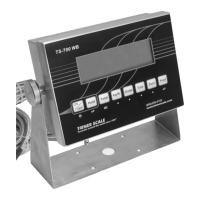
Calibration & Connectivity | TS-700 Series
8
calibration parameters, proceed as follows:
CALIBRATION PROCEDURE
1) Power on the indicator.
2) Press the PRINT and HOLD keys. “C” will
display. Release the keys.
3) “C01” will display, with the 1 flashing. The
indicator is now is Parameter Settings mode.
Navigating in Settings Mode
When the indicator is in settings mode, refer to
the graphic printed below the key to determine
the keypad key’s function.
The
and arrow keys are used to
increase/decrease the value of the flashing digit,
or to navigate up and down a list of preset
options.
The
and arrow keys are used to move the
active digit over to the left or to the right.
The
key and key can be used to move
forward or backward through the parameters.
Also, the
key is used to enter/accept
changes after they have been made to the
parameter settings.
The
key can be used to exit settings mode.
With the indicator in settings mode and the
calibration weight nearby, proceed with the
calibration process while referring to the
following chart:
NOTE: After completing and verifying the
calibration, set the calibration switch to the “Off”
position and securely fasten the rear plate.


 To Next Page
 Loading...