9
troubleshooting
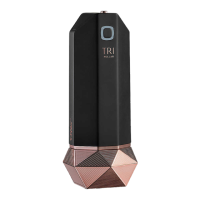
Technical specications of TriPollar
®
POSE
™
device:
Weight: 118 gr, (not include protective cover)
Frequency: 1 MHz
Physical Dimensions: H=152 mm L=55mm W=55mm (with protective
cover)
Operating conditions:
• Temperature: +5°C to +30°C
• Humidity: 20RH to 80RH
Rating:
• AC 100Vac to 240Vac 1 A 50/60Hz
• DC 12V 2.5A
Transport and Storage:
• Temperature: 0°C to 40°C
• Humidity: 10RH to 90RH
Electrical Safety: Power supply is classied as Class ll – double insulation
In the event that your TriPollar
®
POSE
™
device is not working, check
the following:
1. If power cord is damaged, contact local service center for
replacement.
2. Make sure the electric cord is securely connected to the device and
to the electrical outlet.
3. Make sure the power button was pressed and the LOW power level
green indicator light appears (g.6).
4. If green indicator light does not appear when power button is
pressed, contact local service center (g.6).
5. If the power button becomes jammed, or, device dose not turn
on/o, or, energy level cannot be adjusted - unplug electrical cord
and contact local service center.
6. If the Orange indicator light stays continuously lit for more than 1
minute, and Green indicator light does not appear, contact local
service center (g.6).
7. If the Orange indicator light does not appear, even when Green
indicator light (active power level) does turn ON and OFF, contact
local service center (g.6).
For Service, please refer to your warranty card to locate the nearest
service center or visit our website at www.stop-age.com.
When contacting a local service center, please have handy the
device’s serial number that appears on the side panel.
Customer satisfaction is our priority. To help us provide you with
the best support possible, please send us your comments and
suggestions. Contact details can be found on the back cover of
this user manual.
customer support
technical specications


 To Next Page