5
treatment frequency
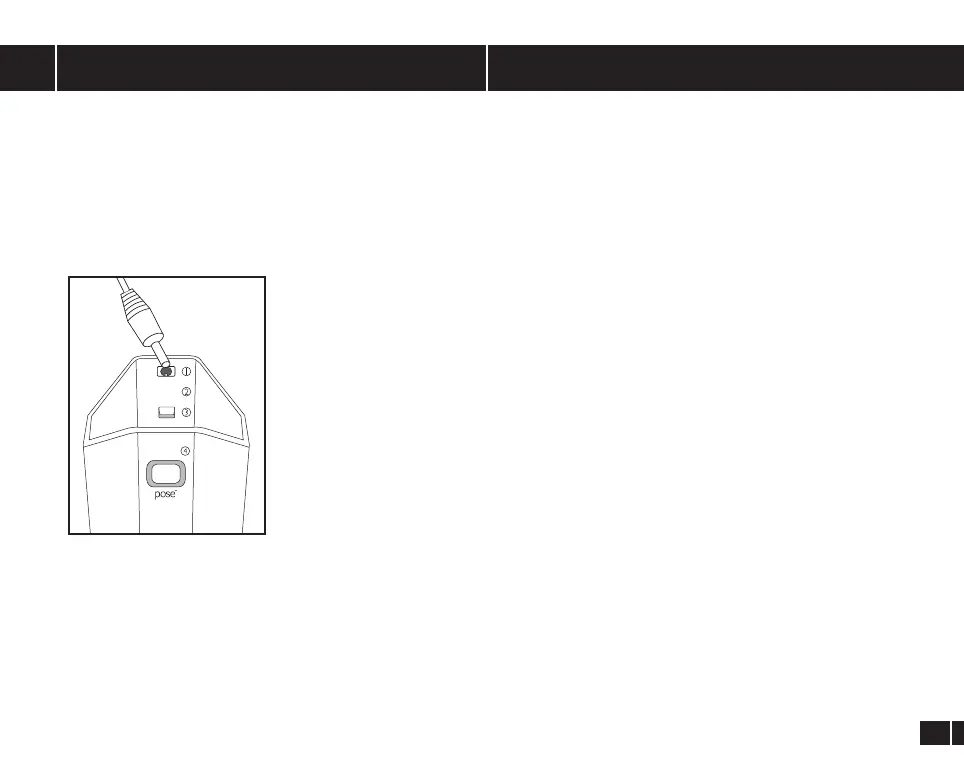
1. Inlet for power supply
2. Power level indicator light LOW/MID /HIGH
3. ON/OFF Button and power selector button
4. Treatment orange indicator light
preparing for treatment
Prepare yourself for the TriPollar
®
POSE
™
treatment:
1. Remove any jewelry near the treatment area.
2. Make sure the treatment area is clean and free from creams and/or
any ointment residue.
3. Position yourself in a comfortable position to reach the selected
treatment area. Your position should allow adequate space for
freedom of movement throughout the treatment.
Prepare your TriPollar
®
POSE
™
device:
1. Before your initial use of the
TriPollar
®
POSE
™
device remove the
warning sticker that holds it to the protective cover. If your device does
not have this sticker, DO NOT USE and contact your local service
center.
2. Connect the Power Supply electrical cord to the TriPollar
®
POSE
™
device (g. 6).
3.
If this is your initial treatment using TriPollar
®
POSE
™
, you must
connect the Electrical Outlet Adaptor to the Power Supply
provided (see illustrations provided on the outside of theTriPollar
®
POSE
™
Power Supply box). Ensure that the adaptor “clicks in” and is
securely connected. Plug the Power Supply into an electrical outlet.
4.
Gently remove the protective cover of the
TriPollar
®
POSE
™
device.
(g.6)
1. It is recommended to use the TriPollar
®
POSE
™
device on the same
treatment area several times a week, with at least one day interval
between treatments on the same area.
2. For optimal and long-term results, use your TriPollar
®
POSE
™
2-3
times a week for 6-8 weeks on each area.
3. To maintain the long-term results, use your TriPollar
®
POSE
™
twice
a month or as needed to prolong and enhance results.
HIGH
MID
LOW


 To Next Page