50
7. Administration
(
continued
)
7.3.4 ANMS
(
continued
)
LDAP Data Structure
AnLDAPdirectorystoresinformationinatreestructureknownasthe
Directory Information Tree (DIT). The nodes in the tree are directory
entries,andeachentrycontainsinformationinattribute-valueform.An
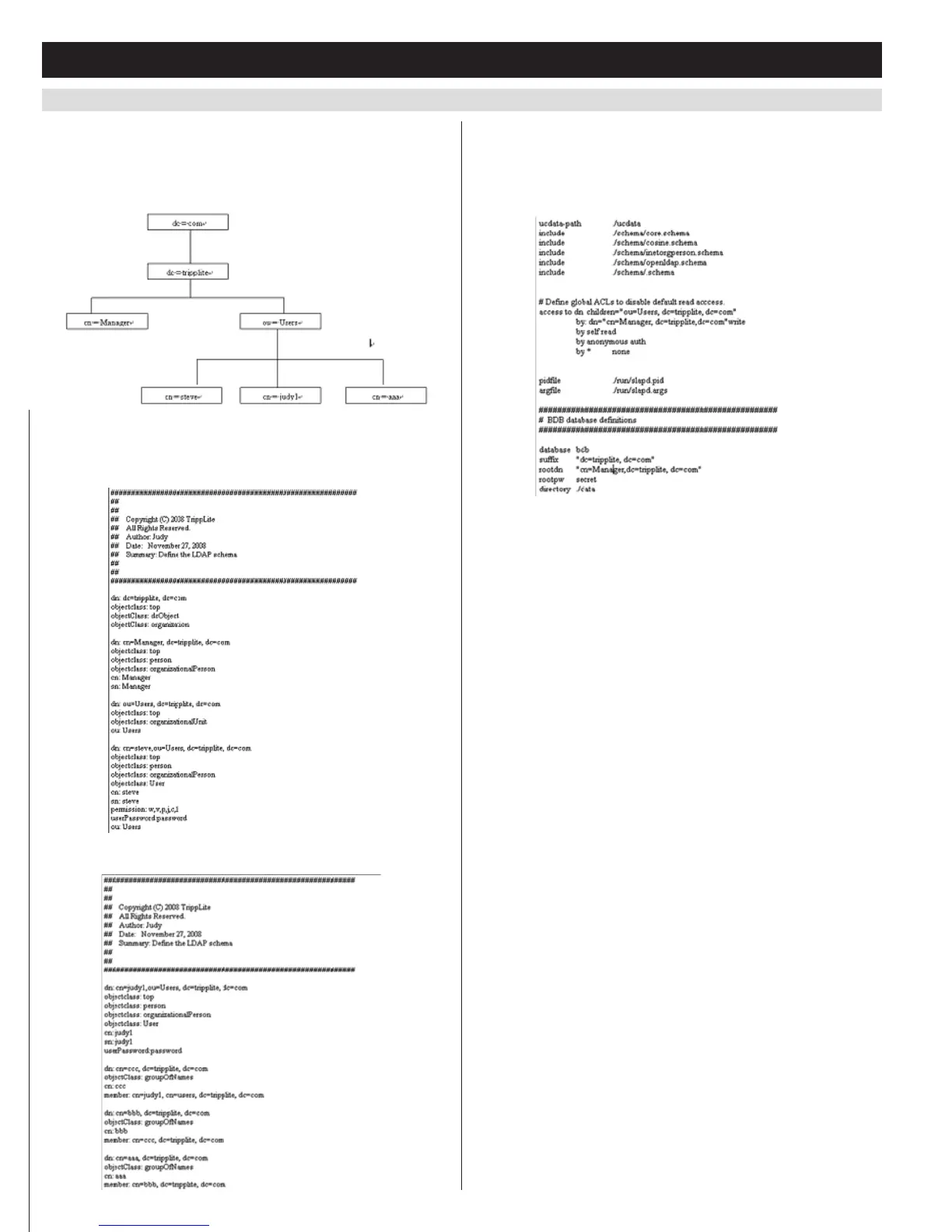
exampleoftheLDAPdirectorytreeisshowninthefigurebelow.
DIT Creation
The LDAP Data Interchange Format (LDIF)isusedtorepresentLDAP
entriesinasimpletextformat(pleaserefertoRFC2849).Thefigure
illustratesanLDIFfilethatcreatestheDITfortheKVMdirectorytree.
ThefollowingfigureillustratesanLDIFfilethatdefinesthe
OpenLDAPgroupfortheKVM:
Using the New Schema
To use the new schema, do the following:
1. Savethenewschemafile(e.g.,B022-U08-IP.schema)inthe/
OpenLDAP/ schema/ directory.
2. Add the new schema to the slapd.conf file, as shown in the figure:
3. RestarttheLDAPserver.
4. WritetheLDIFfileandcreatethedatabaseentriesininit.ldif with
the ldapadd command, as shown in the following example: ldapadd
-f init.ldif -x -D “cn=Manager,dc=tripplite,dc=com” -w secret
Log Server Settings
Also included in the ANMS screen are settings that are required for the
Windows-basedlogserver;MAC Address and Port. If these settings are
not entered correctly, the log server will not be able to communicate
withandpullloginformationfromtheKVMswitch.
• MACAddress:EntertheMACaddressofthecomputerthatthe
Windows-basedlogserverwasinstalledonhere.
• Port:Enter the firewall access port being used to communicate with
theWindows-basedlogserverhere.


 To Next Page
 Loading...