Optional Installation
These connections are optional. Your UPS will function
properly without these connections.
USB and RS-232 Serial
Communications
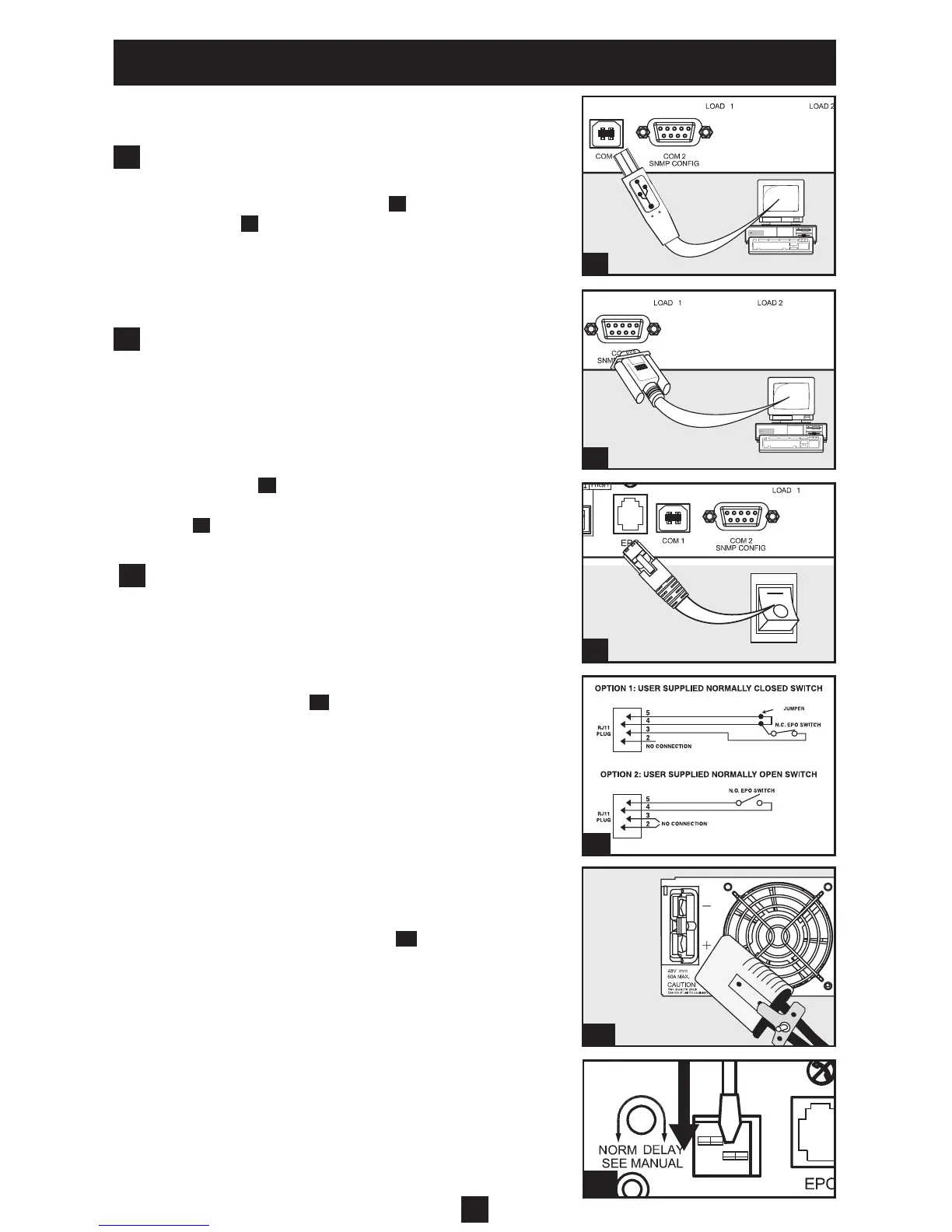
Use the included USB cable (see
1a
) and/or DB9 serial
cable (see
1b
) to connect the communication
port on your computer to the communication
port of your UPS. Install on your computer the Tripp
Lite PowerAlert Software appropriate to your
computer’s operating system.
EPO Port Connection
This optional feature is only for those applications
which require connection to a facility’s Emergency
Power Off (EPO) circuit. When the UPS is connected
to this circuit, it enables emergency shutdown of the
UPS’s inverter.
Using the cable provided, connect the EPO port of
your UPS (see
2a
) to a user-supplied normally closed or
normally open switch according to the circuit diagram
(see
2b
). The EPO port is not a phone line surge
suppressor; do not connect a phone line to this
port.
External Battery Connection
Your UPS comes with a robust internal battery
system; external batteries are needed only to extend
runtime. Adding external batteries will increase
recharge time as well as runtime.
The illustration (see
3a
) shows the location of your
UPS’s External Battery Connector, where
you will insert the battery pack cable. Complete
installation instructions for your battery pack appear
in the battery pack owner’s manual. Make sure that
cables are fully inserted into their connectors. Small
sparks may result during battery connection; this is
normal.
Do not connect or disconnect battery packs when the
UPS is running on battery power.
If you connect any external batteries, set the Battery
Charge Level Switches (see
3b
) to the down
position. This will increase your UPS’s charger
output so that the additional batteries charge faster.
Caution! DO NOT set the Battery Charge Level
Switches to the down position without an external
battery connected. There is a risk of damaging the
UPS’s internal battery system.
6
1b
1a
2a
2b
3a
1
2
3
3b




 To Next Page