4
4. Enclosure Installation
4.1 Preparation
4.2 Unpacking
4.3 Placement
4.4 Ground Connection
Caution! Read All Instructions and Warnings Before Installation!
Warning: Rack enclosures can be extremely heavy. Do not attempt to unpack, move or install the enclosure without assistance. Use extreme caution
when handling the enclosure and be sure to follow all handling and installation instructions. Do not attempt to install equipment without first
stabilizing the enclosure.
The enclosure must be installed in a structually sound area that is able to bear the weight of the enclosure, all the equipment that will be installed in the
enclosure and any other enclosures and/or equipment that will be installed nearby. Before unpacking the enclosure, you should transport the shipping container
closer to the final installation location to minimize the distance you will need to move the unit after the protective packaging has been removed. If you plan to
store the enclosure for an extended period before installation, follow the instructions in the Storage and Service section.
If using the optional casters, you can use the casters to move the enclosure for a short distance over a level, smooth, stable surface. Do not attempt to roll the
enclosure over long distances. The enclosure should be moved close to its installation location inside its shipping container before it is unpacked.
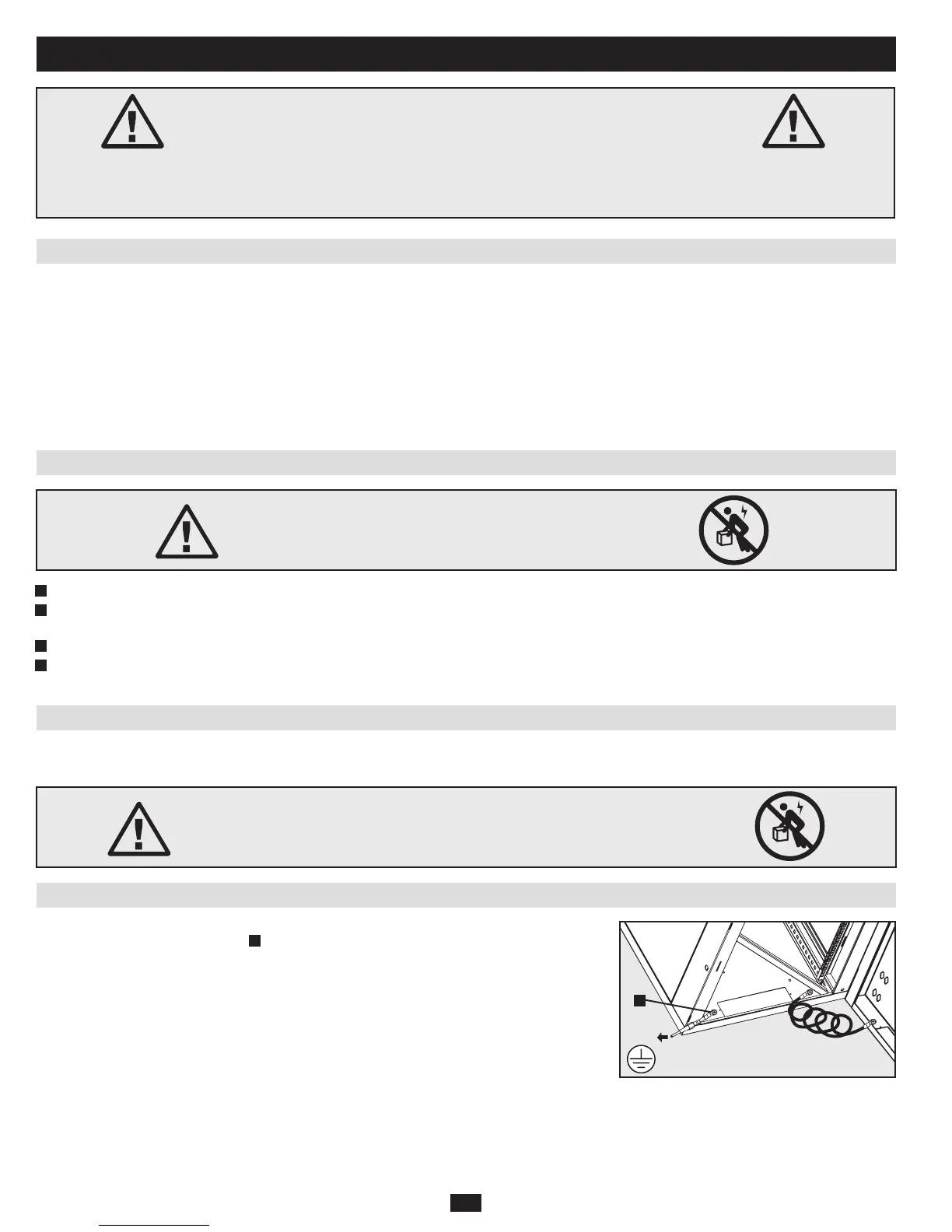
All parts of the enclosure are grounded to the frame of the enclosure. Connect your facility’s earth ground
connection to the provided ground stud
A
using an 8 AWG (3.264 mm) wire. Warning: Attach each
enclosure to earth ground separately. Do not use the enclosure without an earth ground connection.
You need several tools:
• Level
• Phillips-headScrewdriver
• Appropriatetoolsforwallmounting
You also need the following hardware:
• Appropriatehardwareforwallmounting(notincluded)
Note: The hardware used in mounting the enclosure must be able to withstand
the weight of the enclosure and all mounted equipment. For the weight of the
enclosure and its capacity, see the specifications on page 8.
Use at least two people to unpack the enclosure.
Warning: Never attempt to lift or install without adequate help.
Do not try lifting the enclosure alone.
1
Move shipping box to a firm, level surface.
2
Open box and remove the corner protectors. Save all packing materials for later use unless you are certain they will not be required. Packing materials are
recyclable.
3
With one person on each side, carefully lift the enclosure out of the box and place on a firm, level surface.
4
Examine the enclosure for any damage or loose parts. Confirm all parts are present. If anything is missing or damaged, contact Tripp Lite for assistance. Do
not attempt to use the enclosure if it has been damaged.
A



 To Next Page