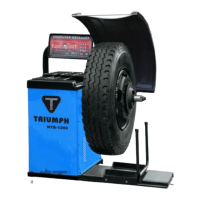
The Triumph NTB-1200 is a wheel balancer designed for balancing vehicle wheels. It is intended for indoor use in a dry environment and requires a stable, flat floor for installation. The machine is capable of balancing full-size car and truck tires, but not ATV or smaller tires.
Function Description:
The primary function of the NTB-1200 is to measure and correct imbalances in vehicle wheels. It offers several balancing modes, including:
- Standard Dynamic Mode: Used for balancing steel wheels with clip-on weights on both the inside and outside of the rim.
- Static Mode: Balances the wheel by placing weight only on the outside of the rim.
- ALU1-3 Mode: Designed for rims that do not accept clip-on weights on one or both sides, utilizing stick-on weights.
- ALUS Mode: This mode requires four parameters to be entered and is considered the most accurate for using stick-on weights.
- OPT Mode: This mode is for matching tires to the correct rim, with instructions to be referenced from the tire manufacturer.
The machine provides visual indicators on its control panel to guide the user through the balancing process, showing unbalance points, display windows for inside, middle static, and outside unbalance, and indicators for sticking and clamping weight positions.
Important Technical Specifications:
While specific numerical specifications (like weight capacity or balancing accuracy) are not explicitly detailed in the provided pages, the manual emphasizes the following:
- Power: The electrical plug is preinstalled for North American 110-volt electrical sockets. It requires a power surge protector to prevent damage from electrical surges or storms.
- Measurement Units: The machine can display measurements in either grams (Gr) or ounces (Oz), and width/diameter inputs can be set to inches or millimeters.
- Measurement Range: Users are warned not to use the wheel balancer beyond its specified measurement or weight range, as this can cause damage and lead to imprecise balancing.
- Calibration: Requires a 15 or 14-inch steel rim with a tire for accurate calibration. Calibration must be performed if the balancer is moved, unplugged, or loses power.
Usage Features:
- Control Panel: Features dedicated keys for various functions, including:
- Wheel Parameters Input and Shift Key (N)
- Down Key (O)
- Up Key (P)
- Enter Key (Q)
- Dynamic/Static Mode Key (R)
- ALU Mode Key (S)
- OPT/HID Key (T)
- Measurement Unit Key (U)
- Start Key (V)
- Motorcycle Mode Key (W)
- Fine Measurement Key (X) (not included in the 1200 model)
- Stop Key (Y)
- System Settings: Users can customize various settings, including:
- Guard Control: Can be set to "On" (prevents spinning with the safety hood up) or "Off" (ignores the safety hood).
- Standardization Display: Sets the multiple for weight display (e.g., 1g/5g or .10 Oz/.25 Oz).
- Least Unbalance Value: Defines the threshold below which unbalance is displayed as "0" (e.g., 1g-40g or .1 Oz-1.5 Oz).
- Buzzer Switch: Toggles the buzzer sound "On" or "Off."
- Width Input Unit: Sets the unit for width input (mm or inch).
- Diameter Input Unit: Sets the unit for diameter input (mm or inch).
- Unbalance Unit of Measurement: Selects between grams ("Gr") and ounces ("Oz").
- Parameter Input: The machine requires input for three parameters (A, B, D) for Dynamic, Static, ALU1-3, and motorcycle modes, and four parameters for ALUS mode. These parameters relate to the distance of the wheel from the balancer, rim width, and rim size. A built-in ruler and plastic caliper are used for measurements.
- Fine Measurement: The "FINE" button allows users to view the exact unbalance value, providing more accurate readings (1 gram or .10 Ounce).
- Wheel Installation: Wheels are installed using a cone and a quick wing release nut. A spring can be used if the cone is not long enough to reach the tire.
- Safety Hood: The safety hood is an integral part of the operation, especially when guard control is enabled, as it initiates the spin cycle when closed.
Maintenance Features:
- Troubleshooting Guide: The manual includes a section dedicated to common errors and their solutions, such as:
- "ccc ccc": Indicates measurement results are beyond range, often due to incorrect calibration or placing a wheel that is too light or heavy.
- "OFF OFF": Occurs when the STOP button is pressed while a wheel is spinning.
- "Err 01": Guard not closed or raised during spin. Solution involves adjusting guard control settings or ensuring the guard is down.
- "Err 02": Low rotating speed. Solutions include tightening the drive belt, checking the spin shaft, motor, and using a heavier wheel.
- "Err 03": Incorrect rotation direction (for 3-phase motors). Requires adjusting 3-phase wires.
- "ERR CAL": Machine not calibrated. Solution is to follow calibration steps.
- "ERS CAL": Factory Maintenance Error. Contact manufacturer.
- "Machine Continues to ask for more weight": Indicates improper calibration, incorrect wheel parameters, or a defective weight sensor board.
- "Machine trips electrical breaker": Suggests defective transformer or power board.
- "Machine seems to overheat and shut down automatically": Points to an overheating transformer or power board.
- "Machine does not turn on": Check the on/off switch, wire connections, and electrical current.
Safety Instructions:
The manual emphasizes several safety precautions:
- Operator Training: All operators must be properly trained.
- Personal Safety: Operators should not wear loose clothing or jewelry and must wear protective eye wear.
- Safety Guard: The safety guard must be used to prevent injury.
- Environmental Protection: The balancer should be kept indoors in a dry environment, away from extreme heat and moisture.
- Electrical Safety: Use a surge protector to prevent damage from electrical surges.
- Operational Limits: Do not use the balancer beyond its measurement or weight range.
- Compliance: Adhere to OSHA and local safety regulations.


 To Next Page
 General