10
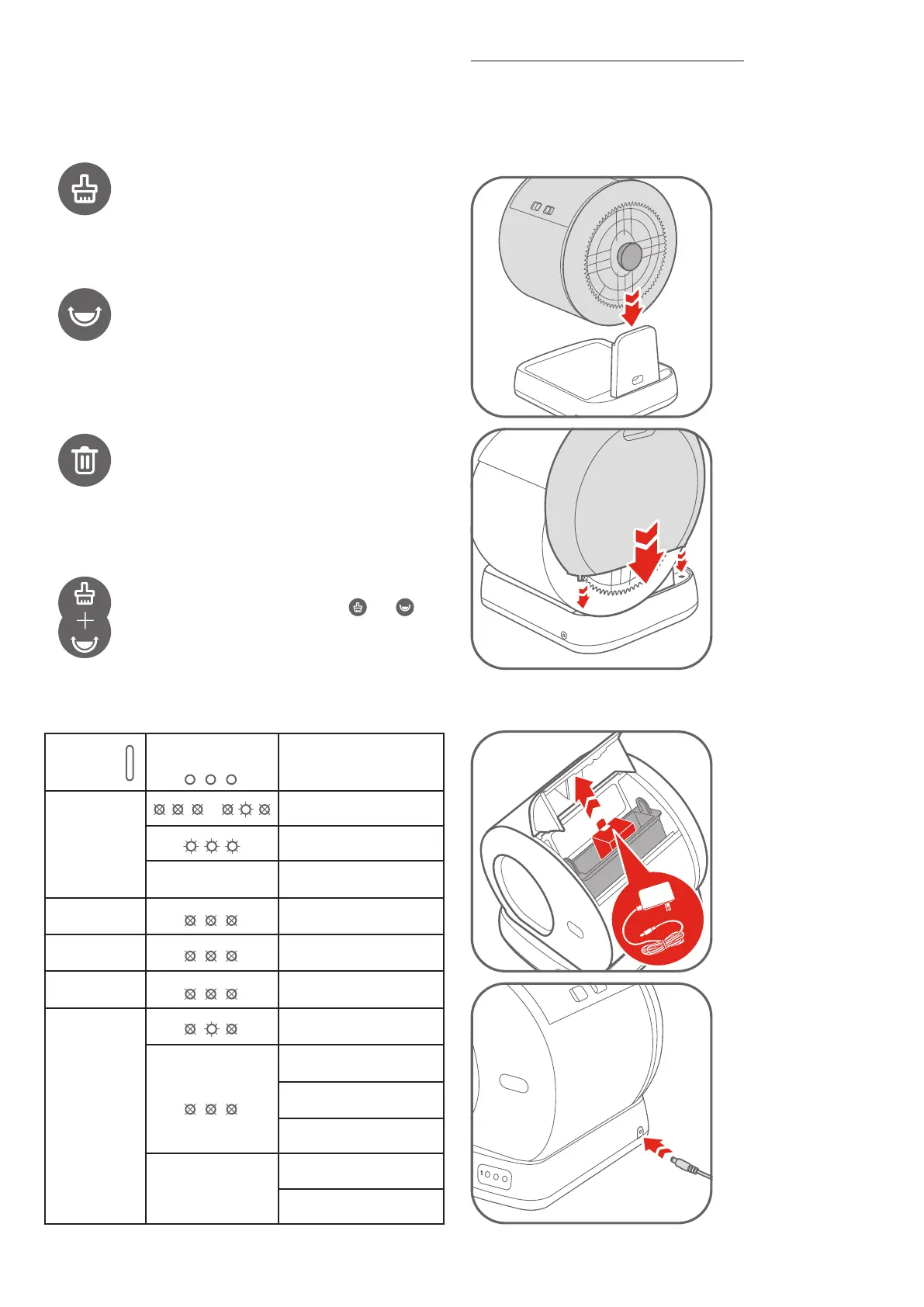
2.2 Control Panel
For all button indicators: When the selected process is engaged, the
corresponding indicator stays solid on. If paused, it will flash.
Status
Indicators
Button
Indicators
Function
description
| Ready for use or working
Solid Blue Firmware upgrading
Flashing
Restoring to factory
settings
Solid Green
Cat / weight detected when
stationary
Flashing Green
Drum returning to Home
position
Flashing Green
Twice
Child Lock on/off
Clean / Flatten / Replace
paused
Cat / weight detected when
rotating
Solid Red
Foreign object approached
when rotating
Rear cover opened
Flashing
Drum not in place
Motor error
Clean: Press once to start a cleaning cycle. If already
started, press it again to pause.
Flatten: Press once to start spreading the litter flat. If
already started, press it again to pause.
Replace: Hold for 3s to start emptying the litter. If
already started, press it once to pause or resume.
Child Lock: Press twice to lock or unlock (status
indicator flashes green twice)
Restore to Factory Settings: Hold and
simultaneously for 5s to restore to factory settings.
Part III Installation and Operation
3.1 Setting Up
Place the litter box indoors on a firm, level surface and in a cool, dry
location. Do not touch any walls. Leave a little space around.
Place the drum on the
base.
Note: The rotating shaft
of the drum should be
inserted into the slot of
the base support.
Insert the rear cover into
the slot of the base.
3.2 Turn On
Open the waste bin cover
to take out adapter, plug
adapter in the litter box.
Plug in the litter box. The
drum will rotate a full
circle automatically. Wait
for it to return to Home
position, then the unit is
ready for use.
Make sure the cable is not stuck in the rotating shaft. Keep the cable
away from cats.
2.3 Status Indicators


 To Next Page