9
8
Setup
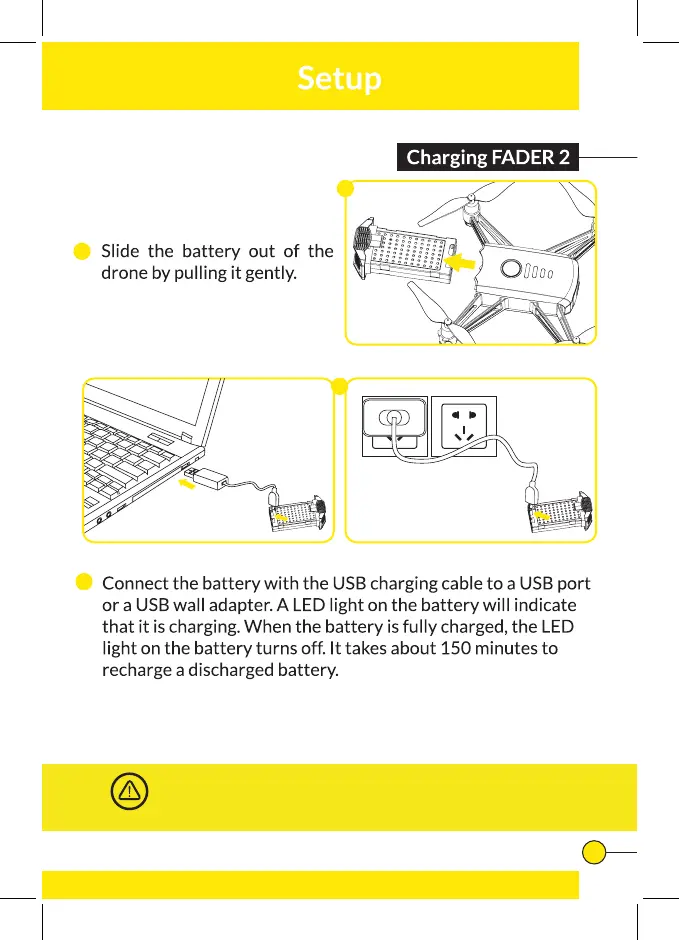
Charging FADER
Connect the Micro USB Charging Cable to a USB port
1
and the battery of
the drone.
2
A LED light on the battery will indicate it is charging. When the
battery is fully charged, the LED light on the battery turns off. It takes about 30
minutes to recharge a discharged battery.
Slide the battery out of the drone by pulling it gently.
Make sure you only charge the rechargeable battery with the supplied
USB Charging Cable. If you try to charge the rechargeable battery
with a different battery charger, this might cause serious damage.
WARNING
1
1
2
2



 To Next Page