The Trotec TDP DS is a pressure switch designed to control garden or deep well pumps for delivering service water in private areas, such as gardens. It is installed in the water line between a pump and one or more extraction points (e.g., a water tap or garden sprayer). The device monitors the water pressure and flow rate, activating or deactivating the connected pump accordingly.
Function Description:
The pressure switch monitors the water pressure in the line. If the pressure drops below a predefined value, the device switches on the pump. Conversely, when the pressure level is sufficient (e.g., after a water tap is closed), the device switches off the pump. It also monitors the flow rate volume; if the flow rate drops below 2 l/m (e.g., due to the pump running dry), the device switches off the pump to prevent damage. A restart button allows for manual pump restart after an error message. The device is equipped with a backflow preventer and a pressure gauge to indicate current pressure. It must be connected a maximum of 15 m underneath the highest-level consumer.
Important Technical Specifications:
- Model: Pressure switch TDP DS
- Max. flow rate: 3 l/min
- Max. delivery head: 23 m at 1.5 bar
- Power supply: 230 V ~ 50/60 Hz
- Type of protection: IP 54
- Maximum connected load for pump:
- Single-phase connection: max. 2300 W (230 V/AC, 10 A)
- Three-phase connection: max. 4000 W (400 V/AC, 10 A)
- Power input: 1100 W
- Power consumption: ≥ 1.1 kW with circuit breaker
- Max. inlet pressure: 10 bar
- Integrated pressure gauge: Yes
- Max. temperature of pumping medium: 60 °C / 140 °F
- Pumping medium: Clean fresh water
- Start-up pressure: 1.5 to 2.5 bar (adjustable)
- Connection thread: 1" external thread
- Cable length: 0.45 m (1 m with plug for connection to the mains socket)
- Dimensions (length x width x height): 125 x 153 x 165 mm
- Weight: 1 kg
Usage Features:
- LED Indicators:
- Power On (green): Indicates the device is switched on.
- Pump On (yellow): Indicates the pump is switched on.
- Alarm (red): Illuminates in case of a fault (e.g., dry run).
- Reset Button: Used to restart the device after an error message.
- Pressure Setting Screw: Allows adjustment of the switch-on pressure between 1.5 bar and 2.5 bar. Each 360° turn changes the pressure by approximately 0.2 bar. This adjustment should only be carried out by specialist companies for water installation.
- Dry-run Protection: Automatically switches off the pump if the water flow rate falls below the set minimum value (2 l/m) to prevent damage.
- Backflow Preventer: Integrated to prevent water from flowing back.
- Compatibility: Suitable for facilities with up to 10 bar water pressure. A pressure reducer can be installed if the pump pressure exceeds 10 bar.
- Pumping Medium: Clean fresh water (e.g., rainwater, groundwater) with a temperature not exceeding 60°C. Not suitable for aggressive, abrasive, caustic, corrosive, combustible, or explosive media, or for drinking water supply.
Maintenance Features:
- Internal Components: The device contains no user-serviceable or lubricable parts.
- Cleaning: The device should be cleaned with a soft, damp, and lint-free cloth. Electrical components must be protected from moisture. Aggressive cleaning agents, solvents, alcohol-based, or abrasive cleaners should not be used.
- Storage: When not in use, the device should be stored dry, protected from frost and heat, and shielded from dust and direct sunlight. Protective caps should be placed on water connections.
- Pre-maintenance Safety: Before any maintenance, the mains plug must be removed from the socket, holding onto the plug itself.
- Troubleshooting: The manual provides a list of common errors and faults (e.g., pump not starting, pump running permanently) with corresponding checks and solutions, such as verifying power connections, checking for leakages, and readjusting pressure. If issues persist, contact customer service or an authorized specialist electrical company.

 Need help?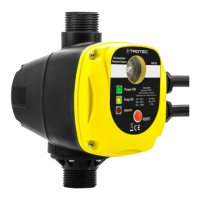

 To Next Page
 General