Display Remote Functions
TRAX-MID
Power on/off
CAUTION: the display will automatically shut off if it is not used for more than 5 minutes.
Switching Display interface
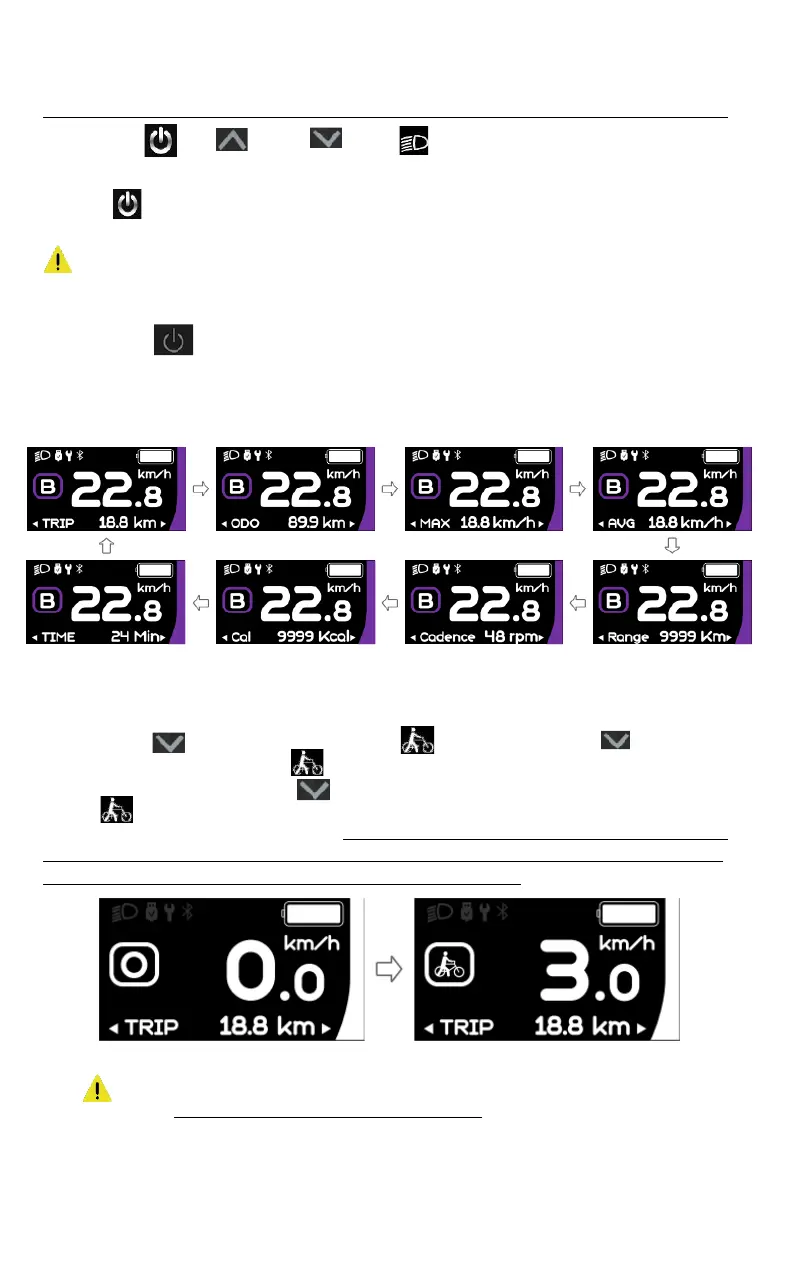
Briey press the buon to switch within the dierent funcons and informaon. The display will
successfully show: Single trip distance (TRIP in Miles) → Total distance (ODO in Miles) → Maximum speed
(MAX in Miles) → Average speed (AVG, MPH) → Remaining distance (Range in Miles) → Riding cadence
(Cadence in RPM) → Energy consumpon (Cal, KCal) → Riding me (TIME, Min.) → and so on
Walk Assist mode (off the bike)
Noce: The Walk Assist mode can only be acvated on a stac E-Bike.
Briefly press the button until this symbol appears . Next, keep pressing the button until the
Walk Assist mode is activated and the symbol is flashing (If no speed signal is detected, the real-time
speed will show as 1.5 MPH) Once the button is released, the Walk Assist mode stops being active
and the symbol stops flashing. If there is no operation within 5 seconds, the display will
automatically return to Assist mode (PAS) “0”. Use the Walk-Assist function only while you are off the bike
and while making sure its usage is safe for riders around you and yourself. Make sure to steer clear of the
pedals as these might turn while your bike is moving in Walk-Assist mode.
Display screen when Walk Assist is on.
CAUTION:
17



 To Next Page