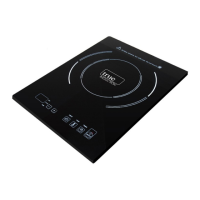
The True Induction Triple Burner Induction Cooktop, model TI-3B, is a sophisticated kitchen appliance designed for efficient and precise cooking. This manual provides comprehensive instructions for its installation, operation, and maintenance, ensuring a safe and optimal user experience.
Function Description
The True Induction cooktop utilizes induction technology, which heats cookware directly through electromagnetic fields, rather than heating the cooktop surface itself. This method offers several advantages, including faster heating, precise temperature control, and improved energy efficiency. The TI-3B model features three independent cooking zones: an upper left, a lower left, and a right zone. Each zone can be controlled individually, allowing for versatile cooking arrangements.
The cooktop's control panel is designed for intuitive operation. It includes dedicated touch control panels for each cooking zone, allowing users to adjust power levels, set temperatures, and utilize a timer function. A central power button controls the entire unit, while individual cooking zone ON/OFF keys activate specific burners. The power option display provides visual feedback on current settings.
Usage Features
To begin using the cooktop, ensure that it is properly installed and connected to two separate dedicated 15 amp breakers for the left and right plugs. The upper and lower left zones are controlled by one plug (totaling 1800W), while the right zone is controlled by a separate plug (1500W). Once powered on, the unit enters standby mode, indicated by a lit power button and an audible sound.
For cooking, place ferromagnetic cookware (pots and pans made of magnetic materials) containing water, oil, or food on the center of the glass-ceramic top. The cooktop requires compatible cookware, which can be identified by an induction symbol on its retail box or by checking if a magnet adheres to its base. Optimal cookware has a flat bottom and a diameter between 4.5" and 10". Pans with warped or curved bottoms will not heat evenly.
After placing cookware, press the Power button on the control panel to activate the cooktop. The power display will blink, and another indicator sound will confirm activation. Next, press the Heat function key for the desired cooking zone. The default power level is "5." Users can adjust the power setting from 1 to 10 using the +/- keys. This is referred to as the HEAT function.
The cooktop also offers a Temperature Setting mode. By pressing the TEMP key, users can select precise temperatures ranging from 150°F to 450°F, in 10-degree increments. This allows for fine-tuned cooking, suitable for various dishes.
A built-in Timer Function adds convenience and prevents overcooking. After selecting either HEAT or TEMP mode, press the TIMER button. The display will show "0," and users can then set the operating time in 5-minute intervals, up to a maximum of 150 minutes, or reduce it by 1 minute. The display counts down the duration, and once the time is up, the unit sounds an alert and automatically enters standby mode. The device's memory retains the previously entered HEAT or TEMP settings, and users can adjust these settings or the timer duration at any time during operation without affecting the other.
The True Induction cooktop incorporates "Power Invariance Technology" for efficient power distribution when multiple burners are in use. The maximum power for an individual burner is setting 10. However, when operating both burners on the same side (upper and lower left zones), their combined total power is limited to level 10. This means that if one burner's power is increased, the other's power output will automatically reduce to maintain the combined total. For example, if one burner is at level 6, the other will automatically adjust to level 4. If one burner is using the HEAT function and the other is using the TEMP setting, the maximum HEAT setting for the HEAT-mode burner is "5."
For the upper and lower left zones specifically, if only one zone is in use, it can be utilized up to max level 10. If both zones are in HEAT mode simultaneously, the maximum setting for one zone is level 7, with the combined maximum reaching level 10. For instance, if the upper left zone is at level 4, and the lower left zone is adjusted from 6 to 7, the upper left zone will automatically reduce to level 3. If one zone is in TEMP mode and the other in HEAT mode, the maximum HEAT level is "5."
The cooktop is equipped with safeguards against parching and will automatically shut off if high-temperature cooking formats like frying, stir-frying, or grilling are used for extended periods. Additionally, a built-in safety shut-off feature automatically turns off the cooktop after 150 minutes of continuous use, displaying an "EE" code and sounding an alert. The unit can be easily restarted and re-set if further cooking is required.
To turn off the unit, simply press the Power button. The cooling fan may continue to run for a short period after the unit is switched off, which is a normal occurrence as the electronics cool down.
Maintenance Features
Proper cleaning and maintenance are crucial for the longevity and performance of the True Induction cooktop. Always ensure the device is switched OFF and completely cool before cleaning. It is recommended to clean the unit after each use to remove food residues.
The glass-ceramic plate and plastic surfaces can be wiped with a slightly damp cloth, preferably a micro-fiber cloth. Dishwashing soap may be used if necessary. It is important to prevent water from seeping into the device. Never use abrasive cleaners, such as metal pads, or oil-based liquids, as these can damage the surface. The cooktop should never be run under water.
For cleaning the air intake and exhaust vents, a vacuum cleaner attachment can be used to suck up dirt and debris, ensuring proper air circulation and preventing overheating.
The cooktop also features a troubleshooting guide for common error codes. For instance, if the cooktop does not work, check if "Lock mode" is turned off and confirm there isn't a power outage. If the cooktop doesn't heat up, verify that the cookware is induction compatible. If the cooktop turns off while cooking, check for blocked vents, ensure it hasn't been powered on for 2 hours and left idle (automatic shut-off), or check for liquids or objects obstructing the control panel. Error codes like E1 (voltage under 75V), E2 (voltage over 145V), E3 (IGBT in short circuit), E4 (defective temperature sensor or concave pot), E5 (unit damaged), E6 (cooking temperature over 450°F in TEMP mode), and EE (max cooking time reached) provide specific indications for potential issues, often requiring user action like changing cookware, restarting the unit, or contacting customer support. The "---" display indicates no suitable pot or no pot on the cooktop, requiring the user to place compatible cookware and press HEAT to start.



 To Next Page
 General