CHAPTER 2: ASSEMBLY INSTRUCTIONS
BIKE ASSEMBLY STEPS (continued):
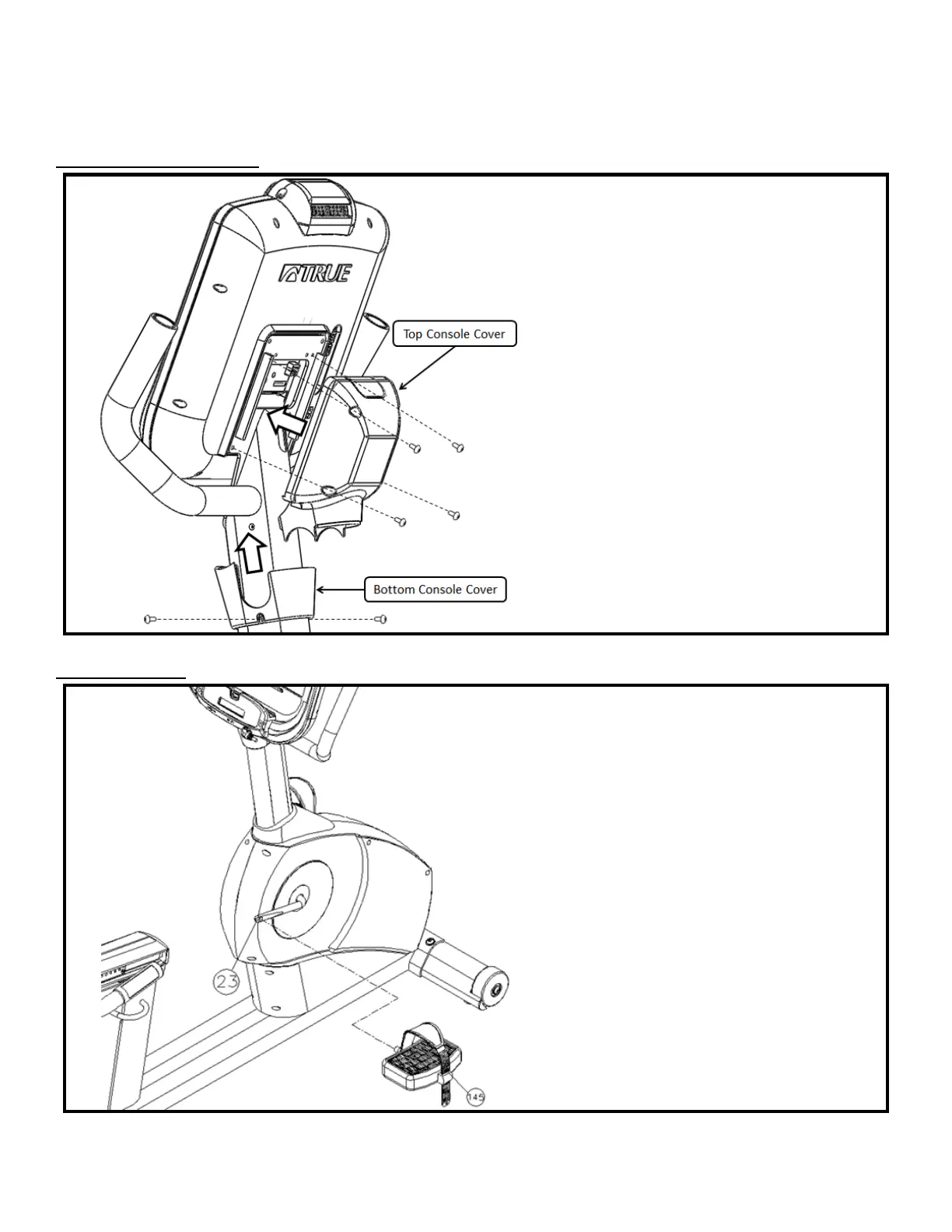
Step 16 Console Cover:
• For all hardware, tighten using a Phillips
head screwdriver (not provided)
• Attach the Top Console Cover to the Front
Mast Mounting Plate using 4 screws
(#221)
• Slide the Bottom Console Cover up the
Front Mast tube until it mates with the
Top Console Cover
• Attach the Bottom Console Cover to the
Front Mast tube using 2 screws (#221)
Step 17 Pedals:
• Align the Left Pedal with the Left Crank
and the Right Pedal with the Right
Crank; Pedals should be clearly labeled
on the Pedal Strap
• Secure each Pedal to the appropriate
Crank using the provided pedal wrench
NO
TE: The Left Pedal is reverse-threaded
(turn counter-clockwise to tighten)
Truefitness.com / 800.426.6570 / 636.272.7100 19


 To Next Page