27
Temperature sensor
Use the enclosed Truma temperature sensor, in particular for
AGM batteries, for temperature-controlled battery charging.
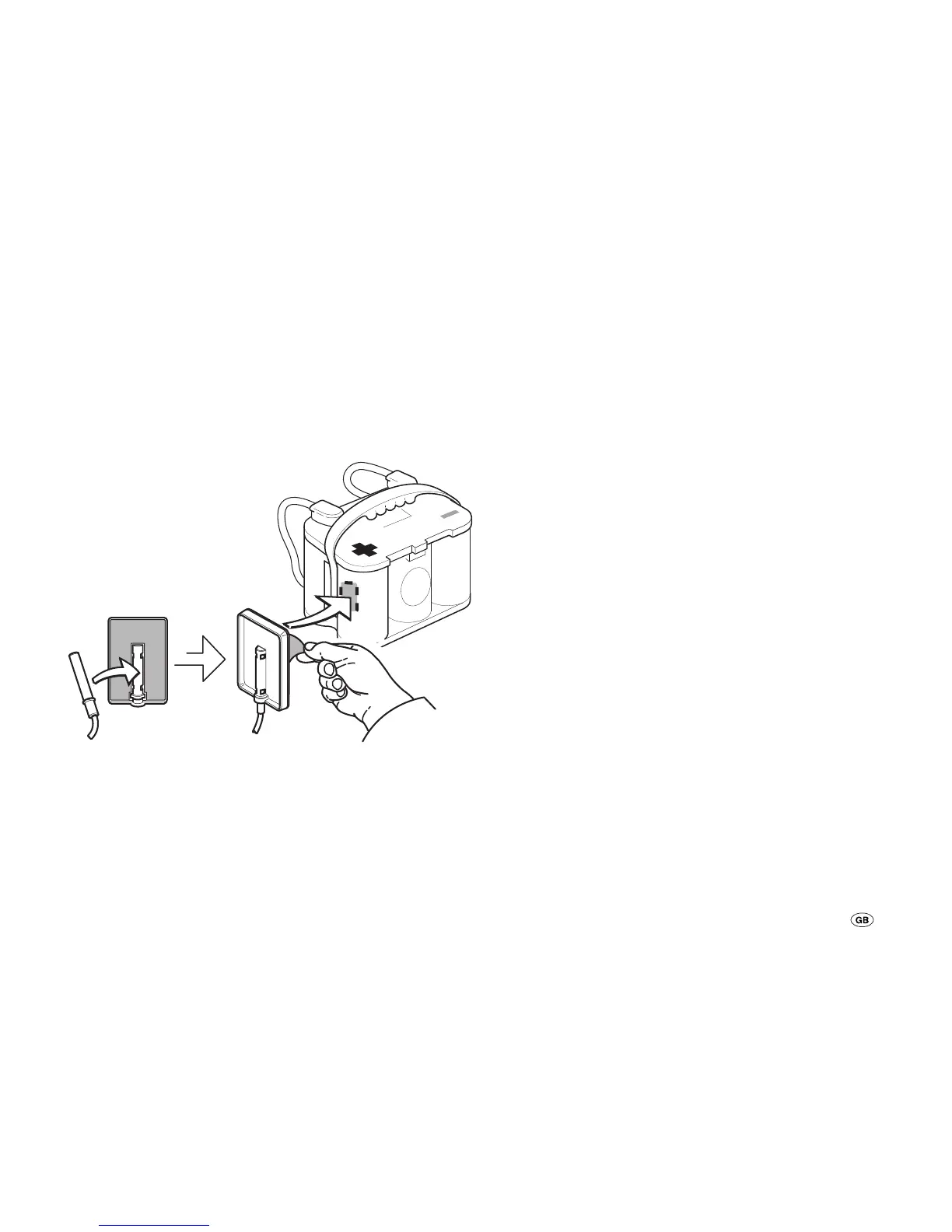
Place the sensor in the centre near the positive terminal on
the housing of the battery (1). To do this, place the sensor in
the middle of the recess of the holder. Remove the protective
film from the self-adhesive holder. Press the holder firmly into
the desired position on the battery.
Temp. Sensor Fixer
TSF - 01
Fig. 3: Assembly of the temperature sensor
Connect the temperature sensor (B1) to the device (connec-
tion X1).
Cable fixing
Secure all cables (e.g. to energy sources, consumers and ac-
cessories) with cable ties.
Wiring diagram
See page 2, fig. A.
Commissioning
The device is operational as soon as a battery of a solar mod-
ule is connected (observe connection sequence).
Set battery type
Set the used battery type (battery 1) (see “Query / change set-
tings – battery type”).



 To Next Page