
 Need help?
Do you have a question about the truMedic MC-2500 and is the answer not in the manual?
Identifies user groups to avoid use and general accident, fire, and electrocution safety warnings.
Provides guidance on safe chair operation, placement, and usage to prevent accidents and damage.
Details grounding requirements, fuse replacement safety, and power cord precautions.
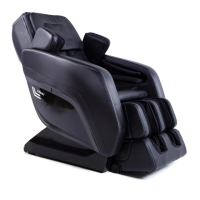
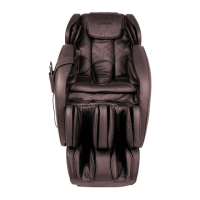
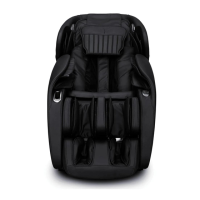
Identifies and illustrates the external components of the massage chair.
Details internal parts like backrest, seat, and external controls like power switch.
Describes functions accessible via the left and right armrest shortcut keys.
Provides instructions on optimal placement and clearance for the massage chair.
Offers tips and examples for safely moving and positioning the massage chair.
Guides users on how to initiate and conclude a massage session safely.
Introduces the remote control interface and automatic massage programs.
Details manual massage techniques and how to adjust settings.
Covers handrail controls, air pressure, other functions, and voice command operation.
Provides instructions for cleaning synthetic leather, cloth, and plastic components.
Details how to clean the remote control safely.
Addresses common problems like the chair not working or unusual noises.
Solves issues related to motor differences, unexpected stops, and electrical problems.
Lists key technical details of the MC-2500 massage chair.
Covers the two-year warranty, service acquisition, and warranty terms.
Specifies conditions and scenarios not covered by the warranty.
The truMedic MC-2500 is a sophisticated massage chair designed to provide a comprehensive and customizable massage experience. Its primary function is to deliver various massage techniques to different parts of the body, aiming to relieve muscle tension, reduce fatigue, and promote relaxation. A standout feature of this chair is its user-friendly voice control system, which allows users to manage settings and adjust the massage without needing to reach for a remote or open their eyes. Simple commands like "Ok, Massage On" initiate the experience, making it highly accessible and convenient.
Beyond voice control, the MC-2500 incorporates a secondary integrated remote control panel, positioned for easy access, eliminating the need for reading glasses to view its display. For enhanced user convenience, the chair is equipped with Bluetooth connectivity, allowing users to stream their favorite audio through top-quality built-in speakers during a massage. Additionally, a USB port is included for charging mobile devices, ensuring both the user and their gadgets can recharge simultaneously.
The massage chair offers a wide array of massage functions, including 12 automatic massage modes that combine shiatsu, kneading, and tapping sensations. These modes are designed to target specific areas or provide a full-body experience, addressing common aches and pains. The chair features massage nodes with vertical movement and a four-wheel drive system, operating with a quiet design to ensure a peaceful environment.
Key usage features include automatic shoulder position detection, which helps tailor the massage to the user's body. For added comfort and therapeutic benefits, the backrest incorporates warming heat to soothe the back muscles. The chair also boasts a forward sliding functionality, allowing it to recline away from the wall, which means it can be stored in a more compact space without compromising the full-body massage experience. Custom height adjustment capabilities are integrated into the leg rests, which extend and retract to accommodate users of various heights.
Airbag pressure-massage functionality is another significant feature. Strategically placed airbags gently grip, twist, and stretch muscles, with additional airbags in the seat providing relief to the waist and hips.
The remote controller, with its crisp LCD screen, provides a detailed interface for customizing the massage. Users can adjust settings such as massage speed, width, and intensity. Specific buttons are dedicated to different massage areas like arm, feet, back, and buttocks, as well as various automatic modes like "Comfort," "Relax," "Stretch," "Shoulder & Neck," "Back & Waist," "Full Body Massage," "Chiropractic Massage," "Fatigue Recovery," "Meridians Massage," "Lower Body Massage," "Peaceful Sleep Massage," and "All Pressure." Manual massage modes include "Shiatsu," "Knead," "Beat," "Knead & Tap," and "Knock," each with adjustable speed and width.
Air pressure massage options allow for full pressure on arms, legs, and feet, or focused pressure on specific areas, with three levels of intensity. Other functions accessible via the remote include raising and lowering the backrest and leg rest, activating a "Zero Gravity" mode, setting a timer (up to 30 minutes in 5-minute increments), turning the foot roller massage on or off (with three intensity levels), and controlling the back heat. A pause button allows users to temporarily stop and resume their massage session.
Handrail shortcut keys further enhance usability. The right armrest features a remote control holder and a USB charging port. The left armrest includes a power button, leg rest adjustment controls, recline controls, an auto massage function button, and a voice control activation button.
For voice control, users simply say "Hi, Alice" to awaken the system. Once activated, the chair responds with "I am here" and listens for commands for 6 seconds. Commands include "Massage On," "Massage Close Down," various comfort and relaxation massages, full-body and targeted massages, "Stretch Massage," "Fixed Massage," "Change to the Other Mode," "Go a Little Down," "Go a Little Up," "Open the Air Pressure Bags," "Close the Air Pressure Bags," "Bring Up the Seat Position," "Bring Down the Seat Position," and "Stop Adjustment." It's important to speak clearly and face the speaker for optimal recognition.
Maintenance features are straightforward. For general cleaning of synthetic leather surfaces, regular wiping with a dry, soft cloth is recommended. Chemical or medical-grade cleaners should be avoided. For deep cleaning, a water-based solution with 3-5% natural detergent and a soft cleaning cloth can be used, ensuring excess liquid is squeezed out. After wiping, excess moisture should be removed with a dry cloth, and the chair allowed to air dry completely, without using a hair dryer.
For cloth surfaces, the same weak, natural solution can be used, applied with a wrung-out cloth or brush. Harsh chemicals like gas, diluent, or alcohol are prohibited. Gentle brushing movements are advised to avoid weakening or damaging the cloth. The surface should then be wiped with a clean damp cloth, followed by a clean dry cloth, and allowed to air dry.
Plastic components can also be cleaned with a weak, natural solution, applied with a wrung-out cloth. After cleaning, wipe with a clean, damp cloth to remove any residue, and allow to dry.
Cleaning the remote control involves wiping dust with an electronics cleaning cloth. For deeper cleaning, a soft, damp cloth can be used, but it must be allowed to dry completely. Alcohol, diluent, or propellant should not be used.
Safety is paramount during cleaning; the chair should always be unplugged from the wall outlet with dry hands before any cleaning activities, and reconnected only with dry hands.
Troubleshooting guidance is provided for common issues. If the chair doesn't work, checks include ensuring the remote is on, a massage function is selected, power connections are secure, and the fuse is intact. Beeping noises during massage are normal, indicating the air pump, mechanical parts, and motor. Asymmetrical massage roller movement is also normal. If the chair is too loud, it might be due to continuous use, suggesting a 30-minute rest period. Unexpected stops could be due to power loss or continuous use. Issues with backrest/leg rest movement often relate to obstructions or continuous use. If the chair doesn't return to its default position, it might be due to prolonged use or the end of the massage timer. Hot wires or plugs indicate continuous use and require immediate cessation of use and professional contact.
 General
| Type | Massage Chair |
|---|---|
| Heat Function | Yes |
| Adjustable Intensity | Yes |
| Remote Control | Yes |
| Zero Gravity | Yes |
| Bluetooth | No |
| Power Source | Electric |
| Massage Techniques/Modes | Kneading, Tapping, Shiatsu, Rolling |
| Color | Black |

 To Next Page