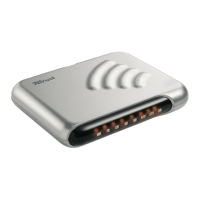
The Trust 56K V92 External Modem is a high-speed 56K modem designed for Internet and e-mail connectivity, linking to your computer via a serial RS-232 port. Beyond basic internet access, it offers a range of communication functionalities, including use as a hands-free speakerphone and a fax machine, thanks to its SPK and MIC connections and the included SuperVoice software.
Function Description
The modem operates based on the V92 standard, an improved successor to the V90 standard, both devised by the ITU (International Telecom Union) for analogous modem communication. While both V90 and V92 offer a downloading bandwidth of 56 kbit/s, the V92 standard introduces several enhancements. It features an improved data compression standard (V44, compared to V42bis in V90), which allows for better data compression during transfer, leading to higher download speeds. The actual speed increase depends on the compressibility of the data; for instance, easily compressible data will see a greater speed boost than less compressible data like JPG images.
Another key benefit of V92 is an increased upload speed, reaching up to 48 kbit/s from your PC to the Internet, a significant improvement over V90's limit of 33.6 kbit/s. The V92 standard also boasts a faster 'connect time,' technically known as V92 QuickConnect, which reduces the time it takes to establish a full connection with your ISP (Internet Service Provider) to between 5 and 10 seconds. Furthermore, the modem includes a 'modem standby' property, enabling you to temporarily pause data communication to answer incoming calls and then resume the data connection once the call ends.
For optimal 56K connection, specific conditions must be met. The modem can receive data at a maximum speed of 56,000 bits per second when connected to the Internet, provided your Internet Provider has a 56,000 bps compatible connect station, and you are connected via a modern (digital) telephone exchange. Additionally, you must use a direct, analogous outgoing telephone line, not one from an in-home telephone exchange. If these conditions are not met, or for sending data via a V90 connection, the maximum speed is 33,600 bps. For sending data with the newer V92 connection, the maximum speed is 48,000 bps. The modem will automatically adjust to a lower speed if the telephone line quality is poor.
The modem is equipped with LED indicators on its front panel to provide visual feedback on its operational status. These include:
- MR (Modem Ready): Lights up when the modem is switched ON.
- TR (Terminal Ready): Lights up if the TR signal is active.
- CD (Carrier Detect): Lights up when a connection is established.
- SD (Send Data): Lights up when the modem is sending data.
- RD (Receive Data): Lights up when the modem is receiving data.
- RTS (Request to Send): Lights up when the RTS signal is active.
- CTS (Clear to Send): Lights up when the CTS signal is active.
- OH (Off Hook): Lights up when the modem is using the telephone line.
Usage Features
Installation of the modem involves both hardware setup and software installation. For hardware, you first switch off your computer, then connect the provided 9-pin serial cable from the modem's 'RS-232' connection to your computer's serial port. Next, connect the RJ-11 telephone cable from the modem's 'LINE' connection to your analogous telephone contact. Optionally, you can connect your analogous telephone to the modem's 'PHONE' connection, a microphone to the 'MIC' connection, and speakers or a headset to the 'SPK' connection for hands-free communication. Finally, connect the adapter to the modem and plug it into a power outlet.
Software installation varies slightly depending on your Windows operating system (95, 98, Me, NT4, 2000, or XP). After activating the modem and starting Windows, the system will detect the hardware and prompt for driver location. You'll need to direct it to the appropriate folder on the provided CD-ROM (e.g., D:\Win95 for Windows 95). For Windows NT4, the process involves logging in as 'Administrator,' accessing 'Modems' in the 'Configuration screen,' and manually selecting the modem and COM port.
The included SuperVoice 2.2j application significantly expands the modem's capabilities. It transforms your modem into:
- Answering machine: Offering full voice-mail features, multiple mailboxes, and paging options for new messages.
- Fax machine: Enables sending, receiving, printing, and viewing faxes directly from Windows applications.
- Telephone dialer: Allows the modem to function as a hands-free telephone when combined with a sound card, microphone, and speakers. You can make calls using the dialer, speed dial options, and the SuperVoice telephone directory.
- Mini BBS (Bulletin Board System): Facilitates data upload and download for callers.
To fully utilize SuperVoice's features, a sound card, microphone, and speakers are required. The SuperVoice button panel, accessible via 'Start – Programs – SuperVoice,' provides an easy interface to launch all parts of the program. A comprehensive user manual and Help function for SuperVoice are also available through the 'Start – Programs – SuperVoice' menu.
Before regular use, it's recommended to test the modem's functionality. This can be done through the serial modem's diagnostics in Windows. Navigate to 'Start – Settings - Configuration screen,' double-click 'Modems,' select the 'Diagnostics' tab, choose the COM port with 'Trust 56K V92 External Modem,' and click 'More information.' If communication is successful, information about the modem will be displayed.
For Internet and e-mail access, you must register with an Internet Service Provider (ISP). The ISP will provide necessary information and may offer a software package for automatic setup. Alternatively, Windows' 'Internet Wizard' can guide you through establishing an Internet connection step-by-step. If the Internet connection is slow, re-dialing is suggested, as telephone line quality can fluctuate, sometimes preventing maximum communication speeds.
Maintenance Features
The Trust 56K V92 External Modem requires minimal maintenance. For cleaning, use a soft, damp cloth. It is crucial to avoid using alcohol or other aggressive cleansing agents on the plastic casing, as these can cause damage. The modem should never be submerged in water or any other liquid, as this is dangerous and will render the product unusable.


 To Next Page
 General