USER’S
1
MANUAL
UK
Product information
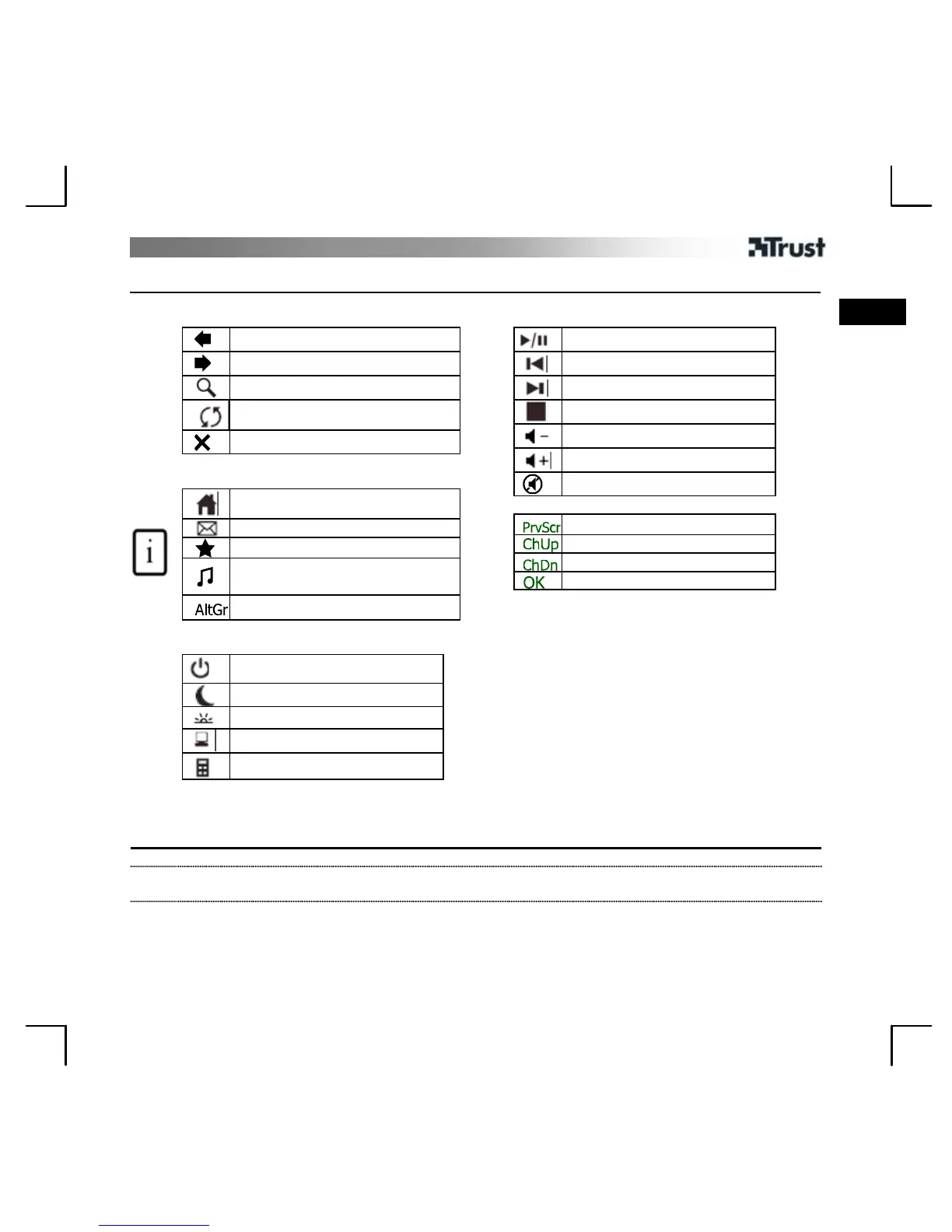
A: Internet Buttons
Browser back
Browser forward
Search
Browser reload
Browser stop
C: Launch/special Buttons
Start Internet Browser
Start E-mail program
Favorites
Launch Windows default
Mediaplayer*
Insert special characters
D: System Buttons
Power
Sleep / Standby
Wake up
My computer*
Calculator*
B: Media Keys
Play / Pause
Previous track
Next track
Stop
Volume down direction
Volume up direction
Mute
Media Center Functions
Previous Screen
Channel Up
Channel Down
OK
E: USB Receiver
F: Mouse 4
th
and 5
th
buttons (Browser Back/
Forward )
G: Scrollwheel with on frontside Battery empty
LED
H: Multimedia buttons (functions: see table B)
* Driver from Trust website needed to support function in Windows 2000
Installation
1 Open battery compartments on bottom sides of mouse and keyboard and place the 4 batteries.
2
Connect USB Transmitter to PC and wait until automatic installation has completed. (Answer any
question Windows asks with Allow, Continue, Next, OK or Yes)


 To Next Page