EasyManua.ls Logo

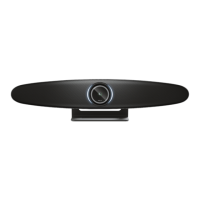
Trust IRIS - User Manual

Trust IRIS
76 pages
Print Icon
To Next Page IconTo Next Page
Loading...
User Guide • Bedienungsanleitung • Mode d’emploi • Gebruikershandleiding •
Manuale utente • Manual del usuario • Guia do utilizador
IRIS
Deliver a clear message
Question and Answer IconNeed help?

Do you have a question about the Trust IRIS and is the answer not in the manual?

Summary

INTRODUCTION

PACKAGE CONTENTS

VIDEO CONFERENCE CAMERA SYSTEM

Lists the main components of the camera system.

CABLES

Details the included USB, power cables, and adapter.

ACCESSORIES AND MOUNTS

INCLUDED ACCESSORIES

Lists included accessories like remote and wall mount.

OPTIONAL ACCESSORIES

Lists optional accessories like extended cable and microphone.

PLACEMENT TIPS AND GUIDE

USING THE DESKSTAND

Instructions for placing the camera on a desk and connecting cables.

CAMERA PLACEMENT METHODS

USING THE WALL MOUNT

Steps for mounting the camera on a wall.

USING THE TV MOUNT

Information on using an optional TV mount.

QUICK-START GUIDE

CONNECT POWER AND USB-C CABLE

Guide to connecting the camera to a computer.

SETUP CONFERENCING SOFTWARE

Steps to select the IRIS as the default device in software.

ADVANCED QUICK-START FEATURES

CAMERA FRAMING MODES

Explanation of manual, participant, and speaker framing modes.

OPTIONAL EXTENDED MICROPHONE

How to connect an optional extended microphone.

REMOTE CONTROL FUNCTIONS

LED-INDICATOR RING STATUS

EXTRA FEATURES

PAIRING BLUETOOTH DEVICE

Instructions for connecting the IRIS to a Bluetooth device.

CUSTOM SETTING MODES

How to save and recall camera positions.

TECHNICAL SPECIFICATIONS

Summary

INTRODUCTION

PACKAGE CONTENTS

VIDEO CONFERENCE CAMERA SYSTEM

Lists the main components of the camera system.

CABLES

Details the included USB, power cables, and adapter.

ACCESSORIES AND MOUNTS

INCLUDED ACCESSORIES

Lists included accessories like remote and wall mount.

OPTIONAL ACCESSORIES

Lists optional accessories like extended cable and microphone.

PLACEMENT TIPS AND GUIDE

USING THE DESKSTAND

Instructions for placing the camera on a desk and connecting cables.

CAMERA PLACEMENT METHODS

USING THE WALL MOUNT

Steps for mounting the camera on a wall.

USING THE TV MOUNT

Information on using an optional TV mount.

QUICK-START GUIDE

CONNECT POWER AND USB-C CABLE

Guide to connecting the camera to a computer.

SETUP CONFERENCING SOFTWARE

Steps to select the IRIS as the default device in software.

ADVANCED QUICK-START FEATURES

CAMERA FRAMING MODES

Explanation of manual, participant, and speaker framing modes.

OPTIONAL EXTENDED MICROPHONE

How to connect an optional extended microphone.

REMOTE CONTROL FUNCTIONS

LED-INDICATOR RING STATUS

EXTRA FEATURES

PAIRING BLUETOOTH DEVICE

Instructions for connecting the IRIS to a Bluetooth device.

CUSTOM SETTING MODES

How to save and recall camera positions.

TECHNICAL SPECIFICATIONS

Trust IRIS Specifications

General IconGeneral
ConnectivityWi-Fi
Operating Temperature0°C to 40°C
Motion DetectionYes
Two-Way AudioYes
Resolution1280x720
Night VisionYes
Power Supply5V DC
StorageMicroSD card

Related product manuals