SETUP
–
8
–
EN
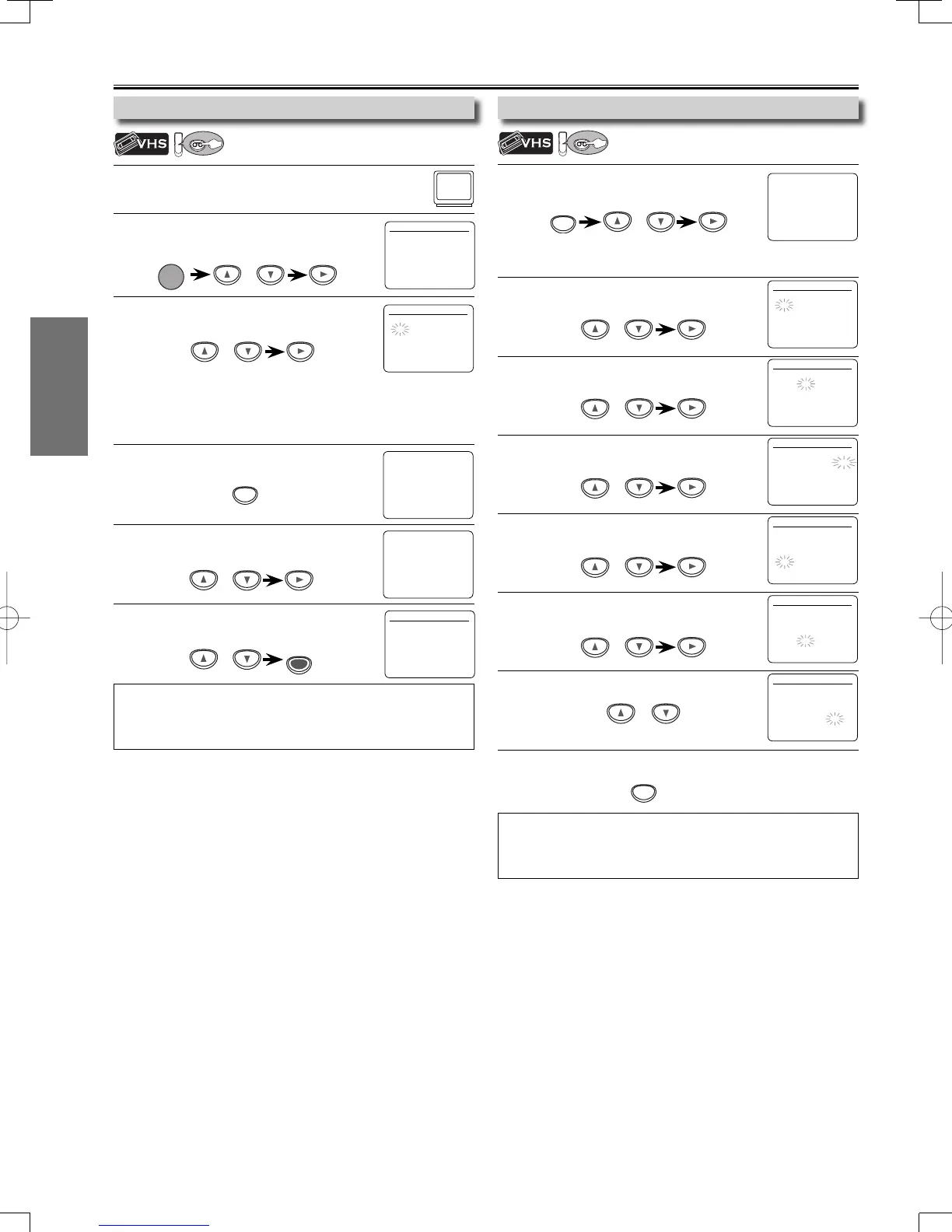
1
Be sure your TV’s input is set to VIDEO. (Name may
vary with TV manufacturer. See your TV manual for
details.)
2
Select your on-screen language.
Then press [B] to continue.
3
When “CLOCK SET” menu appears,
go to step 2 in “Clock Setting” on this page.
or
POWER
1
Press [SETUP] and select “CLOCK SET”.
Then press [B] to go to next step.
• If the clock is not set, the “CLOCK SET” menu appears when you
press [SETUP]. In this case, go to step 2.
2
Select the current month.
Then press [B] to go to next step.
3
Select the current day.
Then press [B] to go to next step.
4
Select the current year.
Then press [B] to go to next step.
5
Select the current hour.
Then press [B] to go to next step.
6
Select the current minute.
Then press [B] to go to next step.
7
Select “AM” or “PM”.
8
Press [SETUP] to exit the “CLOCK SET” menu.
To Change the Selected On-screen Language
Preparation for Use
Note:
• To go back, press [s] during steps 2 to 7.
• Clock setting will be lost after a power failure, or this unit has been
unplugged for more than 30 seconds.
SETUP
or
SETUP
or
or
or
or
or
or
LANGUAGE SELECT
B ENGLISH [ON]
FRANCAIS
ESPAÑOL
- M E N U -
TIMER PROGRAMMING
SATELLITE LINK
AUTO REPEAT [OFF]
B CLOCK SET
LANGUAGE SELECT
CLOCK SET
MONTH DAY YEAR
1 0 / - - - - - -
HOUR MINUTE AM/PM
- - : - - - -
CLOCK SET
MONTH DAY YEAR
1 0 / 0 2 - - - -
HOUR MINUTE AM/PM
- - : - - - -
CLOCK SET
MONTH DAY YEAR
1 0 / 0 2 TUE 2 0 0 7
HOUR MINUTE AM/PM
- - : - - - -
CLOCK SET
MONTH DAY YEAR
1 0 / 0 2 TUE 2 0 0 7
HOUR MINUTE AM/PM
0 5 : - - - -
CLOCK SET
MONTH DAY YEAR
1 0 / 0 2 TUE 2 0 0 7
HOUR MINUTE AM/PM
0 5 : 4 0 - -
CLOCK SET
MONTH DAY YEAR
1 0 / 0 2 TUE 2 0 0 7
HOUR MINUTE AM/PM
0 5 : 4 0 P M AM
B PM
Turning on Unit for the First Time
VCR
Clock Setting
VCR
Please note: most instructions in this man-
ual refer to remote control use.
Note:
• If you accidentally select Spanish or French and need English:
Press [SETUP] and choose
“
SELEC. IDIOMA
”
or
“
SELECTION LANGUE
”
.
Press [B] and select “ENGLISH”. Finally, press [CLEAR/C.RESET].
CLOCK SET
MONTH DAY YEAR
1 0 / – – – – – –
HOUR MINUTE AM/PM
– – : – – – –
or
1
Press [SETUP] until the main menu appears.
2
Select “LANGUAGE SELECT”.
Then press [
B] to go to next step.
3
Select
“ENGLISH”, “FRANCAIS” or
“ESPAÑOL”. Then press [CLEAR/C.RESET].
LANGUAGE SELECT
B ENGLISH [ON]
FRANCAIS
ESPAÑOL
- M E N U -
TIMER PROGRAMMING
SATELLITE LINK
AUTO REPEAT [OFF]
CLOCK SET
B LANGUAGE SELECT
SETUP
or
or
CLEAR/
C. RESET
- M E N U -
B TIMER PROGRAMMING
SATELLITE LINK
AUTO REPEAT [OFF]
CLOCK SET
LANGUAGE SELECT
E8E70UD.indd8E8E70UD.indd8 2006/11/3010:44:422006/11/3010:44:42


 To Next Page