

EasyManua.ls Logo

TSUKUMO Versa H26 - User Manual

TSUKUMO Versa H26
12 pages
Print Icon
To Next Page IconTo Next Page
Loading...
CA-1J5-00M1WN-05 Versa H26 HATSUNE MIKU EDITION 19/11/20 A
稿
20
80g
X X X X X
2
(g/m )
CHECK DESIGN
2
(g/m )
)
125 mm
176 mm
Poki
(19/11/20)
Anna
(19/11/20)
© 2019 Thermaltake Technology Co., Ltd. All Rights Reserved. A-2019.12
All other registered trademarks belong to their respective companies.
www.thermaltake.com
User's Manual
Benutzerhandbuch
Mode demploi
Manual del usuario
Manuale dellutente
Manual do Utilizador
Руководство пользователя
kullanıcı elkitabı
(EEE Yönetmeliğine Uygundur)
H A T S U N E M I K U E D I T I O N
Art
Question and Answer IconNeed help?

Do you have a question about the TSUKUMO Versa H26 and is the answer not in the manual?

Summary

Product Specifications

Model Identification

Specifies the product model and its unique edition.

Case Type and Form Factor

Defines the physical size and type of the computer case.

Physical Dimensions

Provides the height, width, and depth of the product.

Side Panel Design

Describes the material and design of the side panel.

Construction Materials

Indicates the primary materials used for the product build.

Cooling System Details

Details the fan specifications and cooling capabilities.

Storage Drive Bay Configurations

Lists the available slots for 2.5" and 3.5" drives.

Expansion Slot Availability

Specifies the number of expansion slots for add-on cards.

Motherboard Compatibility

Lists compatible motherboard sizes (Mini ITX, Micro ATX, ATX).

Fan Support and Mounting

Details fan sizes supported in front, top, and rear.

Radiator Installation Options

Lists supported radiator sizes for liquid cooling.

Component Clearance Limits

Specifies maximum height for CPU cooler and length for VGA.

Important Warnings and Notices

CPU Cooler and VGA Limitations

Details maximum height for CPU coolers and length for graphics cards.

Side Panel Disassembly Guide

Power Supply Unit (PSU) Installation

Motherboard Installation Procedure

HDD Installation (3.5 & 2.5)

Installation Without HDD Tray

5.25 Drive Bay Installation

PCI Slot Usage Instructions

Radiator Installation Guide

Air Cooling Installation Guide

Front Panel Leads Installation

Case LED and Switch Connection

Connects case LEDs and power/reset switches to motherboard headers.

USB 2.0 Connection Guide

Provides instructions for connecting USB 2.0 devices to the motherboard.

USB 3.0 Connection Guide

Details how to connect USB 3.0 devices, ensuring motherboard support.

Audio Connector Installation

Guides connection of audio jacks, recommending AC'97 or HD Audio support.

Thermaltake Power Supply Series (Optional)

Smart Power Management (SPM) Overview

Explains the cloud-based SPM software for PC monitoring and management.

Tt RGB Plus Ecosystem Features

Tt RGB Plus Software Capabilities

Describes the software for synchronizing TT RGB PLUS products with LEDs.

Tt AI Voice Control Functionality

Highlights voice control for TT RGB PLUS products.
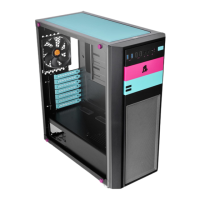
TSUKUMO Versa H26 Specifications

General IconGeneral
BrandTSUKUMO
ModelVersa H26
CategoryDesktop
LanguageEnglish