Tiny Audio C3
may need to perform the “Auto Scan” again. The scanning operation is similar to
your home TV set.
Service Information: DAB+ mode
The Service Information display -The Service Information data will be displayed
with scrolling text which is being broadcasted from the station.
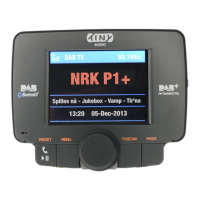
While listening to DAB+, the display will show the followings if applicable
1. Channel Name
2. Frequency
3. Multiplex Name(DLS)
4. DAB+ icon
5. Number of Channel Scan and Stored
6. Time
7. Date
8. Signal Strength
9. FM Transmitting Frequency
10. Bluetooth Connection Status
11. Aux-In or Aux-Out status
Manage the Preset Stations:
Storing the Preset Stations:
To program and store your favorite DAB+ preset stations,
1. To select a favorite DAB+ station using Tuning Knob,
2. Press and hold “PRESET” button for 3 seconds to enter “Store Preset
Stations” mode
3. Use Tuning Knob to scroll up or down to select a number in memory to
store your favorite station,
4. Press “PRESET” button to confirm and exit “Store Preset Stations” mode. A
message “Stored Successfully” will be displayed.
8


 To Next Page