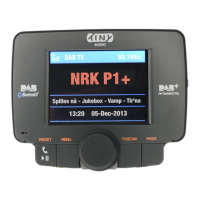
Tiny Audio C3
Recalling the Preset Stations:
To recall your favorite DAB+ preset stations,
1. Press “PRESET” button to enter “Select Preset Stations” mode
2. Use Tuning Knob to scroll up or down to recall a Preset Station.
3. Press “PRESET” button again to confirm and exit “Select Preset Stations”
mode.
Manage the Bluetooth devices:
Pairing a Phone:
Paring a phone with TINY AUDIO C3 for the first time, follow the below procedures:
1. Press the “MODE” button until you scroll the screen to “Bluetooth” mode
2. In “Bluetooth” mode, press and hold “TX/SCAN” button to activate the
TINY AUDIO C3 device into pairing mode, a message of “Pairing in
progress” will be shown,
3. From your phone, turn on Bluetooth and search for Bluetooth peripherals,
a list of available Bluetooth peripherals will be displayed,
4. Select “CAR KIT” in the list and once connection is established, the
Bluetooth screen will display “Connected” and a Bluetooth icon will be
shown at the top of blue bar.
5. In “Paring in progress” mode, if you want to stop searching for any new
phone, you can always press “PRESET” button to stop searching and return
to last connected phone.
Remark: during the process of re-connecting to last connected phone, it may
take several seconds to one minute for re-connecting depend on
model of phone. In the re-connecting process, the Bluetooth icon at
the top of blue bar will be flashing and the LCD will show
“Not Connected”
9


 To Next Page