Key Focus 6 – Responding to sound
Just behind the pen tube is a sound sensor (a
microphone reporting values 0 - 100). InO-Bot
can be programmed to respond to sound. It
might move, stop moving or light up different
lights.
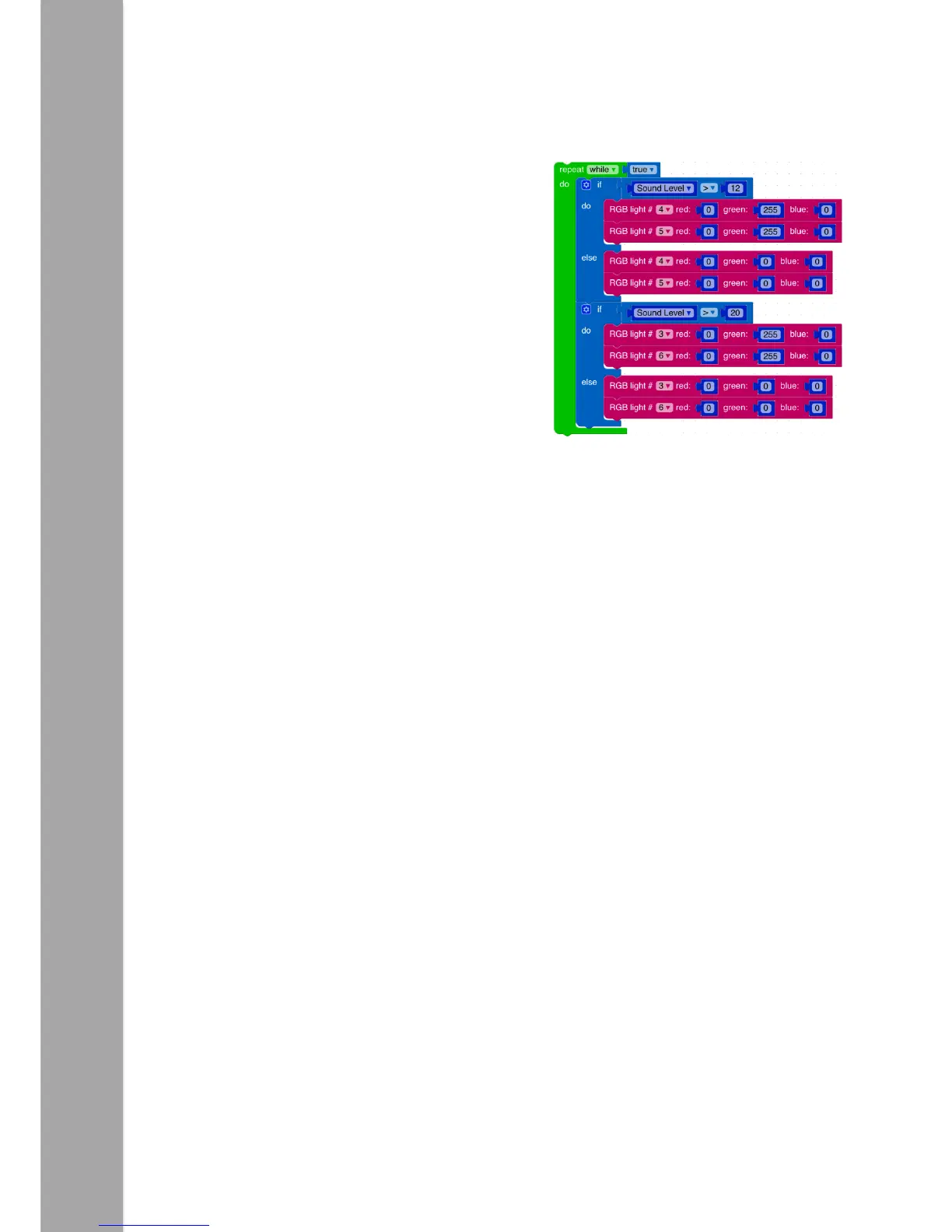
An example is shown on the right. ‘If’ the sound
level rises above 12 then ‘do’ light the front two
LEDs ‘else’ turn them off. ‘If’ it rises above 20
then ‘do’ turn the next row of LEDs on ‘else’
turn them off. Because both conditional checks
are in the same loop both can be true at the
same time and therefore the first two rows of
lights come on at the same time.
Note the commands used in the ‘else’ section. These are used to ensure the lights
switch off again rather than switching on and staying on.
A further challenge could be to light another row of lights or make something else
happen, e.g. at different sound levels change the colour of LEDs 4 and 5 only.



 To Next Page