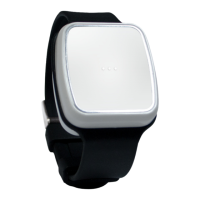
The Tunstall Gem5 is a personal safety device designed as a smartwatch, offering a range of features for personal monitoring and emergency assistance. It is primarily intended for users who may require quick access to help in various situations, such as falls or other emergencies.
Function Description:
The Tunstall Gem5 functions as a personal alarm system integrated into a smartwatch form factor. Its core capabilities include:
- SOS Alarm Activation: Users can manually activate an SOS alarm by pressing the side button for 3 seconds. Upon activation, the watch vibrates and provides a voice prompt confirming the alert. There is a 10-second window to cancel the alarm. If not cancelled, an SOS alert text message is sent to pre-programmed emergency contact numbers, followed by outgoing calls. The system attempts to connect to the first number, then the second after a 10-second delay if the first fails, and so on. During these 10-second delays between calls, the user can stop the call sequence or prevent a false alarm by pressing the SOS button.
- Fall Alarm: The watch is equipped with an automatic fall detection feature. If a fall is detected, the watch issues a warning message to the user. Similar to the SOS alarm, there's a short period for the wearer to cancel the fall alarm by clicking "Cancel" on the watch face. If not cancelled, emergency contacts are called. It's important to note that some daily activities, including sports or abrupt sitting, might trigger a false alarm. The manual also cautions that the watch may not detect every real fall and strongly advises users to press the SOS button if able, in any emergency situation.
- Heart Rate Measurement: The device can measure the wearer's heart rate. By wearing the watch on the left hand and selecting the heart rate function, the screen will display the heart rate in BPM after a few seconds of checking.
- GPS Tracking: The Tunstall Gem5 includes GPS functionality for location tracking. To obtain an initial GPS fix, users are advised to go outdoors or near a window, as it may take a few minutes depending on the environment. The manual notes that GPS functionality may be unavailable or inaccurate in certain locations, such as inside buildings, near tall structures, or underground.
- Time, Date, and Step Display: The watch face displays the current time, date, and the number of steps taken.
- Customizable Watch Faces: Users can choose from five different watch faces, including two analog and three digital options, by navigating through the settings menu.
Important Technical Specifications:
- Dimensions: 47.5mm x 16.9mm / 1.87in x 0.66in
- Weight: 65g / 2.29oz
- Battery: Rechargeable, 3.7V, 580mAh
- Battery Life: Up to 24 hours under normal environmental conditions
- Charging Voltage: 5V DC
- Waterproof Rating: IP67
- Locating Technology: GPS
Usage Features:
- Touch Screen Interface: The watch features a touch screen for navigation and interaction with its functions.
- Power/SOS Button: A single side button serves as both the power button and the SOS alarm activation button.
- Multiple Watch Faces: Users can personalize the watch's appearance by selecting from five different watch face designs.
- Spoken Confirmations: When charging, the watch provides a spoken confirmation: "your watch is charging."
- Easy Charging: The watch charges via a dedicated charging base connected to a USB cable and AC adaptor.
Maintenance Features:
- Daily Charging Recommended: To ensure normal operation, the battery should be fully charged daily for approximately 2 hours or when the battery level is low.
- Non-Removable Battery: The watch battery is not designed to be removed by the user.
- Care and Storage Guidelines:
- Avoid using or storing the watch in dusty, hot, cold, electric, or chemical environments.
- Keep the watch and accessories dry.
- Do not drop, shake, or knock the watch, as rough handling can cause damage.
- Clean the watch with a dry cloth; do not use chemicals or detergents.
- Do not disassemble or refit the watch, as this will void the warranty.
- Using unauthorized batteries may lead to unwanted situations.
- Avoid playing with the watch while driving to prevent accidents.
- Turn off the watch in aircraft and adhere to any restrictions, as wireless devices can cause interference.
The Tunstall Gem5 aims to provide peace of mind through its emergency features and health monitoring capabilities, all within a user-friendly smartwatch design.

 Need help?

 To Next Page
 General