78 79
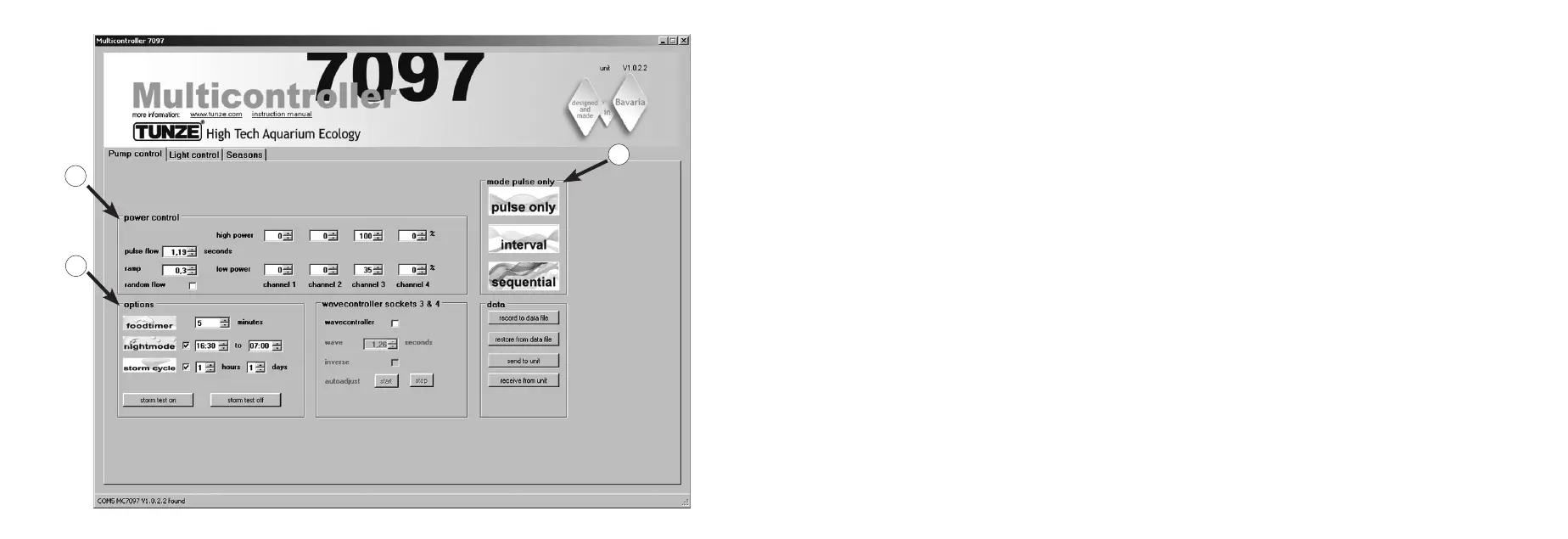
Short description of the display
“Pump control“ – for Turbelle
®
circulation pumps
Field “mode” (1)
In this eld the mode of the pumps can be selected with a simple click on the icons, which will also be signaled in the
box on the upper left.
“pulse only” = only wave motion simulation
“interval“ = low and high tide simulation
“sequential” - sequential pump circuit /random current ow
Field “power control“ (2)
In this eld the performance of the various pumps, as well as the time base for the wave motion, tide and ood, or
sequential pump circuit / random current are specied.
Field “options“ (3)
This eld is used to specify the important options of the Multicontroller such as the food timer, moon-phases simulation,
night mode, storm for desedimentation.
3
2
1


 To Next Page