106 107
“
random ow“ – random current ow
The random ow occurs when the sequential pump circuit and the pulse operation are switched on simultaneously. It
always occurs when a xed “pulse ow“ pulse frequency, or “random ow“ is set.
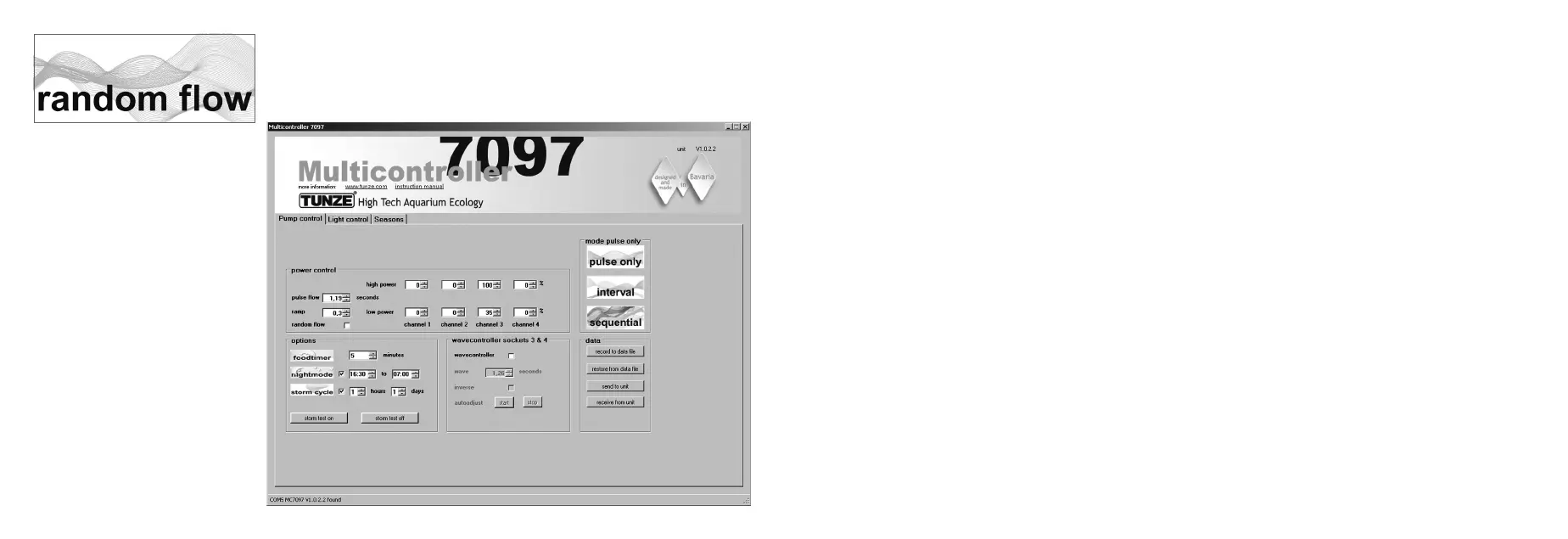
In the eld “mode“, click on the “sequential“ button.
Set the “sequential“ switching time by clicking on 1 to 10 sec.
In the eld “power control“, the pump performance can be set to “low power“ and “high power“ by clicking on the
channels “channel“ 1 to 4. The number zero “0“ means pump not operating. The lowest possible setting is 20%, and
the maximum adjustable setting is 100%.
The pulse frequency “pulse ow“ can be set from 0.3 to 8.0 sec.
Result:
Pump 1 will start, later on pump 2, then pump 3, then pump 4, and subsequently all four pumps will stop.
At the same time, the pumps will pulse in the pulse frequency “pulse ow“ and reproduce an uneven current ow
pattern.
If the night mode function “night mode“ is enabled, this will interrupt the pulse operation for the programmed time
interval, for example, from 9:00 p.m. to 9:00 a.m., during which all pumps will remain in the “low power” setting. In the
morning after 9 a.m., the selected pulse operation of the pump will then start.
If the “wavecontroller“ function is activated, the outputs 3 and 4 will be used, the sequential pump circuit “sequential“
will then only be active for outputs 1 and 2.


 To Next Page