108 109
“wavecontroller“ – oscillating current with the Wavebox
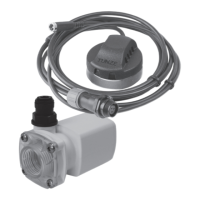
The Wavecontroller function was especially designed for the use of TUNZE
®
Waveboxes, and is also interesting option
for the electronically controlled Turbelle
®
propeller pumps. To generate the maximum wave motion, the frequency of
the Wavebox must be set exactly to the resonance frequency of the aquarium.
Any current ow type can be selected in the “mode“ eld (see previous chapter).
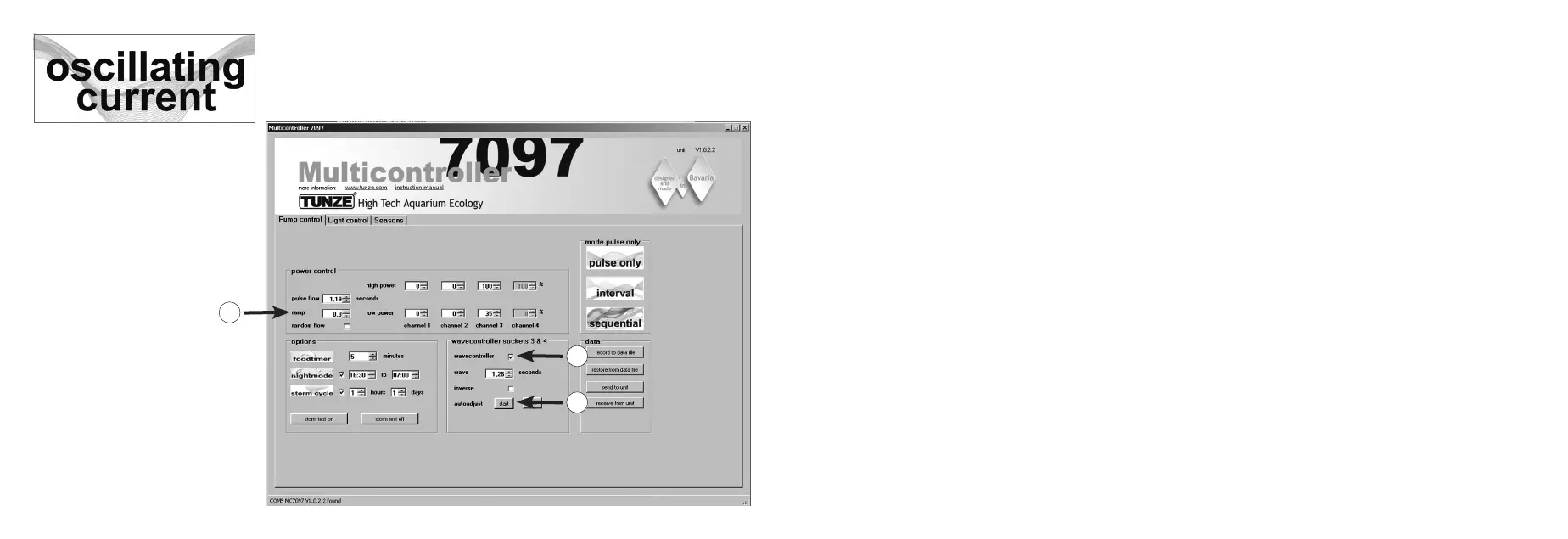
Click on the “wavecontroller“ function in the eld “wavecontroller socket 3 & 4“ (1) The pump outputs 3 and 4 in the
box “power control“ are now active for the Wavecontroller function.
Set a known resonance frequency the eld “wave“, or nd a suitable frequency through several attempts.
The function “inverse“ should be clicked, if at least two Waveboxes are positioned adjacent to each other (setting
visibly to “low power“ and “high power“). If the Waveboxes are placed side by side, this feature should be disabled.
The “ramp“ setting with a time delayed start-up start creates a quiet and gentle start of the Wavebox pump. (2)
“autoadjust“ (3)
Clicking on “start” will enable an automatic and convenient detection of the optimal resonance frequency for the
Wavebox in the aquarium. The pulsing will then start at an interval of 0.3 sec, and increase every 3 seconds in
an interval of 0.01 seconds to the highest value of 2.5 seconds. During this time, the aquarium should be closely
observed. A water movement can be observed, once the resonant frequency is reached. The “auto adjust“ function
can then be stopped by clicking on “stop“. The “wave“ value can be additionally manually ne-tuned with “seconds“.
1
3
2


 To Next Page