
 Need help?
Do you have a question about the Turbo Air TST-72SD and is the answer not in the manual?
The serial number is located on the rating label on the left interior wall for service purposes.
Ensure no objects obstruct airflow and maintain at least 5 inches of clearance at the rear of the unit.
Locate the unit on a floor strong enough to support its total weight and contents.
Do not place near hot corners or stoves, as high ambient temperature reduces cooling efficiency.
Install the unit indoors to prevent exposure to rain and moisture.
Ensure stable installation by locking the front wheels during use.
Verify the unit is level from front-to-back and side-to-side for proper operation.
Ensure the unit is connected to a dedicated electrical outlet for safe operation.
Clean the interior and exterior with warm water and mild soap; avoid abrasive cleaners.
Keep the condenser coil free of dust to ensure optimal cooling effect.
Clean the door gasket frequently to maintain proper sealing and prevent leaks.
After cleaning, plug in the unit and verify that it is operating correctly.
Ensure the power cord is connected to the proper voltage and a protected circuit.
Wait 5 minutes before re-starting the unit after it has been disconnected.
The controller is inside, with factory setting 'Normal'; adjust for cooler temperatures.
The thermostat controls the compressor's on/off cycles based on internal temperature.
Address freezing/melting food by adjusting the temperature dial or checking unit placement.
Check power connection, sunlight exposure, door usage, and condenser for refrigeration failure.
Resolve loud noises by checking installation and tray position; wipe dewdrops with a dry cloth.
Ensure proper door closure by leveling the unit and repositioning the gasket if needed.
Avoid abrasive cleaners, scratches, and chloride-based products to protect the passive layer.
Use non-abrasive tools and clean along polish lines to prevent damage to stainless steel.
Use alkaline, alkaline chlorinated, or non-chloride cleaners; avoid quaternary salts.
Soften hard water and use filters to reduce corrosive deposits and maintain equipment.
Use recommended cleaner strengths and clean frequently to avoid hard stains.
Rinse and wipe dry immediately when using chlorinated cleaners; allow to air dry.
Hydrochloric acid (muriatic acid) should never be used on stainless steel surfaces.
Regularly restore/passivate stainless steel using recommended cleaners and techniques.
Covers cabinet and parts for three years from installation or 39 months from shipment.
An extra two years for hermetically sealed compressor parts, not exceeding five years total.
Adhere to refrigerant, lubricant, dryer, and vacuum level specifications to maintain warranty.
Warranty is only valid for the original purchaser and is not transferable.
Excludes consequential damages, alterations, neglect, abuse, misuse, accidents, and acts of God.
Express warranties are exclusive; no implied warranties of merchantability or fitness apply.
Claims require model number, serial number, proof of purchase, and defect information.
 General
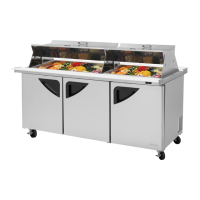
| Type | Refrigerator |
|---|---|
| Model | TST-72SD |
| Width | 72 inches |
| Number of Doors | 3 |
| Energy Star Certified | Yes |
| Voltage | 115V |
| Refrigerant | R-290 |
| Exterior Material | Stainless Steel |
| Interior Material | Aluminum |
| Capacity | 72 cu. ft. |
| Construction | Heavy Duty |
| Certifications | NSF, ETL |



 To Next Page
