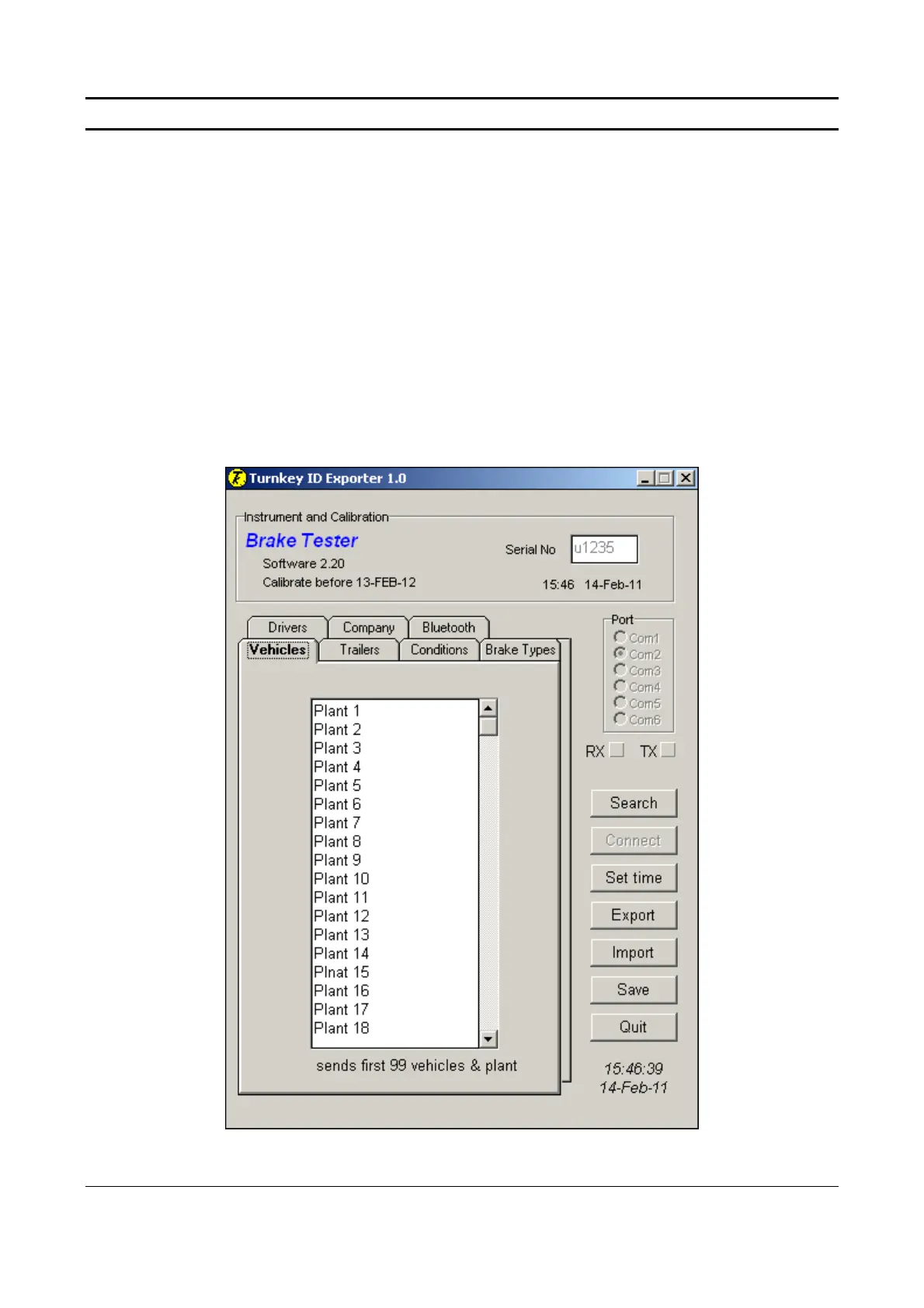
Turnkey ID Exporter Program
The Turnkey ID program allows plant details, site conditions, operator names and other
information to be downloaded to the instrument from a Windows personal computer. The
executable program IDexporter.exe (supplied on the CD or available from the Turnkey website)
should be copied to a convenient directory on your computer. Backup files of the plant names you
use etc., will also be created in that directory.
If your PC is equipped with a Turnkey Bluetooth Adaptor, the instrument will be discovered by it
and a wireless connection made whenever it is switched on and discoverable (e.g. in the Start Menu
and Main Menu).
Alternatively, use a Turnkey USB Link to physically connect the instrument’s DIN connector to a
USB port on your computer. The instrument will sense the DIN connector and override the
Bluetooth, if fitted.
Start the IDexporter program and use the radio buttons to select the com port to which the
Bluetooth Adaptor or USB link is attached.
Simret 4000 Instructions, Issue 10, Jan 2011
© 1994-2011, Turnkey Instruments Ltd. Page 16 of 17


 To Next Page