6
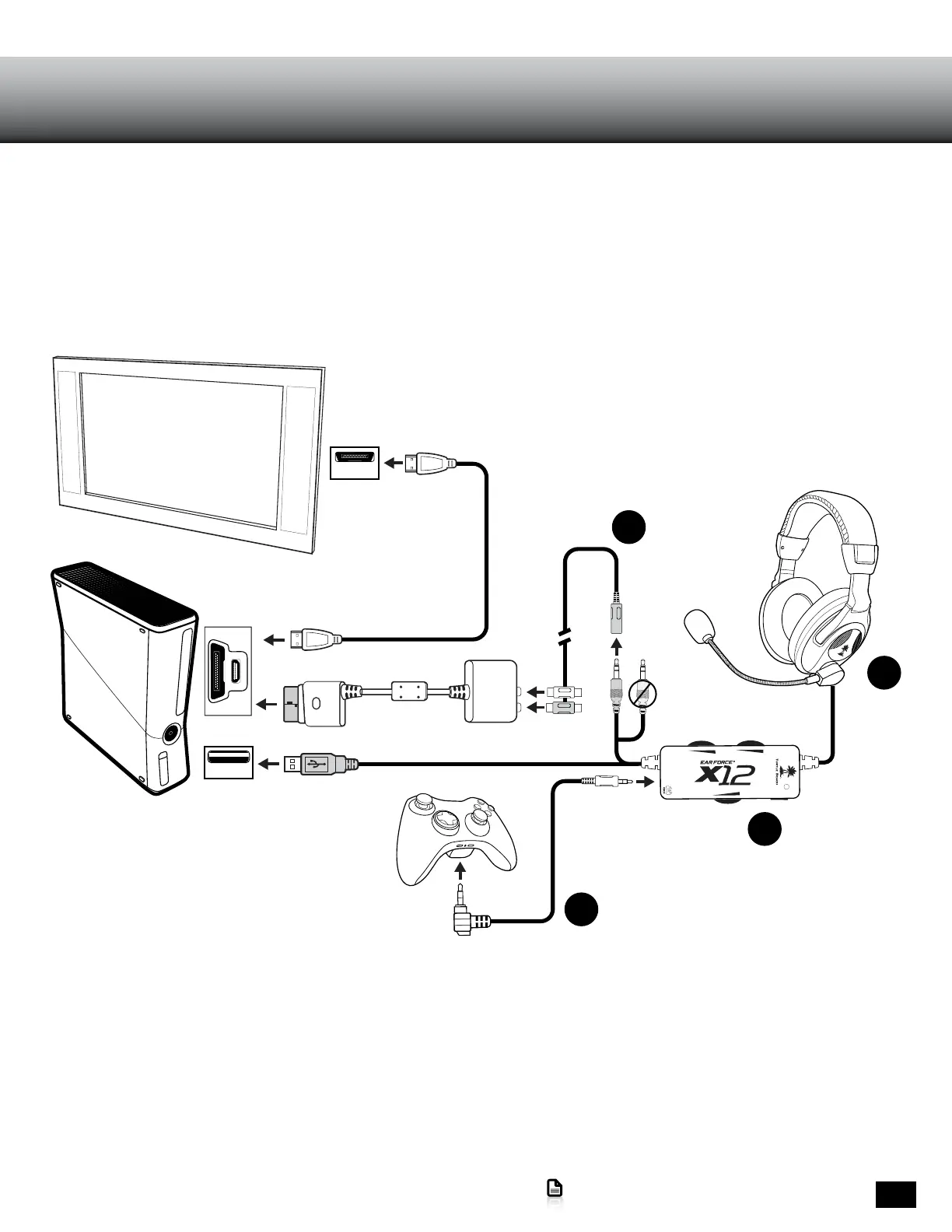
Xbox 360 Slim HDMI Setup
Go to Table of Contents
Xbox 360® Slim HDMI Setup/Configuration Xbox 360® Slim – HDMI
A
B
HDMI
green
pink (not used)
Xbox 360® Audio Adapter*
E
D
HDMI
USB
USB
The Ear Force X12 Arctic Edition can be set up a variety of ways to match different Xbox 360 Console Versions and A/V
Connections. Check the following pages for the set-up that most closely resembles your home gaming system.
For best Xbox chat performance, use with official Microsoft Xbox 360 products.
* Older Xbox 360 models and Xbox 360 Slim models require an Xbox 360 Audio Adapter Cable for audio output when used
with an HDMI connection (Adapter available from turtlebeach.com). Note: If your HDMI TV has red and white AUDIO OUT
RCA jacks, you can use them to feed the sound from your TV to your Ear Force® X12 headset. (AUDIO IN jacks will not send
sound to your headset. AUDIO OUT is required).















 To Next Page