EasyManua.ls Logo

TUTTOKool TK-721 - Thermostat Quick Reference Details; LCD Display Indicators; Battery Door Installation

TUTTOKool TK-721
3 pages
Print Icon
To Next Page IconTo Next Page
To Previous Page IconTo Previous Page
Loading...
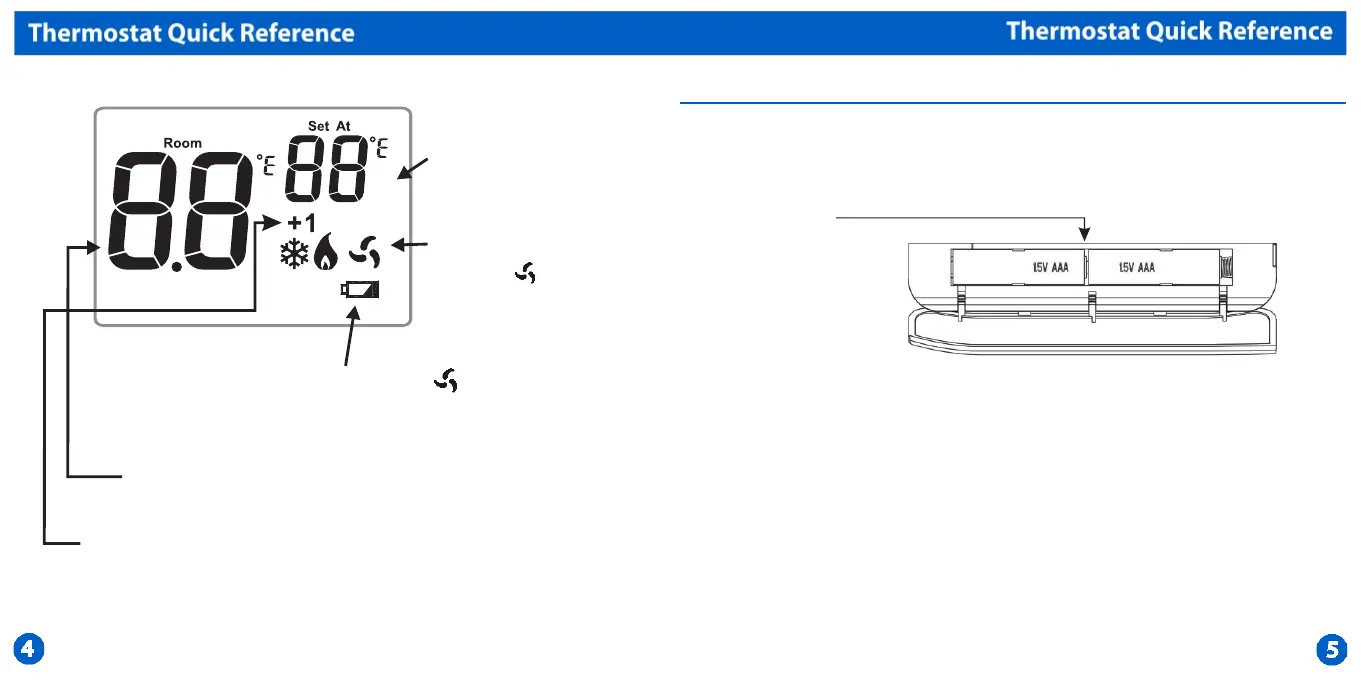
Displays the
setpoint
temperature.
System Operation
Indicators:
The COOL,HEAT,
EmH or icon will
display when
the COOL,HEAT,
Emergency heat or
(fan) is on.
NOTE:The
compressor delay
feature is active if
these icons are
ashing.The
compressor will
turn on when the 5
minute delay has
elapsed.
Low Battery lndicator:
Replace batteries when
indicator is displayed.
lndicates the
room temperature.
Stage 1 and 2 indicate the
stages of HEAT which are
active.
Remove tab
between the
batteries to
activate the
thermostat.High
quality alkaline
batteries are
recommended.
Battery Door lnstallation

Other manuals for TUTTOKool TK-721

Related product manuals