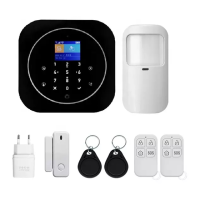
Need help?
Do you have a question about the TUYA WL-JT-99BST and is the answer not in the manual?
Explains the function of each button on the system's keypad.
Shows the rear view of the main panel, including ports and keys.
Instructions on how to activate the device's display from sleep mode.
Details on using navigation buttons to select and manage menu options.
Describes the various icons displayed in the system's status bar.
Manages phone numbers for alarm calls and SMS notifications.
Configuration options for date, time, passwords, and other system parameters.
Manages custom voice messages for alarm notifications.
Steps to add or delete phone numbers for system alerts.
Procedure to set the current date and time on the alarm panel.
How to configure user and administrator passwords for system access.
Adjusts the volume levels for voice prompts and the siren.
Configures doorbell music and volume settings.
Options for screen saver timeout and brightness adjustment.
Selects the display language for the system interface.
Resets the system to its original default configuration.
Guide on how to record a personalized voice message for the system.
Sets time delays for entering or exiting the premises after arming/disarming.
Automates arming and disarming the system based on a schedule.
Customizes siren behavior, including duration and types.
Configures alerts for power loss or low battery status.
Specifies how long the siren sounds after an alarm event.
Information on connecting and managing wireless siren accessories.
Details on coding and using remote controls with the alarm system.
Overview of various wireless sensors compatible with the system.
Step-by-step guide to arming/disarming using the system's keypad.
Initiating calls from the system to control features or check status.
Steps to connect and configure wireless smart outlets.
Instructions on obtaining the necessary mobile application.
Steps for creating an account for the mobile application.
Process for pairing the alarm system with the mobile app via Wi-Fi or Bluetooth.
Periodic checks to ensure the system's stable and safe operation.
Verifying the functionality of the main alarm panel.
Checking the status and battery levels of individual sensors.
Customizing names for specific zones where detectors are installed.
Assigning types and categories to zones and their associated devices.
 General
| Brand | TUYA |
|---|---|
| Model | WL-JT-99BST |
| Category | Security System |
| Language | English |

 To Next Page