5
❚
CONNECTING YOUR TV-BOOST™ WIRELESS SPEAKER SYSTEM TO YOUR TV – QUICK
There are several way to connect your TV-Boost™ Wireless Speaker System to your TV. In this section we will describe the steps
to connect your TV-Boost™ Wireless Speaker System to your TV with the simplest, quickest, and easiest method. In Appendix A,
we will describe alternative methods, which are more complicated and not necessarily preferred.
❚
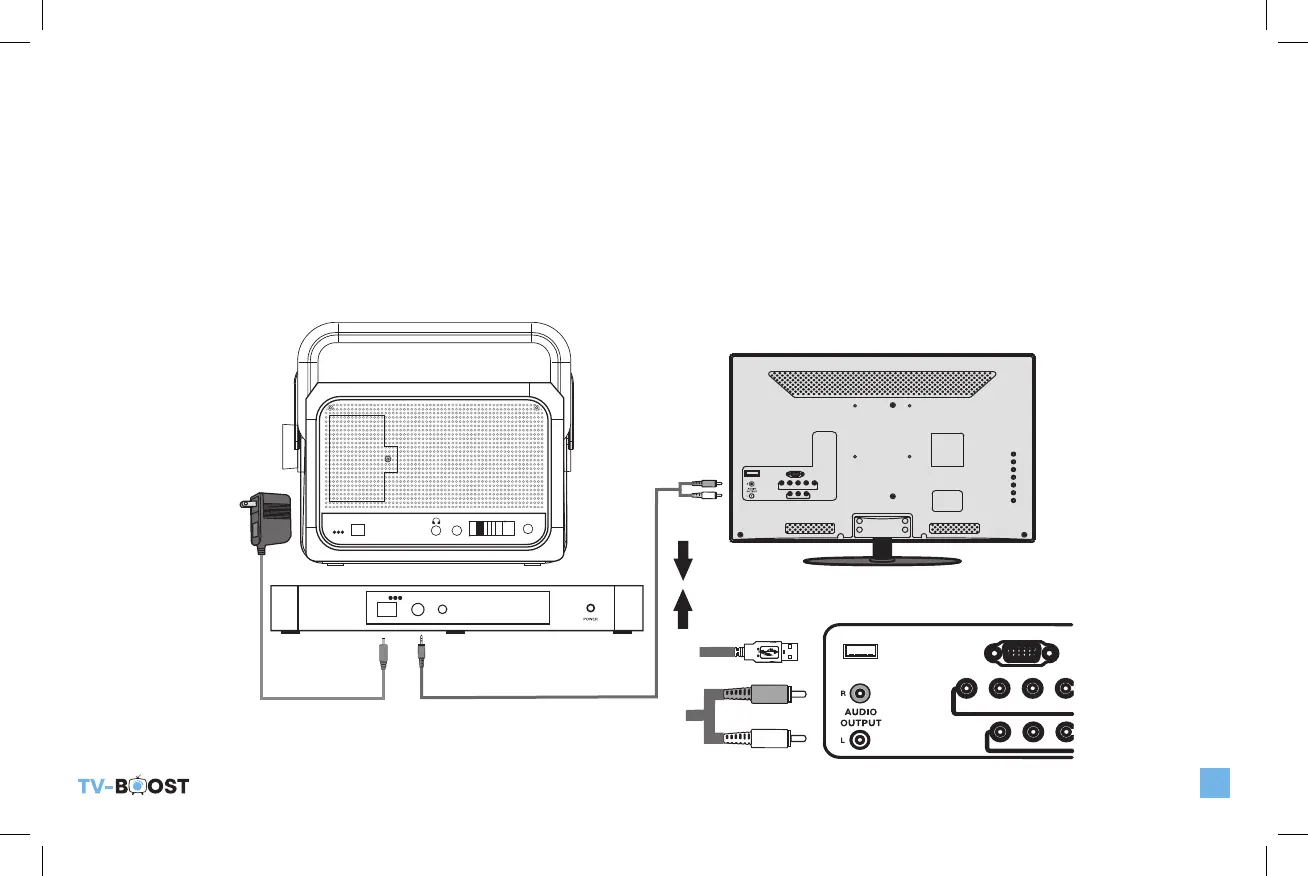
METHOD 1: CONNECT TO THE ANALOG AUDIO OUT ON YOUR TV USING RCA CABLES.
Connect the Base to the back of the TV using the RCA to 3.5mm cable as shown below (Figure 1). Make sure your TV is on. If
you have this connection set and do not have sound, please check the settings menu in the Television to see if Audio settings need
to be set to output sound to external speakers.
DC5V
POWER
MUSIC
AUDIO IN
TV
PAIRING
TONE
DC5V
POWER AUDIO IN PAIRING
TV_Boost_B6000ManualRev2.indd 5 10/20/22 10:47 AM


 To Next Page