
 Need help?
Do you have a question about the TV-Boost TV-B6000 and is the answer not in the manual?
Lists all items included in the TV-Boost Wireless Speaker system package.
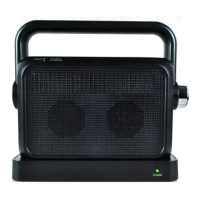
Identifies the key components and controls of the TV-Boost Wireless Speaker and Base.
Describes the simplest method to connect the TV-Boost system to your TV using RCA cables.
Connects the system to the TV's analog audio out port using RCA cables.
Connects the system to the TV's headphone output jack using RCA cables.
Provides recommendations for positioning the TV-Boost Wireless Speaker Base near your TV.
Explains compatibility with Dolby Digital 5.1 and PCM audio formats for optimal performance.
Instructions for charging the TV-Boost Wireless Speaker, including indicator lights and battery life.
Guide on how to plug headphones into the speaker for private listening.
Details on powering on, adjusting volume, and using the tone control for the wireless speaker.
Covers the limited warranty period, coverage, and exclusions for the TV-Boost product.
Instructions on how to make a warranty claim, including contact information and required documentation.
Outlines the consumer rights and arbitration agreement for dispute resolution.
Details the device's compliance with FCC rules regarding radio frequency interference.
Step-by-step guide to pairing additional TV-Boost Wireless Speakers with the base.
Solutions for common problems like no sound, low battery indicator, and connection issues.
Instructions for safely cleaning and maintaining the TV-Boost Wireless Speaker and Base.
Technical details of the TV-Boost Wireless Speaker, including transmission, range, and power.
The TV-Boost™ Wireless TV Speaker System, model TV-B6000, is designed to enhance your television audio experience by providing clear, amplified sound directly to you. This system allows you to enjoy TV programs at your preferred volume without disturbing others, making it ideal for individuals with hearing difficulties or those who simply desire a more personalized listening experience. The core of the system consists of a wireless receiver (speaker) and a transmitter base, which work together to wirelessly transmit audio from your TV to the speaker.
The primary function of the TV-Boost™ Wireless TV Speaker System is to wirelessly transmit audio from your television to a portable speaker. This allows you to place the speaker closer to you, ensuring that TV dialogue and sounds are heard clearly. The system utilizes a 2.4 GHz radio frequency for reliable wireless transmission, minimizing interference and providing a stable audio connection.
The transmitter base connects to your TV's audio output, converting the TV's sound into a wireless signal. This signal is then broadcast to the wireless receiver (speaker). The speaker features an integrated volume control, allowing you to adjust the sound level independently of your TV's built-in speakers. This independent volume control is a key feature, as it enables you to set the TV's volume to a comfortable level for others in the room, while you adjust the speaker's volume to your personal preference.
Another significant function is the tone control feature on the speaker. This allows you to fine-tune the audio output to best suit your hearing needs, particularly for enhancing dialogue clarity. By adjusting the tone, you can make TV conversations more intelligible, which is especially beneficial for those who struggle with muffled or unclear speech from standard TV speakers.
The system also supports the connection of headphones directly to the wireless speaker. When headphones are plugged in, the speaker's internal sound output is muted, providing a private listening experience. This is useful for late-night viewing or when you want to immerse yourself fully in the audio without any external distractions. The headphone volume can also be adjusted using the speaker's volume knob.
For power conservation, the wireless speaker is designed to automatically turn off if no audio signal is received from the base for a period of 3 minutes. This intelligent standby feature helps prolong battery life. When an audio signal is re-detected, the receiver will automatically resume normal operation. If the speaker enters an extended hibernation state and doesn't resume normal operation, a simple power cycle (turning the volume knob off and then back on) will re-sync it with the base.
The TV-Boost™ system is designed to work with PCM (Pulse Code Modulation) digital audio format. If your TV outputs Dolby Digital, you may need a Digital to Analog converter to ensure compatibility. This is an important consideration for users with newer TVs or those who stream content that uses Dolby Digital audio.
Setting up the TV-Boost™ Wireless TV Speaker System is designed to be straightforward. There are several methods for connecting the transmitter base to your TV. The quickest and easiest method involves connecting the base to the analog audio out (RCA cables) on your TV. The system includes an RCA to 3.5mm cable for this purpose. Alternatively, you can connect the base to your TV's headphone output jack using the same RCA to 3.5mm cable. Once audio is detected, a green LED on the base will indicate a successful connection. If no sound is detected, the LED will blink slowly, prompting you to check your TV's audio settings to ensure sound is outputting to external speakers.
The wireless speaker is powered by a built-in lithium-ion battery, offering portability and freedom from power outlets during use. Before initial use, the speaker should be charged for at least 6 hours by placing it on the dock/base. During charging, a low battery/charge LED indicator on the speaker will blink. Once fully charged, this LED will stop blinking and remain steadily lit. A full charge provides approximately 8 hours of listening time at moderate volume. When the battery is low or the speaker is not in use, simply place it back on the dock/base for recharging.
Operating the speaker is simple: rotate the volume knob to turn the receiver on or off and to adjust the sound volume. A green POWER LED will illuminate when the system is powered on. The independent volume control allows you to adjust the speaker's volume without affecting the TV's main volume, which can be turned low or even off. For optimal audio settings, you may need to access your TV's menu using its remote control.
A unique feature of the TV-Boost™ system is its expandability. You can pair up to 50 additional TV-Boost™ Wireless Speakers to operate with a single transmitter base. This allows for multi-room audio or for multiple listeners to have their own personal speaker. The pairing process for additional speakers involves turning the new receiver on, pressing and holding the PAIRING button on the bottom of the new speaker until its ON/OFF indicator blinks, and then pressing and holding the PAIRING button on the back of the transmitter base until its power indicator blinks. Successful pairing is indicated by the new speaker's ON/OFF indicator stopping its blinking and the audio stream beginning within 54 seconds.
Maintaining your TV-Boost™ Wireless TV Speaker System is simple and requires minimal effort. For cleaning, always unplug the AC adapter from the wall outlet first. Then, use a dry, soft cloth to gently clean and dust the outside surfaces of both the speaker and the transmitter base. It is important to also clean the charging contacts on the base to ensure efficient recharging. Never immerse the receiver (speaker) in water, as this can cause damage to the electronic components and the battery.
Proper disposal of the unit and used batteries is crucial for environmental safety. The system uses a lithium-ion battery, and it should not be disposed of in household trash or incinerated. Instead, take the equipment to a nearby recycle center that handles electronic waste and batteries, following local regulations.
For troubleshooting, the manual provides guidance for common issues. If there's no sound from the receiver, check all connections between the base and the TV, ensuring they are firmly seated. Also, confirm that the receiver is within the operating range of 100 feet from the base. If there's sound from the TV speaker but not the receiver, check your TV's audio settings to ensure it's sending signals to the base. If the low battery/charging indicator keeps blinking, it means the battery is low and needs recharging. Ensure the receiver is firmly connected and properly aligned to the base for effective charging. If the blinking persists after about 3 hours of charging, there might be an issue with the connection or the charging process.
The device is intended for home and personal use only. Any unauthorized service or modification of the unit will void the warranty. It is designed for durability under normal consumer usage, but it is important to avoid abuse, misuse, or exposure to extreme conditions like liquid, rain, extreme humidity, or excessive heat.
 Transmission
| transmission frequency | 2.4 GHz |
|---|
Speakers| speaker type | 2x3W Class D Speaker |
|---|
 Battery
| battery type | Built-in Lithium Ion Battery |
|---|---|
| operating range | Over 30m (100 feet) in an open field |
| listening time | About 8 hours (at 50% volume) |
 Power
Power| ac adapter input power | 100-240VAC/50-60 Hz |
|---|---|
| ac adapter output power | 5 VDC 1.5A |

 To Next Page