39
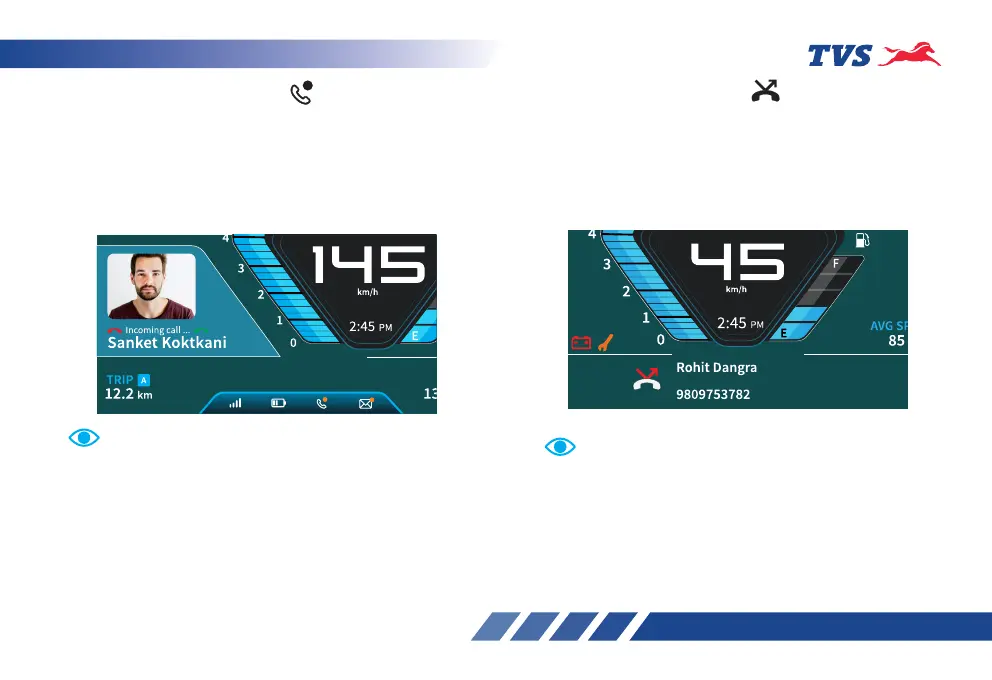
Caller image will be displayed in the TFT cluster incase
if the image is stored against the contact in your smart
phone. It takes min 12 to 15 seconds to display the
image by the cluster.
By pressing the ‘Info switch‘ the incoming calls can be
accepted or rejected. To accept the call, long press the
switch and to reject short press the switch.
Note
Whenever there is a notification is displayed, location of
the standard icons may get shifted to the top which is
normal.
Note
Incoming call alert display ‘ ‘
The connected instrument cluster’s TFT will display
the incoming calls alerts from the smart phone via
Bluetooth. Ex. ‘Incoming call... Sanket Koktkani’,
will be displayed if the contact is stored in the
smart phone’s otherwise number will be displayed.
Ex. ‘Incoming call... 9999999999’.
Missed call alert display ‘ ‘
The connected instrument cluster’s TFT displays the
missed calls from the smart phone via Bluetooth for
10 seconds approx. with the names / numbers of the
callers as shown below when who called me last
voice assist command is given.
Who called me last
Voice assist command shows the Previous missed
call or Previous accepted call details














 To Next Page