enhance otc user manual
TW ENHN OTC QSG 0623 Rev A
red light on base– fault
in the instrument,
base, cable, or adapter
Call 1-888-815-3240 for
assistance.
Level 1 Level 2 Level 3
Level 4
MAX Volume
Beep Beep Beep 2 Beeps
Level 1 Level 2 Level 3
Level 4
MAX Volume
Beep Beep Beep 2 Beeps
tweak hearing tweakhearing.com
|
1-888- 815-3240
|
info@tweakhearing.com
Program Suitable for Indicator
1 Conversation 1 Beep
2 Restaurant 2 Beeps
3 Traffic 3 Beeps
4 Outdoor 4 Beeps
connecting tube and dome/tip
wearing tweak enhance otc
download tweak enhance otc app
using tweak enhance otc
charging information
1 Choose either a left
or right sound tube.
BLUE: Left RED: Right
1 Plug
the
type-C USB
connector into
the charging base.
3 The charging base is marked with blue and red
circles. Place amplifier in the corresponding
port. it will shut off automatically when placed
in the charger.
The rocker switch will glow blue while
charging. When fully charged, the rocker
switch will glow green.
green light on base–
normal operation
left
ear
right
ear
2 Attach tube
connector end
to sound post on
amplifier. Twist tube
clockwise until snug.
sleeve
tip
12
mm
9
mm
12
mm
9
mm
closed
domes
vented
domes
3 Choose dome/tip
to use with sound
tube.
1 Place Tweak Enhance
over your ear. The
curve of the sound
tube should rest
on top of your ear
comfortably, even
with glasses.
1 Using your smartphone, search for
Tweak Enhance OTC app in the App Store
or Google Play store.
2 Download Tweak
Enhance OTC app to
your smartphone.
2 Grab the loose end
of the tubing and
gently insert the tip
into the ear canal.
3 Position the
retaining lock in the
bowl of the ear.
4
When properly
inserted, the tubing
will lay close to the
head around the
front of the ear and
into the ear canal.
Check this by moving
your finger down the
tubing, into the ear.
Turning ON and OFF Volume Control
Memory Switch
To turn ON or OFF, press and hold the upper
portion of the rocker switch until you hear a
beep (approx. 3 seconds) then release. While
you are holding the rocker switch, it will turn
green. The green light will turn off once the
amplifier is ON.
To turn OFF, press and hold the upper portion
of the rocker switch until you hear a beep
(approx. 3 seconds) then release. While you are
holding the rocker switch, it will turn blue. The
blue light will turn off once the amplifier is OFF.
ON —
rocker switch will ash
green;
power is ON
OFF —
rocker switch will ash
blue then shut o
The rocker switch
is used as a volume
control. Pressing the
upper portion of the
rocker switch increases
the volume, while the
lower portion reduces
the volume.
When the hearing instrument is turned ON, it will
revert to the last program and volume setting.
4 Align tip with end
of sound tube and
push tip straight on.
Program 1
Program 2
Program 3
Program 4
2 Plug the
opposite end
of the cable
into adapter
block then
connect with power
source.
Fully charge Tweak Enhance before
proceeding to setup.
As you increase/
decrease the volume,
you will hear beep
sounds for each sound
level.
THIS QUICK START GUIDE WILL HELP YOU SET UP ENHANCE OTC HEARING AID.
READ THE USER MANUAL INCLUDED WITH THIS OTC HEARING AID FOR COMPLETE INFORMATION.
To switch programs, press and hold the lower
portion of the rocker switch for two seconds
then release. Do the same to switch to the other
programs.
Refer to the APP GUIDE inside the user manual to set up Tweak Enhance OTC hearing aids using the Tweak Enhance OTC app.
enhance otc quick start guide
enhance otc warranty
TW ENHN WARR 0521 Rev A
tweak enhance
™
warranty and service– NORTH AMERICA
The manufacturer’s warranty period is 6 months.
This warranty covers any defect in material or faulty production, specifi cally
excluding batteries, tips, and tubes. Any and all warranties are invalidated
if the Tweak Enhance instrument has been tampered with or altered in any
way, if the serial number has been altered or removed, or if any repairs have
been made without authorization. The manufacturer reserves the right to
repair or replace the instrument or any defective part, at manufacturer’s
expense, within the limits of the warranty.
This warranty does not include a promise of specifi c listening improvement.
Warranty service must only be performed by an authorized service center.
Service performed by any unauthorized personnel voids all warranties. If
service is needed, consult your retailer or call 1-888-815-3240.
tweak enhance extended warranty offer–
NORTH AMERICA
Mail the following:
• Completed form below;
• Copy of your itemized sales receipt(s) for the Tweak and concurrent purchase of a DryBoost UV
appliance.Remember to keep copies of the sales receipt(s) for your records;
• Completed warranty card from the DryBoost UV appliance.
ATTN: TWEAK ENHANCE EXTENDED WARRANTY
OR
fax to
P.O. BOX 1178, JOHNSON CITY, TN 37605 423.928.0515
NAME _______________________________________________________________________________________________
ADDRESS _____________________________________________________________________________________________
CITY, STATE, ZIP ________________________________________________________________________________________
PHONE ______________________________________________________________________________________________
EMAIL _______________________________________________________________________________________________
TWEAK PURCHASE DATE: ________________________________________________________________________________
BUSINESS NAME OF RETAILER: ____________________________________________________________________________
❏ SERIAL NUMBER on TWEAK:
LEFT __________________________________________ RIGHT ____________________________________________
❏ SERIAL NUMBER of DRYBOOST UV APPLIANCE: _____________________________________________________________
tweak enhance extended warranty
completion form –
NORTH AMERICA
To take advantage of the Tweak Enhance Extended Warranty Off er, follow the instruction
below. This original form must be submitted within 30 days of your Tweak purchase date.
Moisture is the number one enemy of all PSAPs. The
manufacturer of Tweak recommends daily use of a
DryBoost UV
®
appliance to care for your new PSAP.
A 6-month warranty extension (minimum value $125)
is provided at no charge with the user’s validated
purchase and regular use of a DryBoost UV appliance.
These products may be purchased at your Tweak
retailer or tweakhearing.com
To qualify for the Tweak Enhance Extended Warranty,
follow the instructions in the section below. Extended
warranties are not transferrable.
Looking for more drying options? Visit dryandstore.com
14
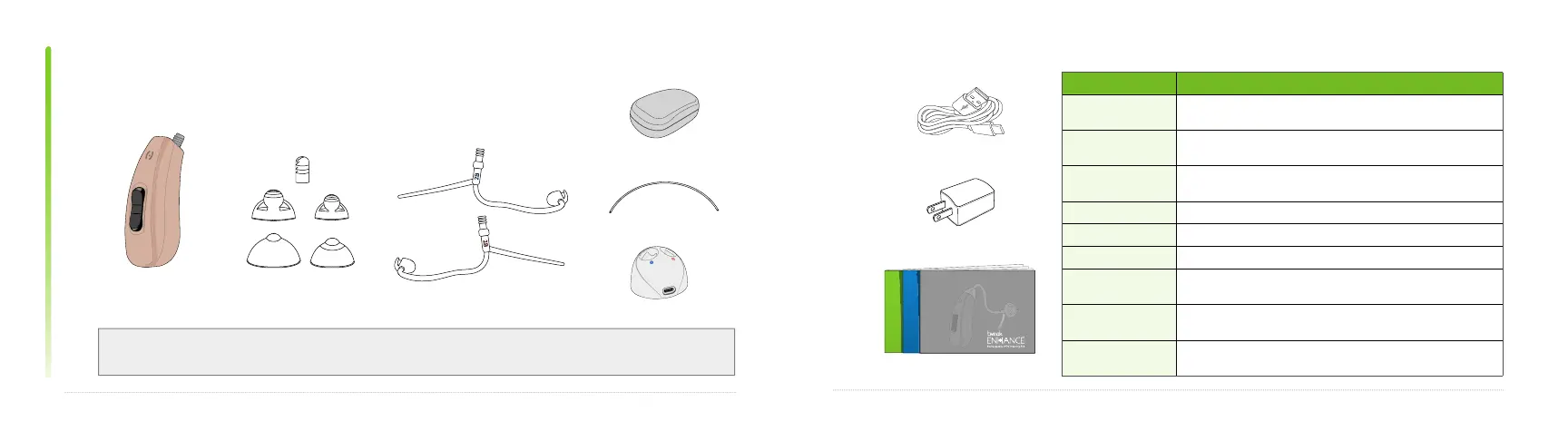
box contents
15
sound domes/tips
(5)
tweak enhance otc
hearing aid (1)
sound tubes (2)
box contents
Contents shown represent a single hearing aid. A pair of hearing aids includes 10 sound domes/tips,
and 4 sound tubes. All other items remain at the single device quantity.
cleaning line (5)
carrying case (1)
charging base (1)
power block (1)
tweak enhance otc manuals
power cable
(1)
Accessories Description
Tweak Enhance OTC
hearing aid
Amplifies sounds picked up by the microphones
Sound tubes Size 2B, left and right. Connects your dome to the hearing aid;
sound travels through the tube and dome into the ear canal.
Sound domes/tip Multiple sizes. Attaches to sound tube; helps to guide sound
into the ear
Carrying case Store your hearing aids inside when they’re not in use
Cleaning lines Used to remove wax from inside the sound tube
Charging base Charges your OTC hearing aids
Power cable Full-size USB on one end with USB-C on the other. Used with
charging base to charge your OTC hearing aids.
Power block Used with charging base and power cable to charge your OTC
hearing aids
Tweak Enhance OTC
manuals
User manual, quick start guide, and warranty


 To Next Page
 Loading...