reset / réinitialisation / reset / reinicio / resettenreset twinkly
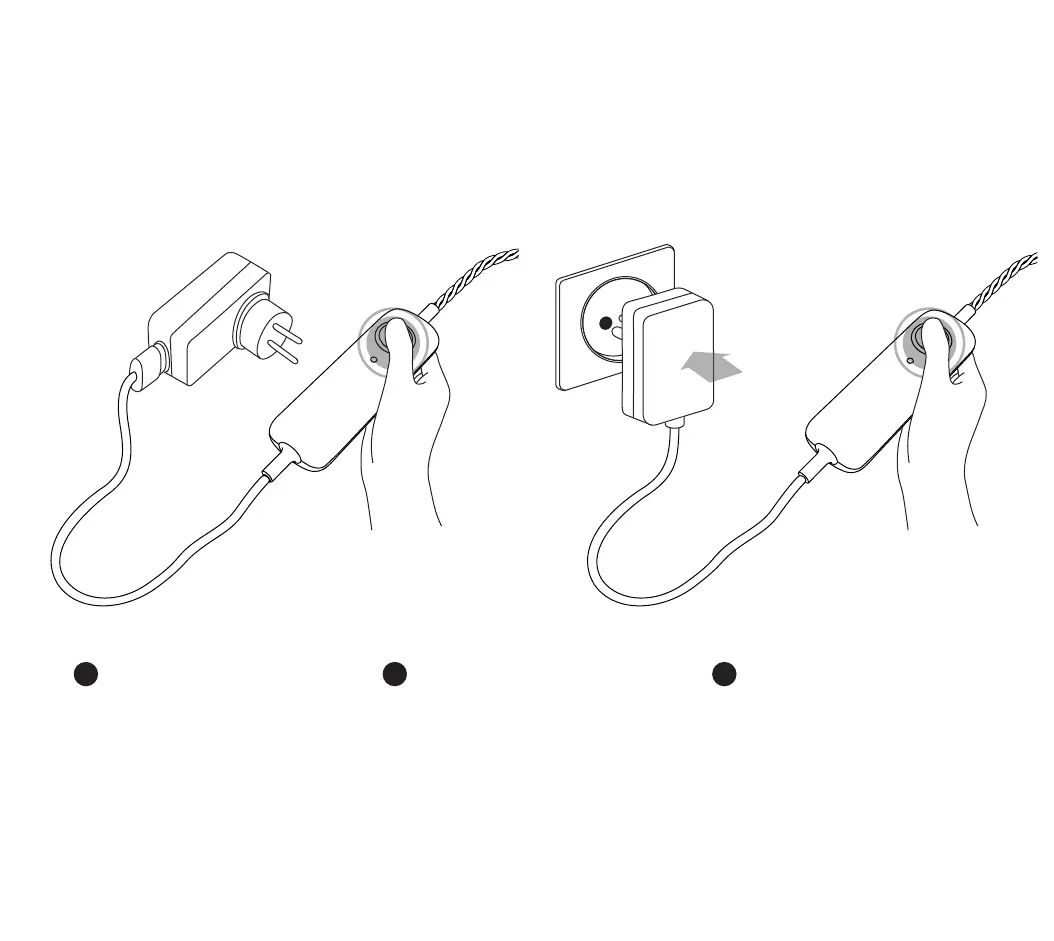
1. Stacca Twinkly dalla presa di corrente, premi e con-
tinua a mantenere premuto il bottone del controller
2. Mentre stai ancora premendo il bottone, collega
nuovamente Twinkly alla corrente
3. Continua a tenere premuto il pulsante no a
quando tutti i LED diventano rossi (o gialli per Gold
Edition), quindi rilascia il pulsante
IT
1. Débranchez Twinkly puis appuyez sur le bouton
du contrôleur et gardez-le enfoncé
2. Tout en maintenant le bouton enfoncé, re-
branchez Twinkly
3. Maintenez le bouton enfoncé jusqu’à ce que
tous les voyants deviennent rouges (ou orange
pour Gold Edition), puis relâchez le bouton.
FR
1. Unplug Twinkly from the power socket. Press
and hold the controller button
2. While holding the button, plug in Twinkly
3. Keep holding the button until all LEDs turn red
(or amber for Gold Edition), then release the
button
EN
1. 2.


 To Next Page