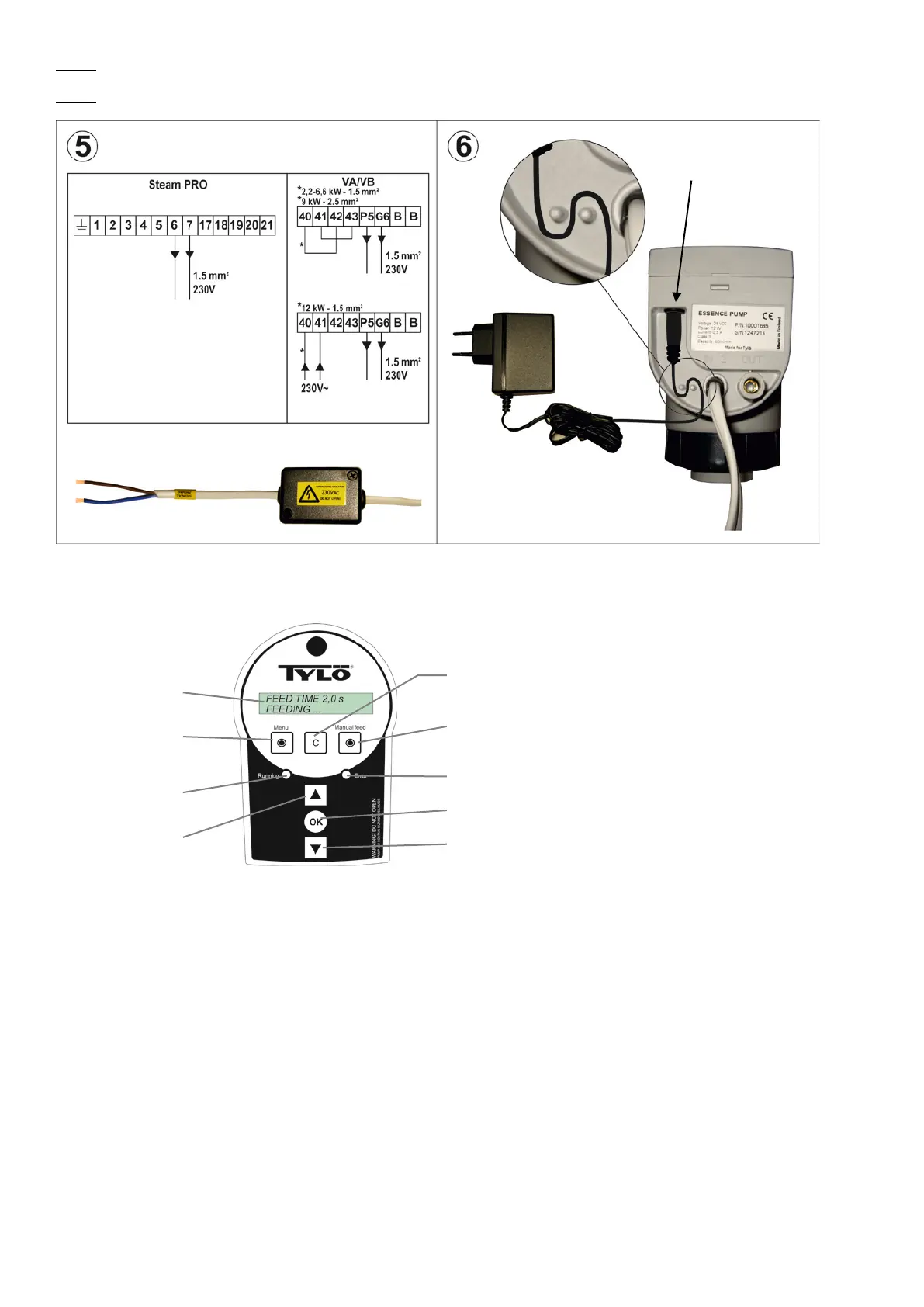
Fig. 5. Connect the signal cable 230VAC to the generator connection terminal designated for the essence pump.
Fig. 6. Connect power cord to the pump.
6. Control panel
“LCD display” Shows the pump status. E.g. running, error or settings.
“Menu” Press to start pump/pause settings.
“Running” LED light (green): Constantly lit means the pump is pumping fragrance. Flashing means that the pump is waiting for a
start signal from the steam generator.
“
” Button for increasing pump/pause times on menu. One short press increases the value by one unit. Press and hold to increase
the value rapidly.
“Cancel” Press to cancel a choice or setting and return to the main menu.
“Manual feed” Press to run the pump manually. The pump will run as long as the button is pressed.
“Error” LED light (red): Flashing light means that an error has occurred or steam temperature is too low. The display will show
more details of what the error may be. A typical error can be the thermostat fitted on the steam pipe being unable to detect heat in
the pipe (70°C), the display will show ”No Steam”.
“OK” Press to accept choice or settings.
“
” Button for decreasing pump/pause times on menu. One short press decreases the value by one unit. Press and hold to
decrease the value rapidly.
pump signal
Essence pump
signal cable
Signal cable for
pump control
Essence pump
signal cable
7


 To Next Page