Doc No. FM0637 issue E Page 5
Registering a Pendant onto a Touchsafe Pro Nursecall system
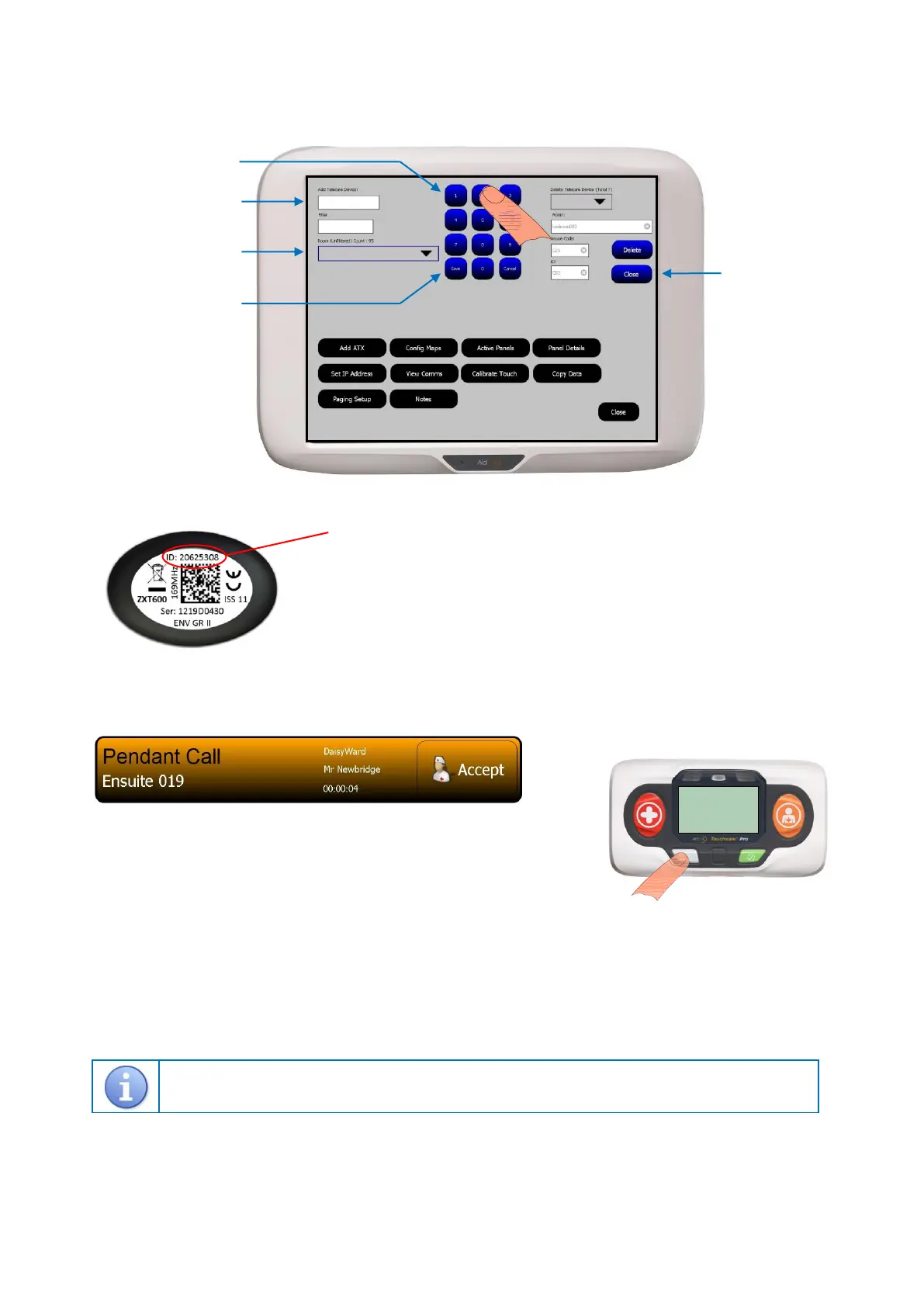
1. Put the Touchsafe Pro Master Panel into Telecare registration mode; touch the screen and Logon as an Engineer or a Manager
(password required), then from the main menu page touch the Telecare button to open the screen shown below…
2. Enter the pendant ID…
3. Press the Close button to exit Telecare mode and the Nursecall panel is now back in normal operating mode.
4. Activate the pendant and check the call is displayed on the Nursecall panel like this…
The screen banner is orange for a pendant call (Touch the banner to display notes).
Press the Accept button on the banner to silence the alarm - this will also
notify all other panels the call is being dealt with.
The screen banner changes to purple when a call is accepted.
You must visit the appropriate Nursecall Call Point to cancel the call.
Deleting a Pendant from a Touchsafe Pro Nursecall system
Select the pendant ID to be deleted from the Delete Telecare Device pull-down list box (prefixed with a “T20”).
Details of the pendant selected will be displayed in the Room, House Code and ID boxes below.
If the details shown are correct press the Delete button.
Press the Close button to exit.
Tynetec and Aidcall operate a policy of continuous improvement and reserve the right to change product specifications without notice.
If any variation to the details contained in this document are suspected please contact Tynetec’s customer support dept on 01670 352371.
The 8 digit ID is printed on the label on the rear of the pendant.
Note: this ID will always start with 20xxxxxx.
Touch the Add Telecare Device box then use the on-screen keypad to enter the ID.
Hint: enter a zone in the Filter box to narrow the search for the room (see below).
Select the users Call Point ID from the Room pull-down list box then press Save.
Note: this is the room unit that will be used to cancel the call.


 To Previous Page
 Loading...