EasyManua.ls Logo

Tynetec Touch 2 - User Manual

Tynetec Touch 2
5 pages
Print Icon
To Next Page IconTo Next Page
Loading...
Doc No. FM0637 issue E Page 1
We declare this product complies with the relevant UK
legislation on condition that it is used in the manner
intended, and in accordance with the current installation
standards and/or the manufacturer's recommendations.
A copy of the full UKCA Declaration of Conformity is
available on request.
169MHz Telecare Devices
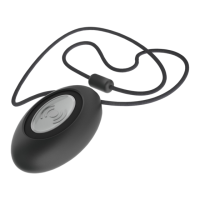
Touch 2 Personal Pendant
__________________________________________________________________________________________________________
Compatible with Reach at-home alarms, Advent xt warden call,
Altec Response and Touchsafe Pro Nursecall systems
Fully sealed against immersion in water
TPU neck cord includes an anti-strangle safety device
TPU wrist strap, belt clip and suction cup options supplied
Red call reassurance light
Low battery warning
Dimensions: 45mm x 30mm x 14mm (HxWxD)
Weight: 12 grams
Product Code: ZXT600
What is the Touch Pendant used for?
One press of the button on the pendant will initiate an emergency alarm call to a local Carer or an Alarm Receiving Centre (ARC)
from anywhere in or around the home. In residential housing, calls can be made from anywhere on the scheme.
Wearing Options
The Touch 2 pendant is supplied with a kit of parts, so it can be worn around the neck, clipped onto a belt or pocket, or on the
wrist like a watch. It also includes a suction cup to stick the pendant to a tiled wall when in the bath or shower.
Neck Cord: lie the cord through one of the grooves on the rear of
the Pendant then slide the neck cord attachment into place.
Note: smaller cord end of attachment marked alongside.
Wrist Strap: feed the wrist strap (pattern side up) through the 2 slots
in the wrist strap attachment. Note: locate the attachment pip in the
centre strap hole marked alongside.
Push the fixing stud through the hole marked at the end of the strap.
Belt Clip: simply clip into place on the rear of the pendant.
Note: the suction cup can be fitted to the belt clip to stick the
pendant to a hard-smooth surface.
Making an Emergency Call
Simply press the SILVER button ONCE
The button will FLASH RED for about 8 seconds
Take no further action your call will be answered soon.
Registering a Pendant
It is necessary to register a new Touch 2 pendant onto the warden call system, at-home alarm unit or Nursecall system.
See the following pages for how to put each of these products into registration mode.
The range of all radio devices can be affected by the working environment - always take care during installation
and perform several test calls from all extremes of the building.
Battery Life
The pendant battery is checked once a day, if the voltage falls and stays below a preset level for 7 consecutive days a low
battery alert is automatically transmitted. Once a low battery call is received the pendant should be replaced within 7 days.
Touch pendants must be returned to Tynetec/Aidcall for battery replacement. Detailed information on battery management for
all Tynetec/Aidcall products is available - request Doc No. FM0630.
Declaration of Conformity
Tynetec and Aidcall are business units of Legrand Electric Ltd
Unit 10 Cowley Road, Blyth Riverside Business Park, Blyth
Northumberland, NE24 5TF. Tel: 01670 352 371
Email: sales@tynetec.co.uk Web: www.tynetec.co.uk
We declare this product complies with the relevant
European legislation on condition that it is used in the
manner intended, and in accordance with the current
installation standards and/or the manufacturer's
recommendations. A copy of the full CE Declaration of
Conformity is available on request.
Question and Answer IconNeed help?

Do you have a question about the Tynetec Touch 2 and is the answer not in the manual?

Summary

Touch 2 Personal Pendant Overview

Product Purpose

Initiates an emergency alarm call to a Carer or Alarm Receiving Centre.

Wearing Options

Details how the pendant can be worn using supplied accessories like neck cord, wrist strap, and belt clip.

Making an Emergency Call

Instructions for initiating an emergency call by pressing the pendant's silver button.

Registering a Pendant

Explains the necessity of registering the pendant with the warden call or alarm system.

Battery Life

Information on pendant battery check, low battery alerts, and replacement procedures.

Declaration of Conformity

Statements of compliance with UK and European legislation for the product.

Reach System Integration

Registering a Pendant onto a Reach at-home alarm unit

Step-by-step guide to add a pendant to the Reach at-home alarm system.

Deleting a Pendant from a Reach at-home alarm unit

Procedure to remove a pendant from the Reach system using specific keypad codes.

Advent xt Warden Call System Integration

Registering a Pendant onto an Advent xt warden call system

Guide to add a pendant to the Advent xt warden call system via DECT telephone.

Deleting a Pendant from an Advent xt warden call system

Steps to remove a pendant from the Advent xt system using the DECT telephone.

Altec Response Local Carer Alarm Integration

Registering a Pendant onto an Altec Response local carer alarm unit

Procedure to add a pendant to the Altec Response unit via its menu system.

Deleting a Pendant from an Altec Response local carer alarm unit

Instructions to remove a pendant from the Altec Response unit using its menu.

Touchsafe Pro Nursecall System Integration

Registering a Pendant onto a Touchsafe Pro Nursecall system

Guide to add a pendant to the Touchsafe Pro Nursecall system via the Master Panel.

Deleting a Pendant from a Touchsafe Pro Nursecall system

Procedure to remove a pendant from the Touchsafe Pro system via the Master Panel.

Overview

The Tynetec 169MHz Telecare Devices Touch 2 Personal Pendant is a versatile and robust emergency alarm device designed for use in various care environments. It is compatible with a range of systems including Reach at-home alarms, Advent xt warden call, Altec Response, and Touchsafe Pro Nursecall systems, ensuring broad applicability.

Function Description:

The primary function of the Touch 2 Personal Pendant is to initiate an emergency alarm call with a single press of its silver button. This call can be directed to a local Carer or an Alarm Receiving Centre (ARC), providing immediate assistance from anywhere within or around the home or scheme. The pendant is designed for ease of use in emergency situations, featuring a red call reassurance light that flashes for approximately 8 seconds to confirm the call has been placed.

Important Technical Specifications:

  • Compatibility: Reach at-home alarms, Advent xt warden call, Altec Response, Touchsafe Pro Nursecall systems.
  • Water Resistance: Fully sealed against immersion in water, making it suitable for use in baths or showers.
  • Dimensions: 45mm (Height) x 30mm (Width) x 14mm (Depth).
  • Weight: 12 grams, making it lightweight and comfortable to wear.
  • Battery Life: The pendant's battery is checked daily. A low battery alert is automatically transmitted if the voltage falls below a preset level for seven consecutive days. Users are advised to replace the pendant within seven days of receiving a low battery call.
  • Product Code: ZXT600.
  • Radio Frequency: Operates at 169MHz.
  • ID Number: Each pendant has an 8-digit ID number (e.g., 20xxxxxx) printed on its rear label, essential for registration and deletion from systems.

Usage Features:

The Touch 2 Personal Pendant offers multiple wearing options to suit individual preferences and needs:

  • Neck Cord: A TPU neck cord is supplied, featuring an anti-strangle safety device for user protection. The cord is threaded through grooves on the rear of the pendant, and a neck cord attachment slides into place.
  • Wrist Strap: A TPU wrist strap allows the pendant to be worn like a watch. The strap is fed through two slots in a dedicated wrist strap attachment, with a pip on the attachment securing it in a central strap hole. A fixing stud at the end of the strap ensures a secure fit.
  • Belt Clip: The pendant can be easily clipped onto a belt or pocket using the supplied belt clip, which attaches to the rear of the pendant.
  • Suction Cup: For use in wet environments like baths or showers, a suction cup is provided. This can be fitted to the belt clip, allowing the pendant to be securely attached to a tiled wall or other hard, smooth surfaces.

Registration and Deletion Procedures:

The pendant requires registration with the specific warden call, at-home alarm, or Nursecall system it will be used with. The manual provides detailed instructions for registering and deleting the pendant from various systems:

  • Reach at-home alarm unit: Involves putting the Reach unit into radio device learn mode, activating the pendant by pressing its silver button, and then exiting learn mode. The process includes audio prompts like "Trigger Radio Device" and "Pendant." Deletion involves entering specific codes on the Reach unit's keypad and the pendant's 8-digit ID.
  • Advent xt warden call system: Requires using a Manager's DECT telephone to put the Advent xt system into learn mode, entering specific codes (e.g., 5000), and then activating the pendant. Deletion follows a similar process with different codes (e.g., 5001).
  • Altec Response local carer alarm unit: Involves navigating menus on the Altec Response unit to select "Learn Device," activating the pendant, and confirming the pendant's ID. Deletion involves selecting "Delete Device" from the menu and activating the pendant to be deleted.
  • Touchsafe Pro Nursecall system: Requires logging into the Master Panel as an Engineer or Manager, accessing the Telecare registration mode, entering the pendant's 8-digit ID via an on-screen keypad, and selecting the relevant Call Point ID. Deletion is performed by selecting the pendant's ID from a list and pressing the "Delete" button.

Maintenance Features:

  • Low Battery Warning: The pendant automatically transmits a low battery alert if its voltage remains low for seven consecutive days. This proactive warning allows for timely replacement.
  • Battery Replacement: Touch pendants must be returned to Tynetec/Aidcall for battery replacement, ensuring proper handling and disposal. Detailed information on battery management is available upon request (Doc No. FM0630).
  • Declaration of Conformity: The product complies with relevant UK and European legislation, with full UKCA and CE Declarations of Conformity available upon request. This ensures the device meets safety and quality standards.
  • Continuous Improvement: Tynetec and Aidcall maintain a policy of continuous improvement, reserving the right to change product specifications without prior notice. Any suspected variations in the product details should be reported to customer support.

The Touch 2 Personal Pendant is designed to be a reliable and user-friendly device, providing peace of mind for individuals and their caregivers by ensuring prompt emergency assistance when needed. Its robust design, multiple wearing options, and clear operational procedures make it a valuable component in telecare and nursecall systems.

Tynetec Touch 2 Specifications

General IconGeneral
BrandTynetec
ModelTouch 2
CategoryIntercom System
LanguageEnglish

Related product manuals