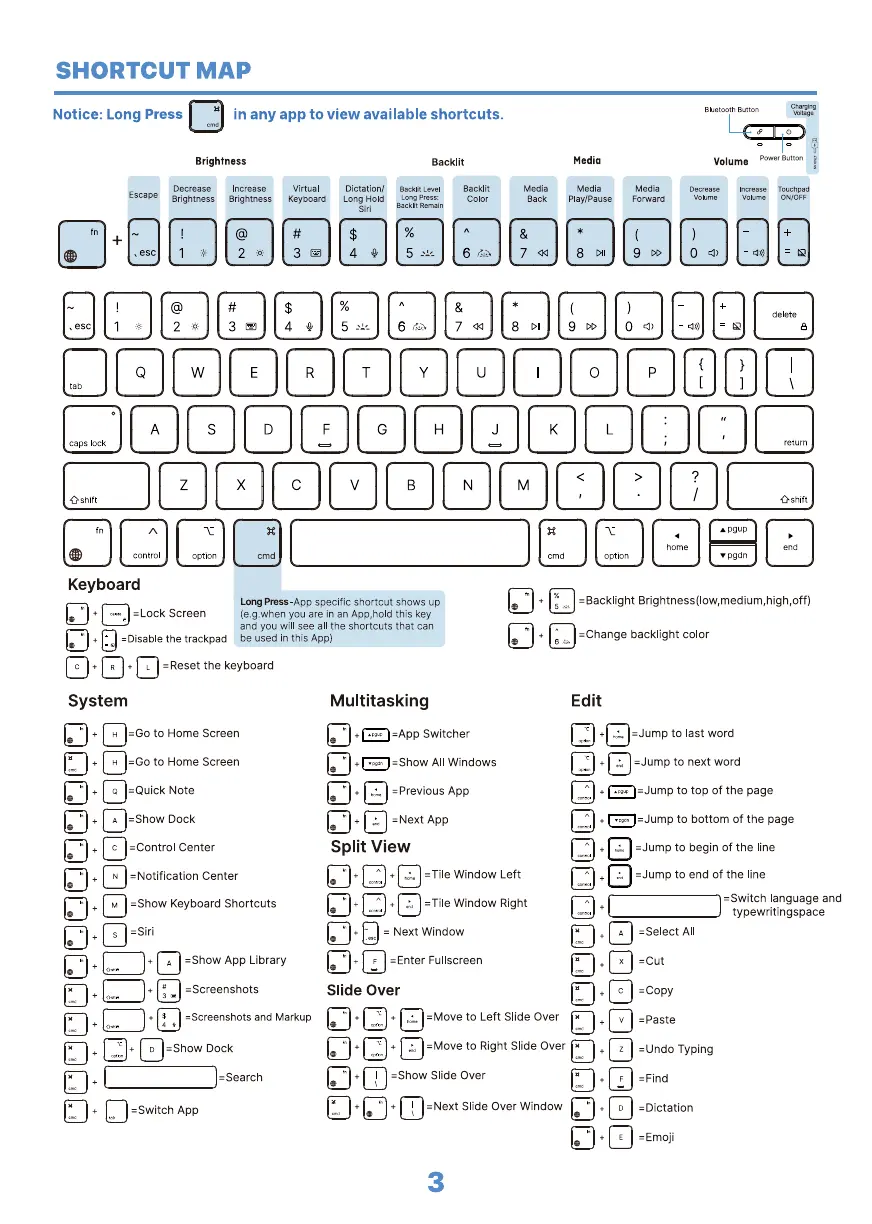
SHORTCUT MAP
Notice: Long Press in any app to view available shortcuts.
Brightness
Decrease Increase
Escape BrightnessBrightness
Virtual
Keyboa rd
Backlit
Dictation/ AacklitLevel
Backlit
Long Hold LongPress:
Color
it Remain
Media
Back
Media
Media
Play/Pause
Media
Forward
Volume
Decrease
Increase Touchpad
Volume Volume OWOFF
Keyboard
Long Press-App specific shortcut shows up
= Lock Screen
you are in an App,hold this key
and you will see all the shortcuts that can
—Disablethe trackpad be used in this App)
L =Reset the keyboard
System
-Go to Home Screen
-Go to Home Screen
-Quick Note
2Show Dock
-Control Center
-Notification Center
-Show Keyboard Shortcuts
-Siri
4 A 2Show App Library
2Screenshots
-Screenshots and Markup
o -Show Dock
—Search
—Switch App
Multitasking
-App Switcher
=Show All Windows
=Previous App
-Next App
Split View
A -Tile Window Left
=Tile Window Right
Next Window
F Fullscreen
Slide Over
+ =Move to Left Slide Over
-Move to Right Slide Over
-Show Slide Over
—Next Slide Over Window
3
—Backlight Brightness(low,medium,high,off)
—Change backlight color
Edit
=Jump to last word
-Jump to next word
Q¯Jump to top of the page
to bottom of the page
-Jump to begin of the line
-Jump to end Of the line
-Switch language and
typewritingspace
—Select A1
-cut
-Copy
—Paste
—Undo Typing
—Find
—Dictation
—Emoji


 To Next Page
 Loading...