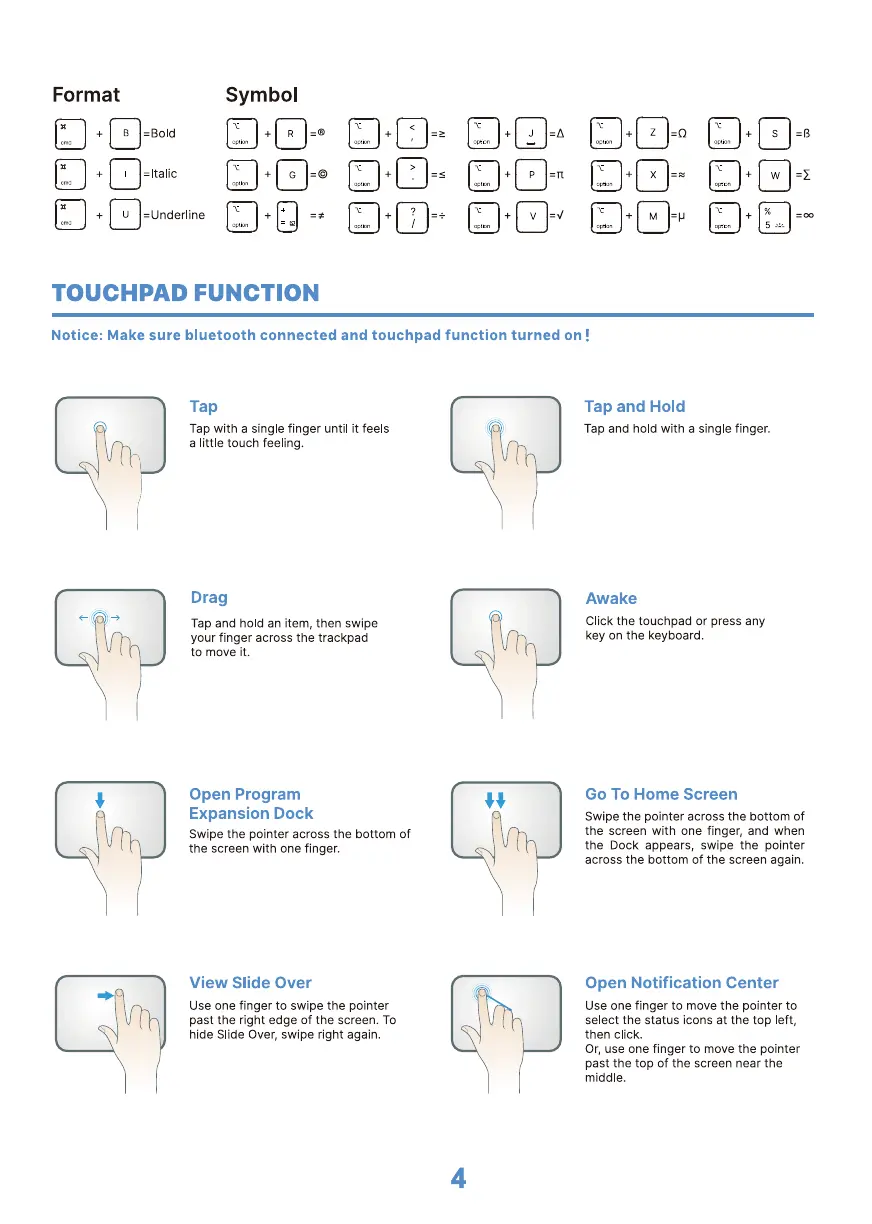
Format
Symbol
TOUCHPAD FUNCTION
Notice: Make sure bluetooth connected and touchpad function turned on !
Tap
Tap with a single finger until it feels
a little touch feeling.
Drag
Tap and hold an item, then swipe
your finger across the trackpad
to move it.
Open Program
Expansion Dock
Swipe the pointer across the bottom Of
the screen with one finger.
View Slide Over
Use one finger to swipe the pointer
past the right edge Of the screen. TO
hide Slide Over, swipe right again.
Tap and Hold
Tap and hold with a single finger.
Awake
Click the touchpad or press any
key on the keyboard.
Go To Home Screen
Swipe the pointer across the bottom of
the screen with one finger, and when
the Dock appears, swipe the pointer
across the bottom of the screen again.
Open Notification Center
Use one finger to move the pointer to
select the status icons at the top left,
then click.
Or, use one finger to move the pointer
past the top of the screen near the
middle.
4


 To Next Page