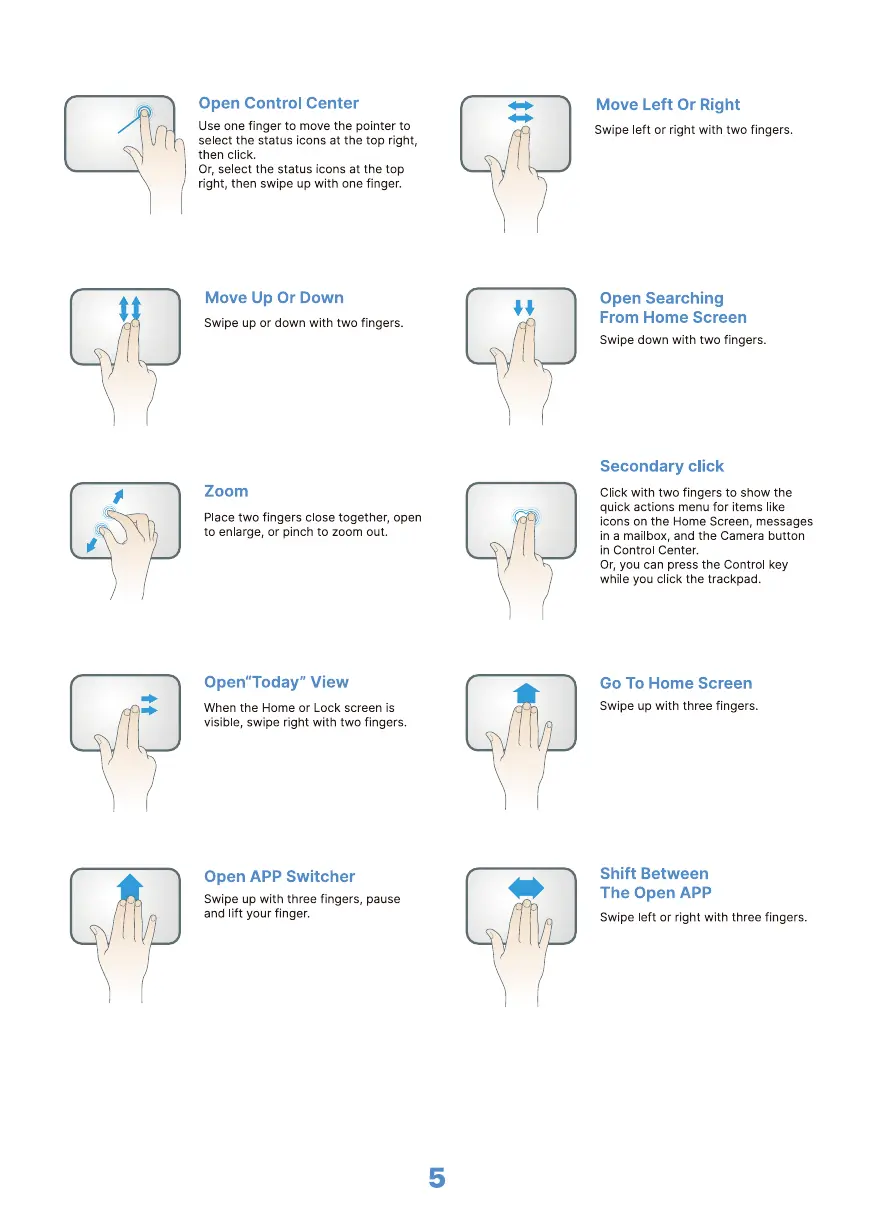
Open Control Center
Use one finger to move the pointer to
select the status icons at the top right,
then click.
Or, select the status icons at the top
right, then swipe up with one finger.
Move Up Or Down
Swipe up or down with two fingers.
Zoom
Place two fingers close together, open
to enlarge, or pinch to zoom out.
Open"Today" View
When the Home or Lock screen is
visible, swipe right with two fingers.
Open APP Switcher
Swipe up with three fingers, pause
and lift your finger.
5
Move Left Or Right
Swipe left or right with two fingers.
Open Searching
From Home Screen
Swipe down with two fingers.
Secondary click
Click with two fingers to show the
quick actions menu for items like
icons on the Home Screen, messages
in a mailbox, and the Camera button
in Control Center.
Or, you can press the Control key
while you click the trackpad.
Go To Home Screen
Swipe up with three fingers.
Shift Between
The Open APP
Swipe left or right with three fingers.



 To Next Page