24
Gallery
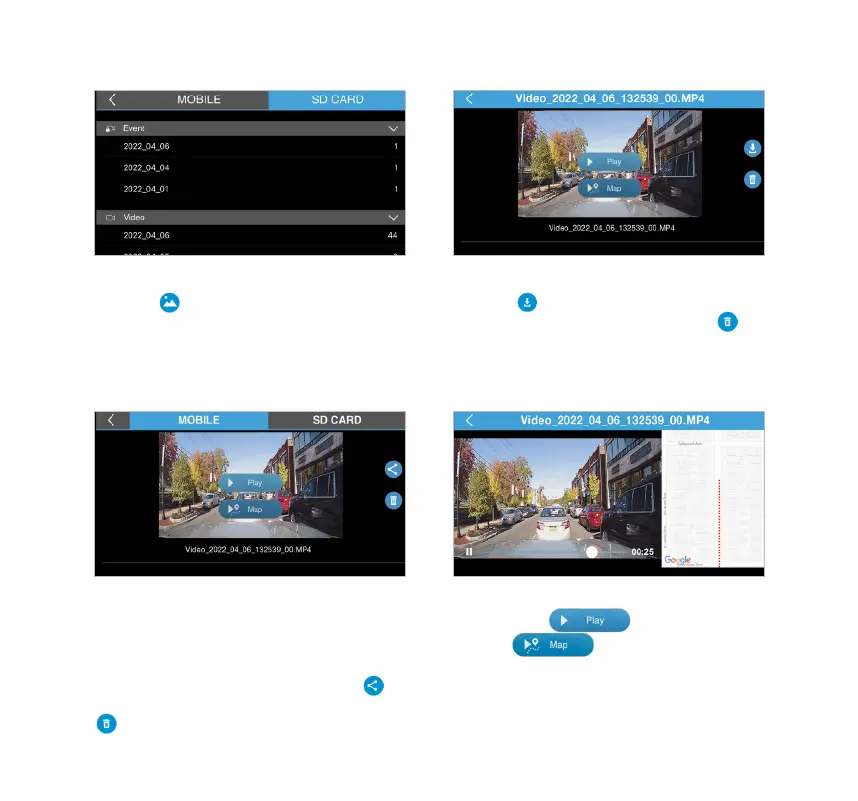
Press the icon on the main interface to
enter the media gallery. Press the SD CARD
tap to access the media les stored in the
MicroSD card. Scroll down the list to select the
le arranging from newest to oldest.
SD CARD tap
Press the icon to download the selected
le into your smartphone, or press the
icon to delete the le from the MicroSD card.
NOTE: 4K video capacity is large and takes longer to transfer
from the Dash Cam's SD card to the APP. Please refer to
page 25 for faster transfering of les using the mass storage
function.
MOBILE tap GPS Information
Press the MOBILE tap to access the
downloaded les in your smartphone. You
can manage les even if your phone is not
auto sync with the Dash Cam. Press the
icon to share the selected le, or press the
icon to delete the le.
You can press to play the footage
or press to show GPS location
while the footage is playing back.



 To Next Page