EasyManua.ls Logo

U-Line H-8938 - User Manual

U-Line H-8938
6 pages
Print Icon
To Next Page IconTo Next Page
Loading...
PAGE 1 OF 6 1120 IH-8938
FIRE RATED STANDARD SAFE
1-800-295-5510
uline.com
H-8938
IMPORTANT! Record the serial number from the
tag on back of safe.
Keep keys and combination in a secure place,
away from children.
Do not store backup key, combination or this
document in the safe.
GETTING STARTED
1. When first receiving the safe, open door with key in
order to install batteries. Batteries are included and
are located inside the safe.
2. To open door with key, first remove lock cover from
front of faceplate using a flathead screwdriver, as
shown. Insert key and turn clockwise. Hold key in
open position and turn knob to the right to open door.
NOTE: Key has also been provided in case
security code is lost or forgotten or if batteries
run low. If key is lost, reference serial number
located on the back of the safe to get a
replacement.
3. Locate batteries inside the safe. Open battery
compartment on back of door by pushing tab to the
right. Install batteries.
ENTERING SECURITY CODE
1. After installing batteries, locate reset button on
inside of door near hinge.
2. Press reset button and release it; user will hear
a beep. DO NOT SHUT DOOR UNTIL USER HAS
CONFIRMED NEW SECURITY CODE HAS BEEN ENTERED
CORRECTLY.
3. With door open, enter user's personal security
code, which can be three to eight digits long, and
confirm new code by pressing the lock key on
electronic touch pad. User will have five seconds to
press the lock key , otherwise user will have to
start over from step one. There will be two beeps (if
sound is turned on) and green light will flash twice if
code has been entered successfully. Before closing
door, enter new security code. Press the lock key
to make sure lock releases knob so that it can
turn and retract the live-action locking bolts.
4. If code fails, go through steps 1-3 again. If code
works successfully, then lock safe.
5. When opening the safe in the future, enter security
code set, followed by the lock key , and turn
knob.
TOOLS NEEDED
HARDWARE INCLUDED
Drill
50 mm Lag Screw x 2 Washer x 2 40 mm Plastic Anchor x 2
3/8" Drill BitFlathead Screwdriver 10 mm Socket Wrench
USAGE
Lock Cover
Question and Answer IconNeed help?

Do you have a question about the U-Line H-8938 and is the answer not in the manual?

Overview

This document describes the ULINE H-8938 Fire Rated Standard Safe, a security device designed to protect valuables from fire and theft. The manual provides instructions for installation, operation, and maintenance in both English and Spanish.

Function Description

The ULINE H-8938 safe is a fire-rated standard safe designed to secure important documents, jewelry, and other valuables. It features a digital keypad for access, allowing users to set a personal security code. The safe is designed to be mounted to a permanent shelf or floor, offering an additional layer of security against removal. Its fire-rated construction provides protection for contents in the event of a fire.

Important Technical Specifications

The safe is equipped with a digital electronic lock that requires a 3 to 8 digit code for access. It operates on four AA batteries, which power the electronic keypad. The manual specifies that the safe is fire-rated, though a specific temperature or duration is not provided in the excerpt. The safe's dimensions are not explicitly stated, but the installation instructions indicate it is designed to be bolted down.

Usage Features

Opening the Safe for the First Time:

  1. Battery Installation: Before initial use, install four AA batteries into the battery compartment located on the back of the door. Ensure correct polarity.
  2. Initial Access: The safe will typically arrive with a factory-set code or in an unlocked state. The manual instructs to press the reset button (usually located on the back of the door) and then enter a new personal security code.
  3. Setting a New Code:
    • With the door open, press the reset button. The safe will emit a beep, and the yellow light on the keypad will illuminate, indicating it's ready for a new code.
    • Enter a new 3 to 8 digit personal security code.
    • Press the "LOCK" button to confirm the new code. The safe will beep twice, and the green light will flash, indicating successful code registration.
    • Test the new code multiple times with the door open to ensure it works correctly before closing the safe. If the code is not accepted, repeat the process.

Opening the Safe with a Valid Code:

  1. Enter your 3 to 8 digit personal security code on the keypad.
  2. The safe will beep, and the green light will flash.
  3. Within five seconds of the green light flashing, turn the knob clockwise to open the door.

Closing the Safe:

  1. Close the door.
  2. Turn the knob counter-clockwise to lock the safe.

Important Security Features:

  • Incorrect Code Entry Lockout: If an incorrect security code is entered three times consecutively, the safe will beep five times, and the yellow light will flash five times. The keypad will then be locked out for 60 seconds. During this lockout period, any attempt to enter a code will result in a beep and a flashing yellow light. After 60 seconds, the safe will beep once, and the green light will flash, indicating it is ready for code entry again.
  • Extended Lockout: If an incorrect security code is entered five additional times (totaling eight incorrect entries), the safe will beep five times, and the yellow light will flash five times. The keypad will then be locked out for five minutes. After five minutes, the safe will beep once, and the green light will flash, allowing for code entry.
  • Emergency Override Key: The safe includes an emergency override key for manual access in case of battery failure or forgotten code. To use the key, remove the cover plate on the keypad, insert the key, and turn it clockwise while simultaneously turning the knob clockwise to open the door.

Installation:

The safe is designed to be bolted to a permanent shelf or floor for optimal safety and security.

  1. Preparation: Identify the desired location for the safe.
  2. Marking: Place the safe in the desired position and mark the drilling points through the pre-drilled holes in the bottom of the safe.
  3. Drilling: Drill holes into the shelf or floor at the marked points using an appropriate drill bit.
  4. Securing: Use the provided fasteners (bolts, washers, and plastic anchors) to secure the safe to the surface. Ensure the safe is firmly attached.

Maintenance Features

Battery Replacement:

  • The safe operates on four AA batteries.
  • When the batteries are low, the yellow light will flash when starting to enter a code.
  • To replace batteries, open the battery compartment on the back of the door by pushing the tab and installing new batteries.
  • Important Note: Do not mix old and new batteries, and do not mix alkaline, standard, or rechargeable batteries. Use four AA batteries of the same type.

Key Management:

  • The manual emphasizes the importance of recording the serial number of the safe, which is located on the tag on the back of the door. This number is crucial for obtaining replacement keys or assistance if a key is lost or stolen.
  • Store keys and their combination in a secure place, away from children and away from the safe itself.
  • Do not store backup key, combination, or this document inside the safe.

Troubleshooting:

  • Lost or Stolen Key/Forgotten Code: If a key is lost or stolen, or the security code is forgotten, contact ULINE Customer Service at 1-800-295-5510. Provide the serial number of the safe for assistance.
  • Locking Mechanism Not Working: If the locking mechanism is deactivated for approximately three to six seconds after a combination is entered, or if the knob is not turned to the 12:00 position during the lockout process, the mechanism may not lock. Ensure the knob is turned completely left to the 12:00 position.

General Care:

  • The safe should be kept clean and dry. Avoid exposing it to extreme temperatures or humidity.
  • Regularly check the battery status and replace them as needed to ensure continuous operation of the electronic lock.

This comprehensive description covers the essential aspects of the ULINE H-8938 Fire Rated Standard Safe, including its function, technical specifications, usage, and maintenance, as derived from the provided manual excerpts.
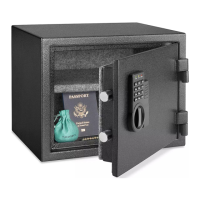
U-Line H-8938 Specifications

General IconGeneral
BrandU-Line
ModelH-8938
CategorySafes
LanguageEnglish

Related product manuals