EasyManua.ls Logo

U Speakers MINI - User Manual

U Speakers MINI
2 pages
Print Icon
To Next Page IconTo Next Page
Loading...
WORLD’S SMALLEST SPEAKERS
WITH THE WORLD’S BEST SOUND
info@shopuspeakers.com @uspeakers shopuspeakers.com
All rights reserved to I&G designs and logistics, LLC
d/b/a Fashionit U Speakers
U MINI USER MANUAL
Transmitting Frequency 20Hz-20KHz
Power Rating 3.5W
S/N >80DB
Bluetooth Distance 10M
Battery Capacity 3.7V 400mAh
Charging Volt 5V
Charging Current 400MA
Charging Time Up to 2.5H
Play Time Up to 4H
U MINI SPECIFICATIONS:
Your life. Your sound.
ACCESSORIES
Look for our carrying holder!
https://www.shopuspeakers.com/
collections/holders
Scan the QR code with your
phone to access the U Holders
page
Question and Answer IconNeed help?

Do you have a question about the U Speakers MINI and is the answer not in the manual?

Summary

U MINI SPECIFICATIONS

ACCESSORIES

INSTRUCTIONS

Play and Bluetooth Pairing

Turn on the speaker, activate Bluetooth on your device, and search for 'U Speaker-Mini' to pair.

Camera Remote Control

Use the power button on the U Speaker to take photos with your camera app.

Charging the Device

Connect via micro USB cable; red lights indicate charging, turning off signifies full charge.

Magnetic Base and Plate

The speaker has a magnetic base for easy placement or use with the included metal plate.

Stereo Surround Sound Pairing

Pair two speakers by double-clicking the back button on one, then connect the main speaker via Bluetooth.

Overview

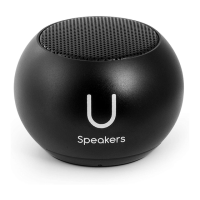
The U Mini Speaker is a compact, portable audio device designed for personal use, featuring a range of functionalities beyond just playing music. It is marketed as "WORLD'S SMALLEST SPEAKERS WITH THE WORLD'S BEST SOUND."

Function Description:

The primary function of the U Mini Speaker is to play audio wirelessly via Bluetooth. It can be paired with a single device for standard audio playback or with a second U Mini Speaker for a stereo surround sound experience. Beyond audio, the speaker also doubles as a remote control for your camera, allowing you to take photos by pressing its power button while your camera app is open. Its magnetic base provides versatile placement options, and an included metal plate allows attachment to non-magnetic surfaces.

Important Technical Specifications:

  • Transmitting Frequency: 20Hz-20KHz, indicating a full range of audible frequencies.
  • Power Rating: 3.5W, suggesting a decent audio output for its small size.
  • Signal-to-Noise Ratio (S/N): >80DB, which is a good indicator of clear audio with minimal background noise.
  • Bluetooth Distance: 10M (meters), providing a standard wireless range.
  • Battery Capacity: 3.7V 400mAh, offering a balance between size and power.
  • Charging Volt: 5V, a common USB charging voltage.
  • Charging Current: 400MA.
  • Charging Time: Up to 2.5 hours for a full charge.
  • Play Time: Up to 4 hours on a full charge.

Usage Features:

  • Power On/Off: To turn on, press the power button for a few seconds until a sound indicator is heard and blue lights illuminate.
  • Bluetooth Pairing: Once powered on, activate Bluetooth on your device (phone, tablet, etc.), search for "U Speaker-Mini," and click to pair. The speaker will pair automatically.
  • Camera Remote Control: Open your camera app and press the power button on the U Mini Speaker once to take a photo. This feature is compatible with most social media and camera applications.
  • Stereo Surround Sound Pairing (V5 Model): For an immersive audio experience, two U Mini Speakers (V5 model) can be paired together.
    1. Before pairing, ensure any previously connected U Speakers are "forgotten" in your device's Bluetooth settings.
    2. Turn on both U Mini Speakers.
    3. Double-click the back button of one of the two speakers. A sound indicator will confirm successful pairing between the two speakers. The speaker you double-clicked will become the "main speaker" and will show a blinking light.
    4. Go to your device's Bluetooth settings and connect to the "U Speaker-Mini" listed there. Only one U Speaker should appear as connected; the second speaker receives its signal from the main speaker.
    5. You can now enjoy music with stereo sound. The main speaker can also be used for selfie remote control.
  • Magnetic Base: The speaker has a magnetic base for easy attachment to metallic surfaces. For non-magnetic surfaces, an included metal plate can be used as an anchor.

Maintenance Features:

  • Charging Indication: When the battery is low, a sound indicator will prompt you to charge the device.
  • Charging Process: To charge, connect the speaker using the included micro USB cable. The red lights will turn off once the device is fully charged, indicating that charging is complete.
  • Accessories: A carrying holder is available for the U Mini Speaker, which can be found at https://www.shopuspeakers.com/collections/holders. A QR code is provided in the manual for quick access to this page.

The U Mini Speaker is designed and distributed by I&G designs and logistics, LLC, d/b/a Fashionit U Speakers. For support or inquiries, you can contact them via info@shopuspeakers.com or through their social media handles @uspeakers and shopuspeakers.com. All rights are reserved.

U Speakers MINI Specifications

General IconGeneral
BrandU Speakers
ModelMINI
CategorySpeakers
LanguageEnglish

Related product manuals