Need help?
Do you have a question about the U Speakers U MICRO and is the answer not in the manual?
Turn on the speaker, pair with a device via Bluetooth, and connect.
Use the power button to take photos remotely with a connected smartphone.
Connect the Micro USB cable to charge until the red lights turn off.
Pair two Micro speakers for stereo sound by double-clicking one speaker's button.
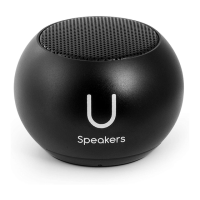
The U Micro Speaker is a compact, portable audio device designed to deliver sound and offer additional functionalities, including a camera remote control and the ability to pair two speakers for stereo surround sound. It is marketed as "World's Smallest Speakers With The World's Best Sound."
The primary function of the U Micro Speaker is to play audio wirelessly via Bluetooth. Users can connect the speaker to their smartphone, tablet, or any other Bluetooth-enabled device to stream music, podcasts, or other audio content. The speaker is designed for ease of use, with a simple pairing process that allows for quick connection to a device.
Beyond audio playback, the U Micro Speaker also features a camera remote control function. This allows users to take photos remotely when connected to their smartphone or tablet. By opening the camera app on the connected device and clicking the power button on the U Speaker, users can trigger the camera shutter, making it convenient for selfies or group photos. This feature is compatible with most social media and camera applications.
A notable advanced feature is the ability to pair two U Micro Speakers for a stereo surround sound experience. This setup enhances the audio output, providing a more immersive listening environment. When two speakers are paired, one acts as the main speaker, and the other picks up the signal from the main speaker, creating a left and right channel separation.
To begin using the U Micro Speaker, the user needs to turn it on by pressing the power button for a few seconds. A sound indicator and blue lights will confirm that the speaker is active. Following this, the user activates the Bluetooth function on their desired device (e.g., smartphone, tablet) and searches for "U Speaker-Micro" in the Bluetooth pairing list. Once found, clicking to pair will establish the connection. The speaker is designed to automatically re-pair with the last connected device when turned on, as long as the Bluetooth connection remains active.
For the camera remote control function, after the speaker is connected to a smart device via Bluetooth, the user simply opens their camera application. A single click on the power button of the U Speaker will then act as a remote shutter button, capturing a photo.
Setting up two U Micro Speakers for stereo surround sound involves a specific pairing process. Before attempting to pair, users must ensure that any previous "U Speaker" connections are forgotten in their device's Bluetooth settings. Both speakers should then be turned on. The user then double-clicks the back button of one of the two Micro speakers. A sound indicator will confirm that the speakers have paired with each other. The speaker that was double-clicked will become the main speaker and will display a blinking light. Subsequently, the user connects their device to the main speaker (named "U Speaker-Micro") via Bluetooth. Only one U Speaker should be connected to the device, as the second speaker receives its signal from the first. Once connected, music can be played with stereo separation. The camera remote control function can also be used with the main speaker in this stereo setup. It's important to note that after the initial pairing of the two Micro speakers, they will automatically pair with each other whenever turned on, provided Bluetooth settings haven't been altered.
The U Micro Speaker incorporates features to indicate when maintenance, specifically charging, is required. When the battery level is low, the speaker will emit a sound indicator, prompting the user to charge the device.
To charge the speaker, users should connect it using the included Micro USB cable. The charging process is indicated by red lights. These red lights will turn off once the device is fully charged, providing a clear visual cue that the speaker is ready for use again. This simple indicator helps users manage the speaker's power and ensures it is always ready when needed.
 General
| Brand | U Speakers |
|---|---|
| Model | U MICRO |
| Category | Speakers |
| Type | Portable Bluetooth Speaker |
| Connectivity | Bluetooth |
| Water Resistance | IPX7 |

 To Next Page