EDIT FIELDS MENU
Highlighted In Black.
7 editable fields per page,
14 possible values
Rotate to select field ⚫ Push to enter edit mode ⚫
Rotate to change value ⚫ Push again to accept
Basic Data
▪ Blank
▪ DG Heading
▪ G Load
▪ Bus Volts
▪ Set Altitude
▪ Altitude
▪ Baro Set
▪ Vertical Speed
If Temp Probe
▪ OAT
▪ TAS
▪ DALT
If GPS Connected
▪ Waypoint ID
▪ Distance To
▪ Ground Speed
▪ Track
▪ XTE
▪ DTRK
▪ Bearing To
Unit Function
Function Lock
GPS NAV SRC
Serial 1
Serial 2
Serial 3
Serial 4
AID mode
AVMAG INSTL
AVMAG CAL
AVMAG YAW
MAG monitor
VIBE monitor
GYRO CAL
INT MAG CAL
Demo Mode
Reset AV-Link
BEACONX GTM
SW Part Num
Software Version
Software Checksum
BL Version
SW Cert
UI Style
UI Font
GPS Track Stabilization
(Rotate) SET HDG BUG
(Push 1x) DG ADJ
1
(Push 2x) SET HDG BUG
2
Rotate to Change Value
Push left button 2x
SETUP
ROT TO SEL
Push left button 3x
INSTALL
ROT TO SEL
Not all values can be placed in every field.
Some values are implemented with graphical
indicators, other with textual fields. DG Mode
allows fewer values.
Push left button 1x
EDIT FIELDS
SEL FIELD
1
With AV-Mag, SET HDG BUG is first
(Push 1x) and DG ADJ is last (Push 2x)
2
When on HDG bug adjustment, hold
down the rotary knob for the heading
bug to align with the current heading.
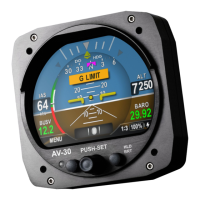
Current Page Selector
3 Customizable Pages, plus 1
Decluttered AI / XPDR control
AV-30 Quick Reference Card
DG Normal Display State
www.uavionix.com/support
Support: (844) 827
-2372
SETUP MENU
INSTALL MENU
3
3 To access the installation
menu, push-and-hold the Rotary
Knob button while applying
power.
FOR REFERENCE ONLY
UAV-1005760-001 Rev C


 To Next Page
 Loading...


