`
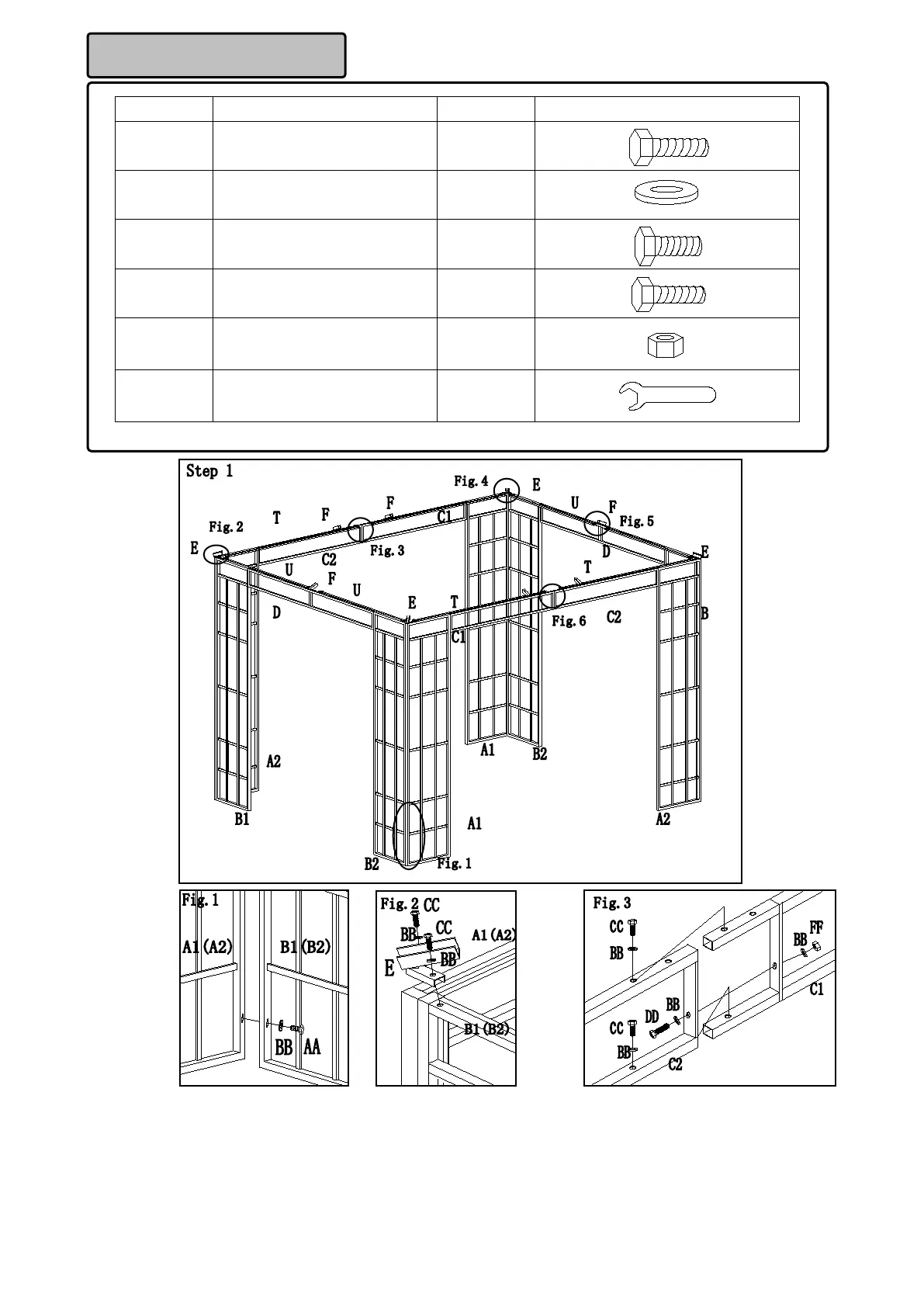
Part Description Quantity Image
AA M6X35 Bolt 4 PCS
BB M6 Flat washer 80 PCS
CC M6X15 Bolt 72 PCS
DD M6X20 Bolt 2 PCS
FF M6 Nut 2 PCS
Z M6 Wrench 2 PCS
Hardware Pack 1
Fig.1: Secure the small panels (B1 and B2) to the big panels (A1 and A2) with bolts (AA) and flat washers (BB).
Fig.2: Secure the lower connector 1 (E) to the corner of the panels with bolts (CC) and flat washers (BB).
Fig.3: Insert the long beam 1 (C1) into the long beam 2 (C2), then secure the long beam 1 (C1) to the long beam 2 (C2)
with bolts (CC), flat washers (BB), bolts (DD) and nuts (FF). Reserve one hole on the long beam 2 (C2) to assemble the
netting tube.



 To Next Page