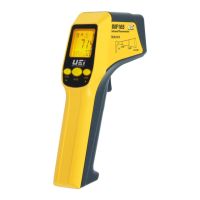
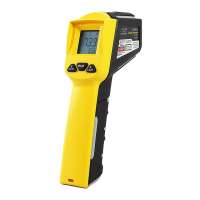
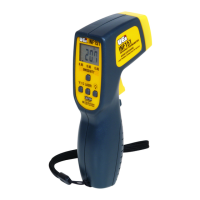
The UEi Scout INF185/INF215 is a series of infrared thermometers designed for temperature measurement in various environments. The INF215 is tailored for advanced and specialty applications requiring wide temperature ranges and superior optics, while the INF185 offers increased features for trend analysis and professional use, including a K-Type surface or contact probe. Both models feature an over-molded handle for comfort grip and come with a carry case.
Function Description:
These infrared thermometers measure the amount of thermal radiation emitted from an object's surface to determine its temperature. Users simply point the aperture at an object and pull the trigger to initiate a measurement. The temperature is displayed and updates approximately twice per second. A one-second delay occurs between pulling the trigger and the display activating. Upon releasing the trigger, a 60-second auto-hold function is initiated, displaying the maximum temperature measured during that period. The instruments can also be used with a thermocouple probe for contact temperature measurements.
Important Technical Specifications:
INF185:
- Non-contact Infrared Scan:
- Measurement range: -76° to 932°F (-60° to +500°C)
- Operating range: 32° to 122°F (0° to +50°C)
- Accuracy (Tobj=-59°-95°F, Tamb=77°C): ±1.8°F (1.0°C)
- Accuracy (Tobj=-27°-932°F, Tamb=73°±3°C): ±2% of reading or 4°F (2°C) whichever is greater
- Resolution (-9.9-199.9°F): 0.10°F / 0.1°C
- Response time (90%): 1 second
- Distance: Spot ratio: 12:1
- Thermocouple Probe Scan:
- Measurement range: -83.2° to +1999°F (-64° to 1400°C)
- Accuracy: ±1% of reading or 1.8°F (1.0°C) whichever is greater (Test under Tamb=73±6°F)
- Shared Specifications:
- Battery life: Standard "AAA" (x2), 140 hours
- Dimensions: 6.9" x 1.5" x 2.8" (175.2 x 39.0 x 71.9mm)
- Weight: 179 grams
INF215:
- Non-contact Infrared Scan:
- Measurement range: -76° to 1400°F (-60° to +760°C)
- Operating range: 32° to 122°F (0° to +50°C)
- Accuracy (Tobj=-59°-95°F, Tamb=77°C): ±1.8°F (1.0°C)
- Accuracy (Tobj=-27°-1400°F, Tamb=73°±3°C): ±2% of reading or 4°F (2°C) whichever is greater
- Resolution (-9.9-199.9°F): 0.10°F / 0.1°C
- Response time (90%): 1 second
- Distance: Spot ratio: 30:1
- Thermocouple Probe Scan:
- Measurement range: -83.2° to +1999°F (-64° to 1400°C)
- Accuracy: ±1% of reading or 1.8°F (1.0°C) whichever is greater (Test under Tamb=73±6°F)
- Shared Specifications:
- Battery life: Standard "AAA" (x2) 1.5V, 140 hours
- Dimensions: 6.9" x 1.5" x 2.8" (175.2 x 39.0 x 71.9mm)
- Weight: 179 grams
Usage Features:
- Worklight: The INF215 includes a UV worklight, while the INF185 has a bright white worklight, both for visibility in low-lit workspaces.
- Measurement Modes:
- MIN/MAX/Differential, Average: Allows for advanced trend analysis by displaying minimum, maximum, difference between max and min, and average readings.
- Adjustable Emissivity: The default emissivity is 0.95, but it can be adjusted from 0.10 to 1.00 using the MODE button and arrow keys. This feature is crucial for accurate measurements on surfaces with varying emissivities.
- Hi/Lo Alarm: User-adjustable high and low alarms with audible beeps and flashing icons to indicate when temperature readings fall outside the set range.
- Contact Probe Input: For use with K-Type thermocouples for contact temperature measurements.
- Display Features:
- Backlight: For improved visibility in dim conditions.
- Laser Splash: Indicates the laser pointer beam.
- HOLD/LOCK: The HOLD function automatically activates for 60 seconds after releasing the trigger. The LOCK function can be manually activated to hold IR measurements for up to 60 minutes.
- Scale Selection: Easily switch between Fahrenheit (°F) and Celsius (°C) scales using a dedicated push-button.
- Battery Level Indicator: Visual icons on the display show battery status (OK, Low, Exhausted).
- Laser Pointer Beam: Aids in targeting the measurement spot. Users are warned not to look directly into the laser beam due to the risk of permanent eye damage. The device is classified as a Class II Laser Product.
- Auto Shut-off: The thermometer automatically shuts off after 60 seconds of idle time, unless in PRB mode, where it shuts off after 12 minutes.
- Measurement Guidelines:
- Ensure the measured object fills the "spot" seen by the aperture.
- Maintain consistent distance and angle when comparing similar objects.
- Consider the emissivity of objects; preparing a surface with masking tape can help obtain accurate readings for objects with challenging emissivities.
- Avoid measuring air directly; aim at the vent for outlet air temperature.
- Keep the thermometer away from strong electrical fields to prevent unusual readings or "overload" indications.
- Operate and store the instrument within its specified temperature range to maintain accuracy.
Maintenance Features:
- Lens Care: The sensor lens is the most delicate part and should be kept clean using a soft cloth or cotton swab with water or medical alcohol. The lens must be fully dry before use. Do not submerge the thermometer in liquids.
- Cleaning: Periodically clean the instrument's case with a damp cloth. Avoid abrasive, flammable liquids, cleaning solvents, or strong detergents as they may damage the finish or impair safety.
- Battery Replacement: Always use fresh "AAA" (2x) batteries of the specified size and type. Remove old or weak batteries promptly to prevent chemical leaks. To replace, slide the battery cover down and away, insert new batteries, and replace the cover.
- Error Messages: The thermometer displays visual diagnostic messages for various issues:
- "Hi" or "Lo": Temperature is outside HAL/LAL settings.
- "Er2": Rapid changes in ambient temperature.
- "Er3": Ambient temperature exceeds the operating range (32° to 122°F / 0° to 50°C). The thermometer needs at least 30 minutes to stabilize.
- "Er-": For all other errors, reset the thermometer by turning it off, removing the battery for at least one minute, then reinserting and turning it on. If the error persists, contact UEi service.
- Service and Repair: Repair and service should only be performed by qualified personnel. The instrument contains no user-serviceable parts. For service needs, contact UEi's service department.
- Warranty: The INF185/215 comes with a three-year limited warranty covering defects in materials and workmanship from the date of purchase. It covers normal use but excludes damage from alteration, tampering, accident, misuse, abuse, neglect, improper maintenance, or failed batteries. Implied warranties are limited to the express warranty. A purchase receipt is required for warranty repairs.

 Need help?
 General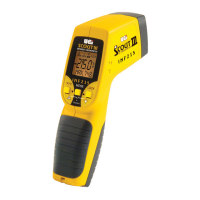

 To Next Page